
Can’t access family subscription of Apple music
Why can’t I access my family’s Apple Music subscription
Why can’t I access my family’s Apple Music subscription
Hi Grizz813,
For help with accessing an Apple Music Family Sharing subscription, have the Family Organizer check the below found in the article here: If you can't find your family's shared content
You'll also want to use the steps in the article to check your settings.
"Check your Family Sharing settings
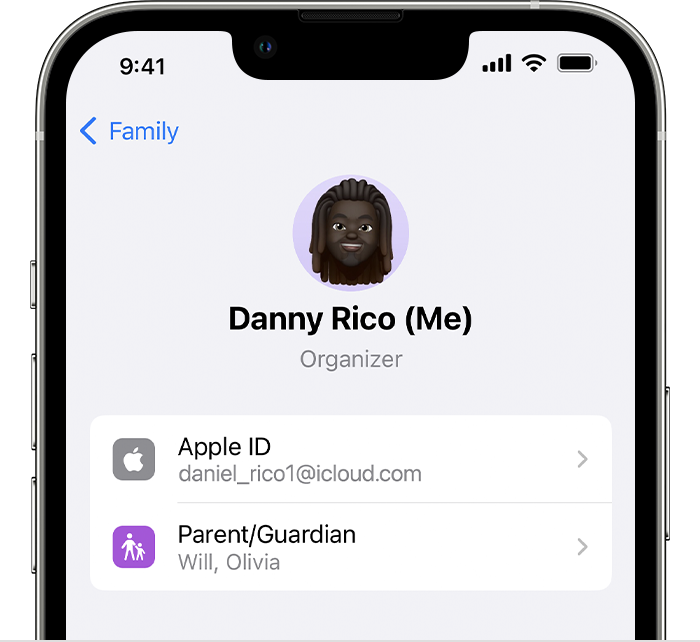
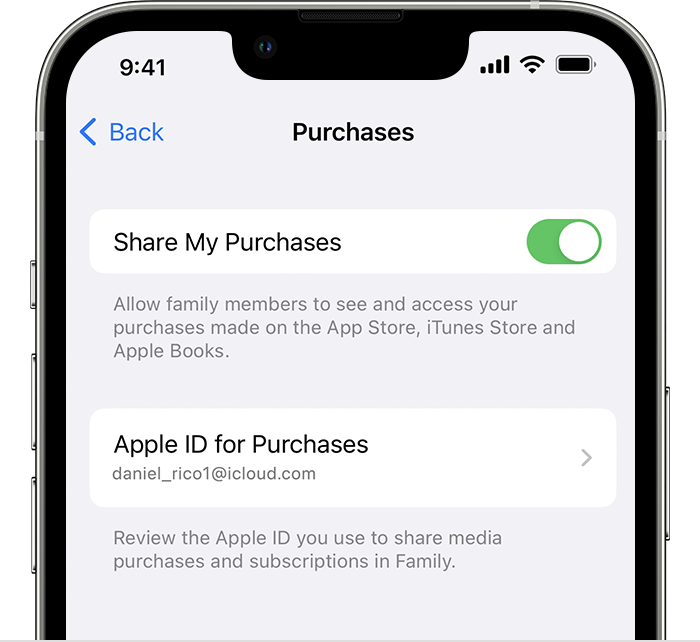
Make sure that you're using the same Apple ID for Family Sharing and Media & Purchases. And make sure that purchase sharing is turned on. Then ask your family members to check their settings too.
On your iPhone or iPad with iOS 16 or later
 "
"
They can also review the content here: Add a family member to your subscriptions from Apple
If you continue to have an issue, reach out to Apple Support directly.
Contact - Official Apple Support
Contact Apple for support and service - Apple Support
Best.
Hi Grizz813,
For help with accessing an Apple Music Family Sharing subscription, have the Family Organizer check the below found in the article here: If you can't find your family's shared content
You'll also want to use the steps in the article to check your settings.
"Check your Family Sharing settings
Make sure that you're using the same Apple ID for Family Sharing and Media & Purchases. And make sure that purchase sharing is turned on. Then ask your family members to check their settings too.
On your iPhone or iPad with iOS 16 or later
"
They can also review the content here: Add a family member to your subscriptions from Apple
If you continue to have an issue, reach out to Apple Support directly.
Contact - Official Apple Support
Contact Apple for support and service - Apple Support
Best.
Can’t access family subscription of Apple music

