how do i receive SMS messages on my iPhone
How do I receive SMS messages on my iPhone?
How do I receive SMS messages on my iPhone?
Hi Seafrog,
Welcome to the Apple (user-to-user) Community.
Re: How do I receive SMS messages on my iPhone?
You receive SMS messages in the "Messages" app
through your cellular service on your iPhone.
Messages go back and forth using wi-fi for Apple devices,
yet using SMS, MMS, for non-Apple devices.
__________________________________________________________
The "Related Article" above your question says:
To use SMS/MMS on an iPhone, you need a text-messaging plan.
Contact your wireless carrier for more information.
If you already have a cellular data plan
(NB: charges may apply for attachments etc.)
Try going to Settings > Cellular > Cellular or Mobile Data to turn it on /off
How to: Use cellular data on your iPhone or iPad - Apple Support
______________________________________________
How to: Set up Messages on iPhone – Apple Support
How to: Use Messages on your iPhone or iPad
If needed:
Messages Support webpage:
There is a "Get Support" link (at the very bottom), of their website (link below)
Messages for iPhone, iPad, Apple Watch, and Mac - Official Apple Support
All the best :-)
Hi Seafrog,
Welcome to the Apple (user-to-user) Community.
Re: How do I receive SMS messages on my iPhone?
You receive SMS messages in the "Messages" app
through your cellular service on your iPhone.
Messages go back and forth using wi-fi for Apple devices,
yet using SMS, MMS, for non-Apple devices.
__________________________________________________________
The "Related Article" above your question says:
To use SMS/MMS on an iPhone, you need a text-messaging plan.
Contact your wireless carrier for more information.
If you already have a cellular data plan
(NB: charges may apply for attachments etc.)
Try going to Settings > Cellular > Cellular or Mobile Data to turn it on /off
How to: Use cellular data on your iPhone or iPad - Apple Support
______________________________________________
How to: Set up Messages on iPhone – Apple Support
How to: Use Messages on your iPhone or iPad
If needed:
Messages Support webpage:
There is a "Get Support" link (at the very bottom), of their website (link below)
Messages for iPhone, iPad, Apple Watch, and Mac - Official Apple Support
All the best :-)
Hello Seafrog,
Welcome to Apple Support Communities.
We are happy to help you with SMS messages.
Did you recently make changes to your iPhone? Do you have cellular service? What is the exact error message you receive, if any?
As long as your device has been provisioned to receive SMS messages, there should not be a reason why you cannot receive them. Even though the title of this section doesn’t exactly match your issue, please try the steps here if you’re not receiving messages: If you can't send or receive messages on your iPhone or iPad - Apple Support
If you receive messages on one device but not the other
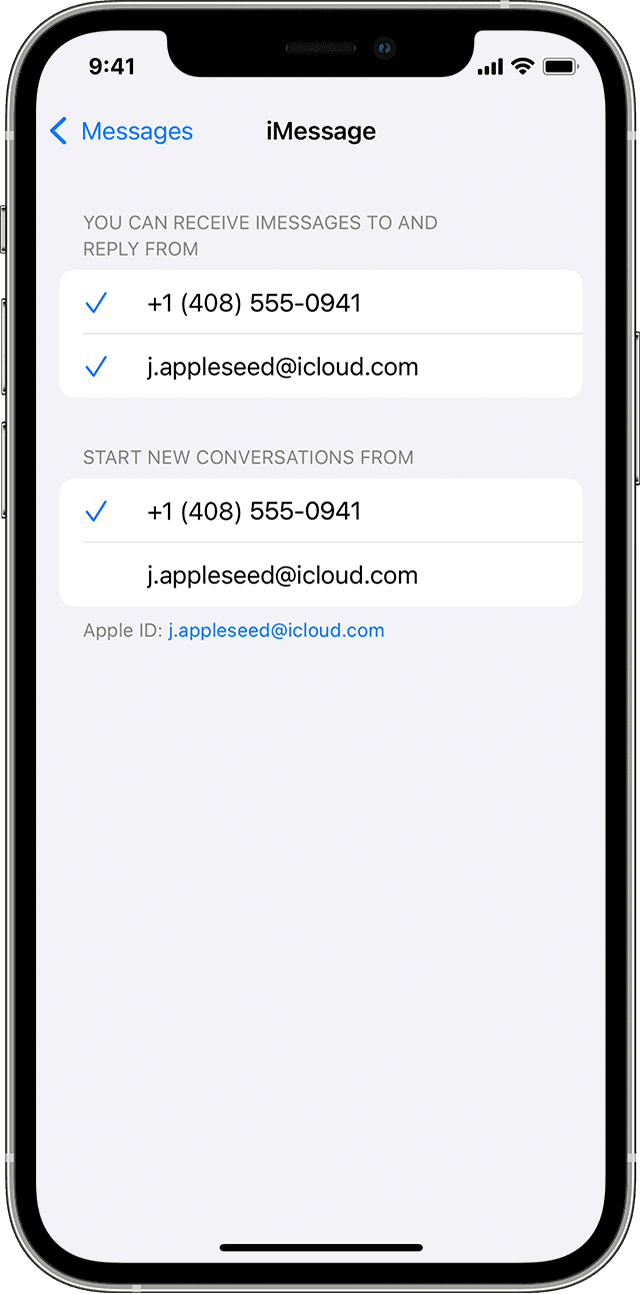
If you have an iPhone and another iOS or iPadOS device, like an iPad, your iMessage settings might be set to receive and start messages from your Apple ID instead of your phone number. To check if your phone number is set to send and receive messages, go to Settings > Messages, and tap Send & Receive.
If you don't see your phone number, you can link your iPhone number to your Apple ID so you can send and receive iMessages from your phone number. You can also set up Text Message Forwarding so you can send and receive MMS and SMS messages on all of your Apple devices.
Let us know if you have further questions.
Take care.
Seafrog Said:
"How do I receive SMS messages on my iPhone?"
-------
Having Issues? Go Here: If you can't Send or Receive Messages on your iPhone, iPad, or iPod touch - Apple Support
how do i receive SMS messages on my iPhone