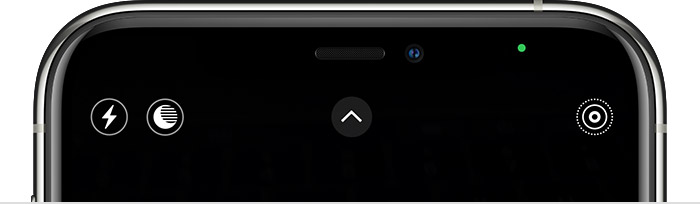
Small white dot camera icon alway on
There is a small whitish-grey dot and camera icon on my screen, even when I’m not using the camera, the green and orange dots are on occasionally as well. Why???
There is a small whitish-grey dot and camera icon on my screen, even when I’m not using the camera, the green and orange dots are on occasionally as well. Why???
Hello Whodatatmydoor,
Thank you for reaching out to Apple Support Communities.
This should explain what the green and orange dots mean:
With iOS 14 or later, an orange dot, an orange square, or a green dot indicates when the microphone or camera is being used by an app.
An orange indicatormeans the microphone
is being used by an app on your iPhone. This indicator appears as an orange square if the Differentiate Without Color setting is on. To enable Differentiate Without Color, go to Settings > Accessibility > Display & Text Size.
A green indicatormeans either the camera or the camera and the microphone are being used by an app on your iPhone.
More details can be found here: About the orange and green indicators in your iPhone status bar
As far as the Camera logo with the white dot, that is just how the image of the icon was designed. We would recommend leaving feedback for Apple directly regarding this.
You can do so by going to iPhone
Hopefully this helps.
Cheers!
Small white dot camera icon alway on