Apple Watch doesn’t vibrate with iMessage alert.

I have one contact with my mother that I no longer receive haptic alerts. The contact does not have "hide alerts" turned on. When I get a message from this person, Apple Watch doesn’t vibrate, but when i raise my wrist, the AW shows the notification. Since my mother is the person I message very often, I really need to feel haptic response for this alert.


It doesn’t vibrate with or without Silent mode on AW either. I prefer to have my notification mirroring my phone because it works for everyone else.


Notifications with haptic response work fine for everyone else. I've compared settings with other contacts and they are exactly the same.


I've tried rebooting and force restarting my phone and Apple Watch several times, but it still does not vibrate.

I have iPhone 11 pro and Apple Watch 8, running iOS 16.3.1 and watchOS 9.3.1. The contact has same iOS version.


Thanks.

Apple Watch Series 8

Posted on Feb 25, 2023 10:25 AM

Reply
1 reply

Feb 27, 2023 1:40 PM in response to Filxx

Hello Filxx,


Please check out the information in the following link to ensure the Haptic Alerts settings are configured correctly, so we can make sure there's no issue there: Change the audio and notification settings on your Apple Watch


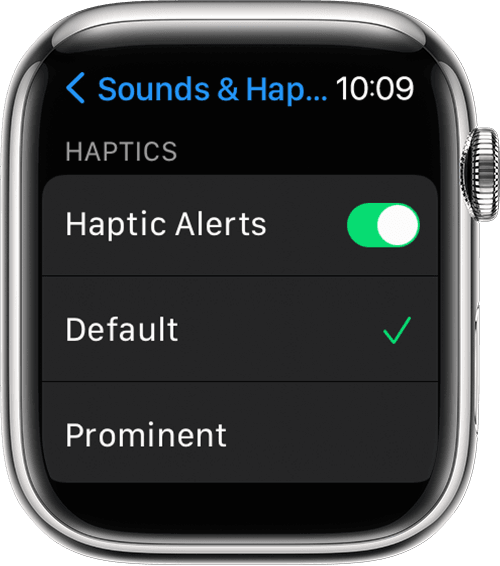
How to manage Apple Watch Haptic Alerts

1. Open the Settings app. 
2. Scroll down and tap Sounds & Haptics.
3. Turn Haptic Alerts on or off.

Apple Watch showing the Sounds & Haptics screen in Settings

4. To add extra emphasis to haptic alerts, tap Prominent. This feature adds an additional haptic tap that pre-announces some of your other haptic alerts. 

You can also change the settings for specific apps from your iPhone. On your iPhone, open the Apple Watch app, go to the My Watch tab, and tap Sounds & Haptics.

If you're wearing your Apple Watch and you don't feel a tap as you adjust the slider, contact Apple Support. For the best haptic results, the back of your Apple Watch needs skin contact. Use a snug, but comfortable fit


If you need additional assistance, please contact Apple Support for help. You may be able to reach Apple Support here: Contact Apple Support


Thanks!

This thread has been closed by the system or the community team. You may vote for any posts you find helpful, or search the Community for additional answers.

Apple Watch doesn’t vibrate with iMessage alert.

Welcome to Apple Support Community
A forum where Apple customers help each other with their products. Get started with your Apple Account.