my airpods got conneted with someone else icloud and it keep saying its not my airpods can you help me with that please
my airpods got conneted with someone else icloud and it keep saying its not my airpods can you help me with that please
my airpods got conneted with someone else icloud and it keep saying its not my airpods can you help me with that please
Thanks for posting in the Apple Support Communities TeresaEC,
The following page provides specific information and guidance that should help: If an item or device is connected to another Apple ID
How to remove AirPods, AirTag, or another Find My network item or device from an Apple ID on iPhone, iPad, or iPod touch
1: Make sure that the device or item is connected via Bluetooth to your iPhone, iPad, or iPod touch, and is within Bluetooth range.
2: Open the Find My app, then tap the Items tab or Devices tab.
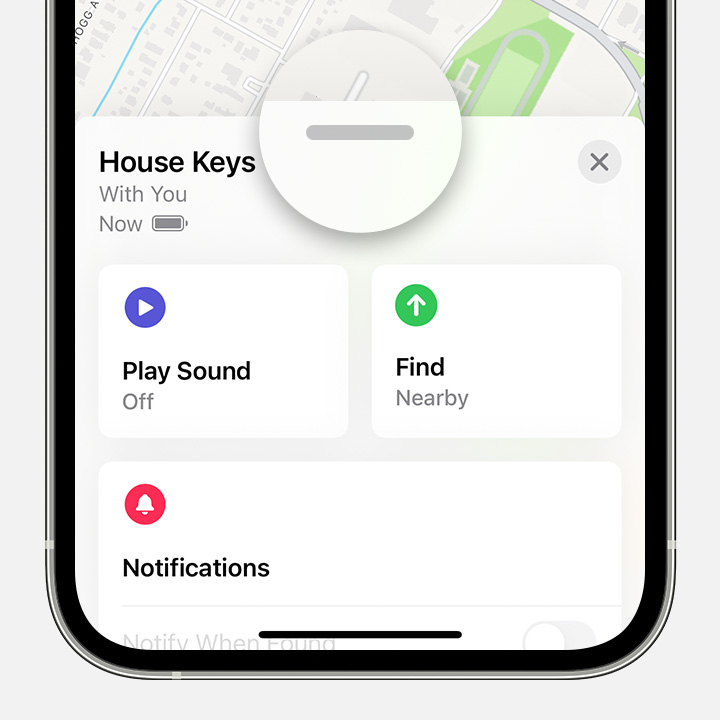
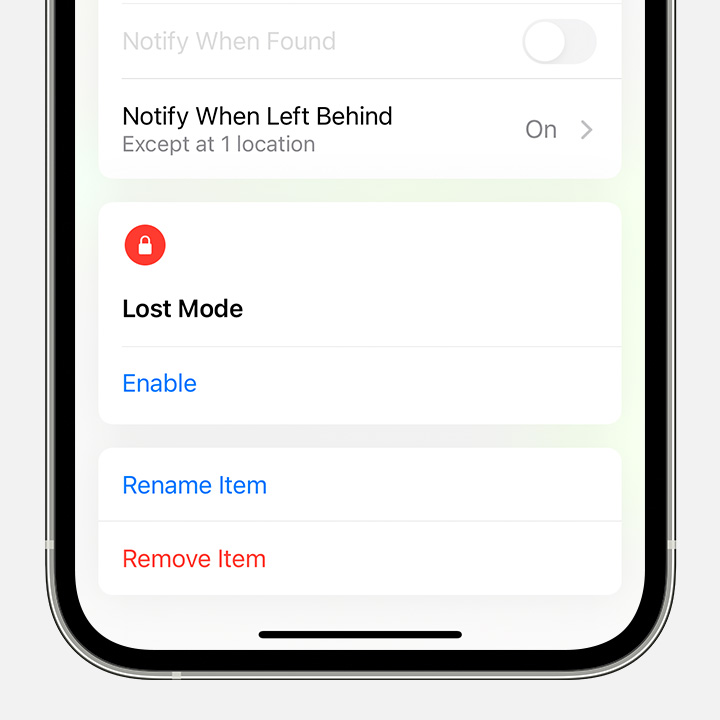
3: Tap the item or device you want to remove, then swipe up on the handle.
4: Tap Remove Item or Remove This Device, then tap Remove to confirm.
How to remove AirPods or another Find My network device from an Apple ID on Mac
1: Make sure that the device is connected via Bluetooth to your Mac, and is within Bluetooth range.
2: Open the Find My app.
3: Select the Devices tab.
4: Select the device that you want to remove.
5: On the map, click the More Info button.
6: Click Remove This Device.
If you need more help, the latter sections of the article above provides additional guidance and steps that may be useful.
Cheers!
my airpods got conneted with someone else icloud and it keep saying its not my airpods can you help me with that please