Why are my NON-iTunes music disappearing from my phone’s libray?

Why are my NON-iTunes music disappearing from the library on my phone? Like stuff I’ve uploaded to my computer by CD or digital download from a different site. This has never been an issue before and I need it to stop, because it is frustrating.

Posted on Feb 27, 2023 10:56 PM

Reply
Question marked as Top-ranking reply

Posted on Mar 1, 2023 4:28 PM

Hello Mrs_mor,


If you're an Apple Music member this page has steps and info that may be applicable to the situation: If songs are missing from your music library after you turn on Sync Library - Apple Support


Check the cloud status of songs on your Mac or PC
1. On your Mac, open the Apple Music app. On your PC, open iTunes, choose Music from the pop-up menu, then click Library.
2. In the sidebar, select Songs.
3. In the menu bar, choose View > Show View Options.
4. Select Cloud Status and Cloud Download.
Look for the following statuses next to your songs to learn what to do.
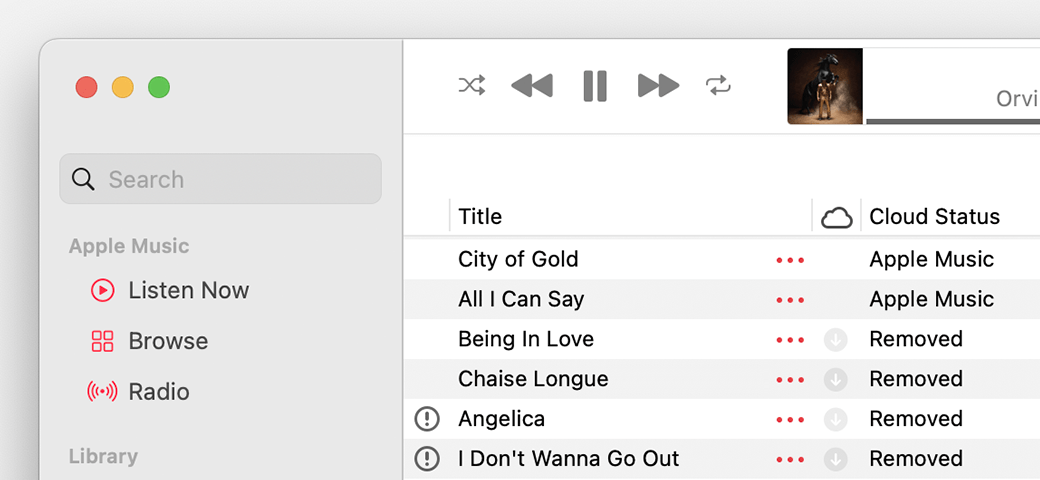
Apple Music app showing Cloud statuses next to songs
Waiting
The song won’t appear on your other devices because it’s waiting to upload. Choose File > Library > Update Cloud Library. Then check if the song appears on your other devices.
Removed
The song was deleted from another device that has Sync Library turned on. If you want the song to appear on your other devices, click the arrow Removed button next to the song, then click Add to Cloud Music Library.
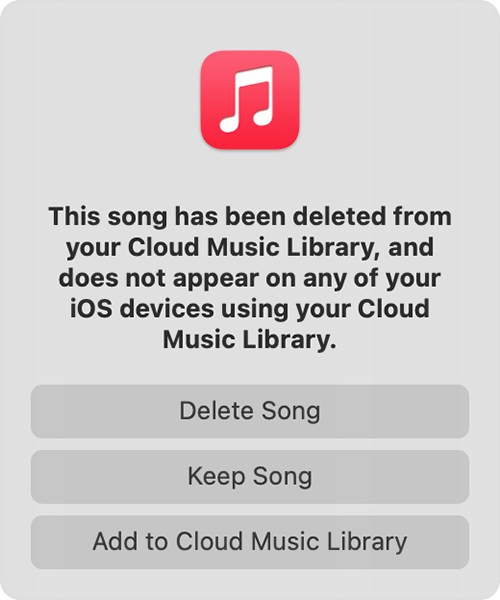
Message that says this song was deleted on another device and options to delete, keep, or add the song to Cloud Music library.
An exclamation point
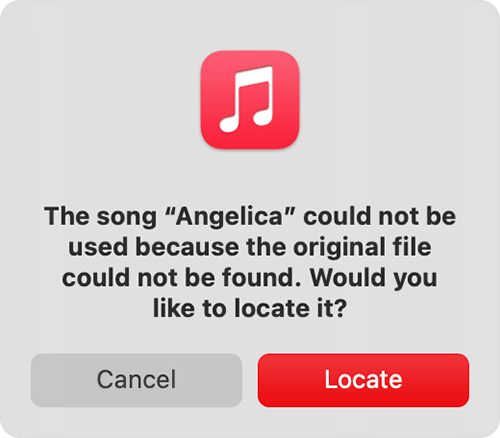
The song can't be played or synced across your devices until the original file is located. Click the exclamation point Invalid location icon, then click Locate. 
Message asking to locate a missing song.
If the song is located, you'll be asked to use the location to find other missing songs in your library. If you see this message, click Find Files.
If a song is grayed out
If you see No Longer Available next to a song that's grayed out, the song was added from Apple Music and was removed from the Apple Music catalog.
Learn what the different cloud icons and symbols next to your songs mean in the Apple Music app
Learn what the different cloud icons and symbols next to your songs mean in iTunes


If the music was synced to the iPhone via an Apple Music membership, be sure to check and see if that is still active at the moment.


Cheers.

1 reply
Question marked as Top-ranking reply

Mar 1, 2023 4:28 PM in response to Mrs_mor

Hello Mrs_mor,


If you're an Apple Music member this page has steps and info that may be applicable to the situation: If songs are missing from your music library after you turn on Sync Library - Apple Support


Check the cloud status of songs on your Mac or PC
1. On your Mac, open the Apple Music app. On your PC, open iTunes, choose Music from the pop-up menu, then click Library.
2. In the sidebar, select Songs.
3. In the menu bar, choose View > Show View Options.
4. Select Cloud Status and Cloud Download.
Look for the following statuses next to your songs to learn what to do.
Apple Music app showing Cloud statuses next to songs
Waiting
The song won’t appear on your other devices because it’s waiting to upload. Choose File > Library > Update Cloud Library. Then check if the song appears on your other devices.
Removed
The song was deleted from another device that has Sync Library turned on. If you want the song to appear on your other devices, click the arrow Removed button next to the song, then click Add to Cloud Music Library.
Message that says this song was deleted on another device and options to delete, keep, or add the song to Cloud Music library.
An exclamation point
The song can't be played or synced across your devices until the original file is located. Click the exclamation point Invalid location icon, then click Locate. 
Message asking to locate a missing song.
If the song is located, you'll be asked to use the location to find other missing songs in your library. If you see this message, click Find Files.
If a song is grayed out
If you see No Longer Available next to a song that's grayed out, the song was added from Apple Music and was removed from the Apple Music catalog.
Learn what the different cloud icons and symbols next to your songs mean in the Apple Music app
Learn what the different cloud icons and symbols next to your songs mean in iTunes


If the music was synced to the iPhone via an Apple Music membership, be sure to check and see if that is still active at the moment.


Cheers.

This thread has been closed by the system or the community team. You may vote for any posts you find helpful, or search the Community for additional answers.

Why are my NON-iTunes music disappearing from my phone’s libray?

Welcome to Apple Support Community
A forum where Apple customers help each other with their products. Get started with your Apple Account.