Hello donicm,
Thank you for reaching out to Apple Support Communities, and we'll be happy to help in any way we can. We understand you're having issues with Adobe Lightroom permissions. Try the steps here to change the permissions as requested: Change permissions for files, folders, or disks on Mac - Apple Support
"Change permissions for files, folders, or disks on Mac
Permission settings determine who can view and alter files on the computer. You change permission settings at the bottom of the Info window for a file, folder, or disk in the Finder. For example, you can change permission settings for a folder so that other users who log in to your Mac, or connect to it for file sharing, can view but not change files in a folder.
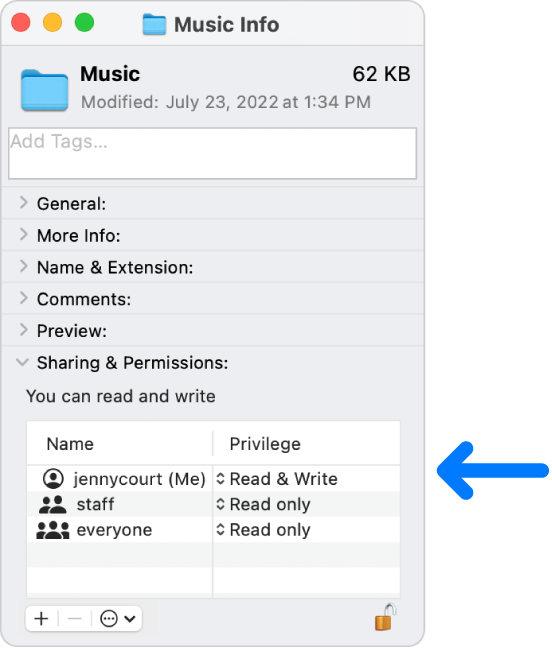
Assign permissions to users and groups
- On your Mac, select a disk, folder, or file, then choose File > Get Info.
- If the information in Sharing & Permissions isn’t visible, click the arrow
 .
. - Select a user or group in the Name column, then choose a privilege setting from the pop-up menu.
- Read & Write: Allows a user to open the item and change it.
- Read only: Allows a user to open the item, but not change its contents.
- Write only (Drop Box): Makes a folder into a drop box. Users can copy items to the drop box, but can’t open it. Only the owner of the drop box can open it.
- No Access: Blocks all access to the item.
You can undo any changes to privilege settings for a user or group in the Sharing & Permissions section since opening the Info window. Before closing the Info window, click the Action pop-up menu  at the bottom of the window, then choose “Revert changes.”
Apply permissions to all items in a folder or a disk
- On your Mac, select a folder or disk, then choose File > Get Info.
- Click the Action pop-up menu at the bottom of the window, then choose “Apply to enclosed items.”
Change an item’s owner
- On your Mac, select the item, then choose File > Get Info.
- If the new owner’s name isn’t listed in the Name column in the Sharing & Permissions section, click the Add button
 to add the new owner.
 - Select the new owner in the Name column, click the Action pop-up menu at the bottom of the window, then choose “Make __ the owner.”
You can undo any changes to an item’s owner in the Sharing & Permissions section since opening the Info window. Before closing the Info window, click the Action pop-up menu at the bottom of the window, then choose “Revert changes.”
Add or remove a user or group in the Name column
- On your Mac, select an item, then choose File > Get Info.
- In the Sharing & Permissions section, do any of the following:
- Add a user or group: Click the Add button below the list, select a user or group, then click Select.
- Remove a user or group: Select the user or group, then click the Remove button
 below the list.
You can undo adding or removing a user or group in the Sharing & Permissions section since opening the Info window. Before closing the Info window, click the Action pop-up menu at the bottom of the window, then choose “Revert changes.”"
We hope this helps.
Cheers!


