Hey 10C2LIP,
Welcome to Apple Support Communities.
You can search for images either by using the search field in Finder or with Spotlight. You can narrow down the search for images by following the steps below.
You can add criteria to a basic search. For example, you can search for particular kinds of files, or for items created on a particular date.
1. Start your search on your Mac in Spotlight or in a Finder window.
• In Spotlight: Open Spotlight  , enter your search term in the search field, then click Search in Finder at the bottom of the search results.
• In a Finder window: Enter your search term in the search field, then press Return.
2. Click the Add button  on the right side of the search window, below the search field.
3. Click the far-left pop-up menu, then choose or add search criteria.
For example, to search for only a certain type of item instead of all items, choose Kind. Or to search for any item whose name contains a particular word or phrase, choose Name.
To add criteria, choose Other, then select each attribute you want to add. For example, to search copyright information, select Copyright in the list of attributes, then click OK.
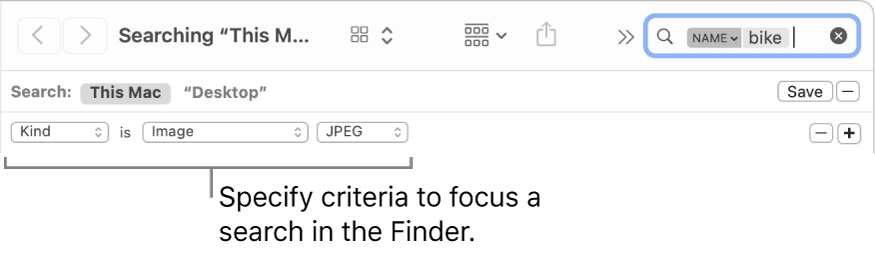
4. Choose criteria from other pop-up menus that appear.
5. For example, after you choose Kind, click the other pop-up menu to specify Document or Image. To add a kind, choose Other.
Add or remove search criteria as needed by clicking the Add button or the Remove button  .
.
6. To search using Boolean operators (OR, AND, or NOT), press and hold the Option key, then click the button  that appears.
You can set criteria and specify that Any, All, or None of them must be met.
The steps above are also available in this article: Narrow your search results on Mac.
Hope this helps. Take care.


