Cannot upgrade icloud 'something went wrong'

Whenever I try to upgrade to iCloud+ with my iPhone or iPad, I get the following message: 'Something went wrong. There was a problem upgrading your iCloud+ Plan. Try again later.' I have been trying again later for months now.


I have tried:

  • Restarting my devices.
  • Logging out and logging in with my apple account.
  • Checked if I have added a payment method, I did.
  • Checked Apple System Status, no problems.
  • The network connection is stable.
  • I also tried logging out at Media & Purchases and logging in again, a suggestion on macrumors.
  • I've tried on my Macbook as well. This one does not give me an error message, it just doesn't give me the storage.


Can anyone please help?

iPhone 11

Posted on Mar 2, 2023 4:46 AM

Reply
1 reply

Mar 4, 2023 12:37 PM in response to manon278

Hi manon278,


Thanks for posting in Apple Support Communities.


We understand you're unable to upgrade your iCloud storage plan. Are you able to make purchases? If not, try updating your payment method on file.


"Update your payment method on your iPhone or iPad

  1. Open the Settings app.
  2. Tap your name.
  3. Tap Payment & Shipping. You might be asked to sign in with your Apple ID.
  4. Tap Add Payment Method, enter the new payment method, then tap Done.
  5. Tap Edit.
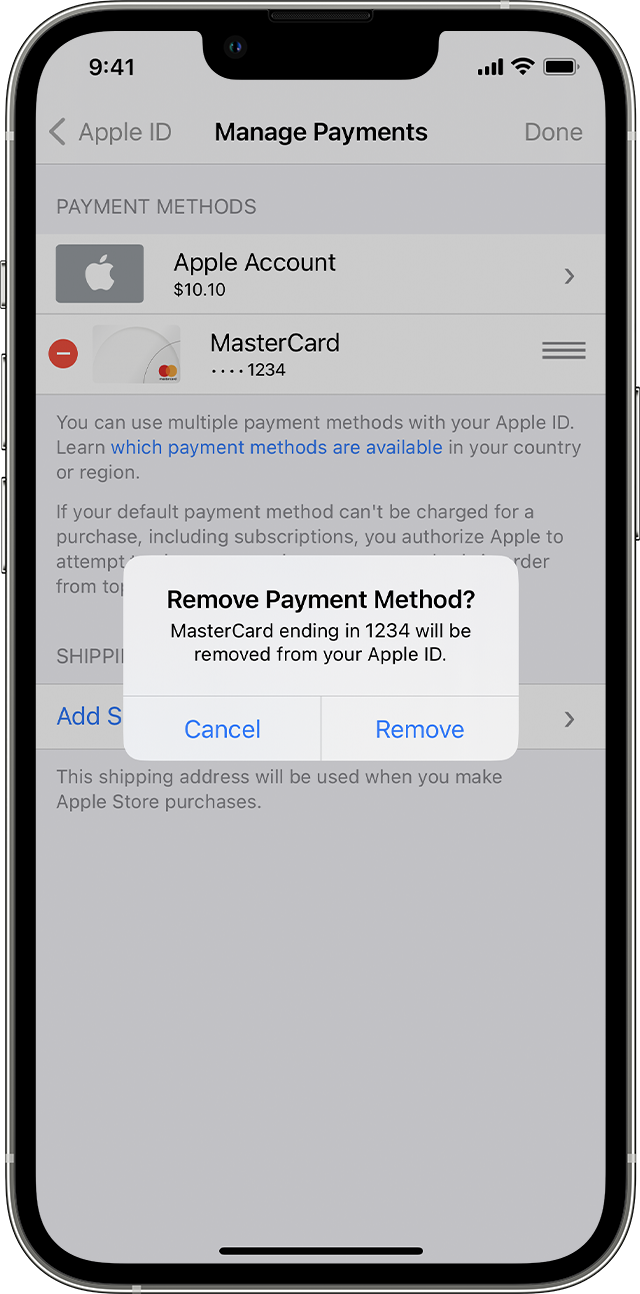
  6. Tap the red delete button next to the old payment method, then tap Delete."

On iPhone, a message says Remove Payment Method. 


If you need to change or update your Apple ID payment method - Apple Support


If you're still unable to upgrade iCloud storage, it would be best to contact Apple and have them to check into what's happening.


Contact - Official Apple Support


Regards.


This thread has been closed by the system or the community team. You may vote for any posts you find helpful, or search the Community for additional answers.

Cannot upgrade icloud 'something went wrong'

Welcome to Apple Support Community
A forum where Apple customers help each other with their products. Get started with your Apple Account.