iCloud Passwords extension in Google Chrome Browser fill in not working

Hi,


iCloud Passwords extension in Chrome is working flawless on my Win 11 machine using Chrome web browser. But on some web sites if i let iCloud password extension let fill in the username and password and 'press' continue/login, the the login is incorrect. I am sure the fill is correct. I have found that if you just edit the login by removing last character and add it by hand, for username and password, the login succeed. So it looks like the fill in is there but not send until you manually do something in that field/s. What to do about this?

Windows, Windows 10

Posted on Mar 2, 2023 6:21 AM

Reply

Similar questions

5 replies

Mar 4, 2023 1:23 PM in response to Doubleuerner1000

Hello Doubleuerner1000,


The steps below will help you with the autofill for iCloud passwords. Follow the steps to sure no step was missed.


"When you set up iCloud Passwords in iCloud for Windows, you can access passwords stored in iCloud Keychain in Google Chrome or Microsoft Edge.


Note: iCloud Passwords only works in Chrome on computers that have iCloud for Windows. It doesn’t work in Chrome on a Mac.


Enable the iCloud Passwords extension

You need to enable the iCloud Passwords extension to access your passwords. If the extension is enabled, you see the Passwords enabled button in the browser’s toolbar.

  1. In Chrome or Edge on a Windows computer, click the Passwords disabled button in the browser’s toolbar.
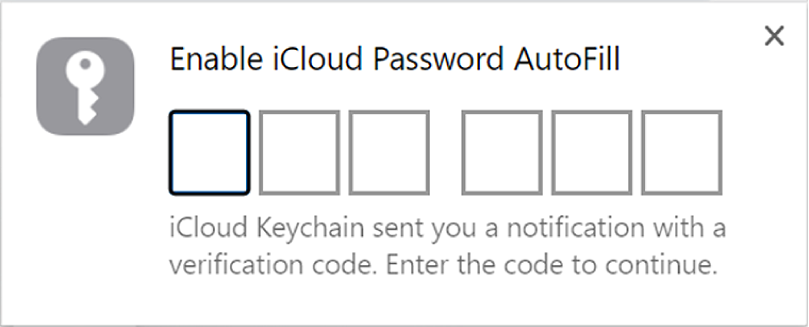
  2. A six-digit verification code is generated on your Windows computer. You see it in a pop-up window near the taskbar.
  3. Enter the six-digit verification code in the dialog.

The dialog for entering a verification code in iCloud Passwords.

Note: If you’re using iCloud for Windows version 13.3 or earlier, iCloud Passwords has different icons.


More troubleshooting steps can be found in this article: Autofill iCloud passwords in a web browser on your Windows computer - Apple Support


Let us know if you have any questions.

Thank you for using Apple Support Communities.

Take care!


Mar 13, 2023 3:22 AM in response to dawngreg08

Hi Dwangreg80,


Thank you for your assistance. What you a telling in your message is what i normally do and check. The remarkable thing here is that the password-dots are filled in (i am sure that password is OK also in the 'database') but the web-page is saying 'please fill in password' or 'password incorrect', but when just removing one character of the password and adding it again by hand gives it a go. Even apple-ID web-page is troubling me. I will try to make a video of this 'bug'.


This thread has been closed by the system or the community team. You may vote for any posts you find helpful, or search the Community for additional answers.

iCloud Passwords extension in Google Chrome Browser fill in not working

Welcome to Apple Support Community
A forum where Apple customers help each other with their products. Get started with your Apple Account.