Charged Twice for same subscription

Hi, I had set up automated payment for a subscription renewal. However initially at the due date the payment didn't go through. I paid for the subscription from my apple funds.

However, a day later, I have a debit in my bank account of the exact same amount paid to apple services.

Apple support exec wants me to contact my bank for the payment which went through, which is useless to me cause the bank wont bother with an automated payment delivery.

This is like a $56 purchase and to say the least I am not at all thrilled by the way things were handled here.

If someone can point me to any next steps, I would be very grateful.

Posted on Mar 4, 2023 2:23 PM

Reply
Question marked as Top-ranking reply

Posted on Mar 6, 2023 4:57 PM

Hi rishik288,


For help with requesting a refund and report the problem through Apple you'll want to complete the steps below found in the article here: Request a refund for apps or content that you bought from Apple


"How to request a refund

  1. Sign in to reportaproblem.apple.com.
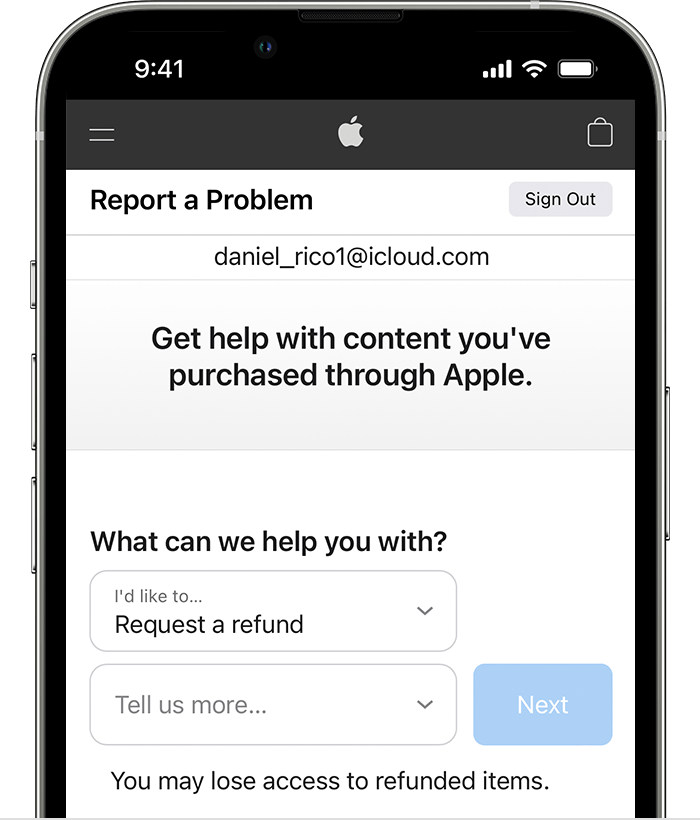
  2. Tap or click "I'd like to," then choose "Request a refund." 
  3. iPhone showing the Report a Problem website where you can request a refund. After you choose Request a refund, choose the reason why you're asking for the refund.
  4. Choose the reason why you want a refund, then choose Next.
  5. Choose the app, subscription, or other item, then choose Submit. If you were charged for a subscription that you no longer want, you can also cancel the subscription."


You can also contact your financial institution to see if they can remove one of the charges. However, if you still have an issue, you can reach back out to apple support directly to voice your concern and further assist.


Contact - Official Apple Support


Contact Apple for support and service - Apple Support


Best.


Similar questions

1 reply
Question marked as Top-ranking reply

Mar 6, 2023 4:57 PM in response to rishik288

Hi rishik288,


For help with requesting a refund and report the problem through Apple you'll want to complete the steps below found in the article here: Request a refund for apps or content that you bought from Apple


"How to request a refund

  1. Sign in to reportaproblem.apple.com.
  2. Tap or click "I'd like to," then choose "Request a refund." 
  3. iPhone showing the Report a Problem website where you can request a refund. After you choose Request a refund, choose the reason why you're asking for the refund.
  4. Choose the reason why you want a refund, then choose Next.
  5. Choose the app, subscription, or other item, then choose Submit. If you were charged for a subscription that you no longer want, you can also cancel the subscription."


You can also contact your financial institution to see if they can remove one of the charges. However, if you still have an issue, you can reach back out to apple support directly to voice your concern and further assist.


Contact - Official Apple Support


Contact Apple for support and service - Apple Support


Best.


This thread has been closed by the system or the community team. You may vote for any posts you find helpful, or search the Community for additional answers.

Charged Twice for same subscription

Welcome to Apple Support Community
A forum where Apple customers help each other with their products. Get started with your Apple Account.