Google drive in files not working

I have the issue of the google drive files not showing in files on ipados 16the issue


I have tried turning off privacy screen so I am puzzled why it won't show the files

And when I press the link all it does is this: so please help me

iPad, iPadOS 16

Posted on Mar 8, 2023 9:26 AM

Reply
Question marked as Top-ranking reply

Posted on Mar 8, 2023 9:38 AM

As indicated in your first screenshot, before Google Drive will be accessible within the Files App, you must first open the Google Drive App - and sign-in to your Google account.


After signing-in (“authenticating”), you should be able to access Google Drive from the native Files App.

5 replies

Mar 8, 2023 9:54 AM in response to Thebestatech

Your first screenshot suggests otherwise.


Removing the Google Drive App from your iPad - and then performing a forced-restart before reinstalling the App - may resolve the problem.


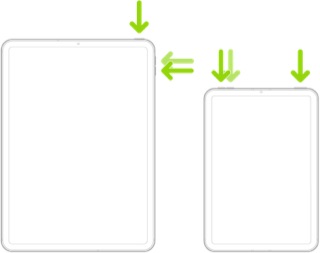
Force restart iPad (models with Face ID or with Touch ID in the top button)

If your iPad doesn’t have the Home button, do the following:

  1. Press and quickly release the volume button nearest to the top button.
  2. Press and quickly release the volume button farthest from the top button.
  3. Press and hold the top button.
  4. When the Apple logo appears, release the top button.


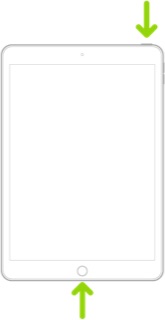
Force restart iPad (models with the Home button)

Press and hold the top button and the Home button at the same time. When the Apple logo appears, release both buttons.


This thread has been closed by the system or the community team. You may vote for any posts you find helpful, or search the Community for additional answers.

Google drive in files not working

Welcome to Apple Support Community
A forum where Apple customers help each other with their products. Get started with your Apple Account.