Why did my husband get notified when I added credit cards to my Apple Wallet?

My husband received a notification on his iPhone when each of the credit cards I added to my iPhone Wallet were ready to use. Why did that happen and is that normal?

iPhone 12 mini

Posted on Mar 9, 2023 7:21 AM

Reply
Question marked as Top-ranking reply

Posted on Mar 10, 2023 10:11 AM

Hey FiraB,


Do you share an Apple ID? Check under Settings and then the name at the top. When tapping it, you'll see the Apple ID email address in use. If you are sharing an ID, this is expected, and we'd recommend one of you creating or signing out of and then into your own Apple ID to stop that behavior.


If you're using the same Apple ID for sharing purchases or subscriptions, Family Sharing allows you both to have your own accounts while still maintaining purchase sharing if you wish. See more info here:


Let us know if that helps.


Cheers!

5 replies
Question marked as Top-ranking reply

Mar 10, 2023 10:11 AM in response to FiraB

Hey FiraB,


Do you share an Apple ID? Check under Settings and then the name at the top. When tapping it, you'll see the Apple ID email address in use. If you are sharing an ID, this is expected, and we'd recommend one of you creating or signing out of and then into your own Apple ID to stop that behavior.


If you're using the same Apple ID for sharing purchases or subscriptions, Family Sharing allows you both to have your own accounts while still maintaining purchase sharing if you wish. See more info here:


Let us know if that helps.


Cheers!

Mar 11, 2023 8:14 AM in response to FiraB

Hi FiraB,


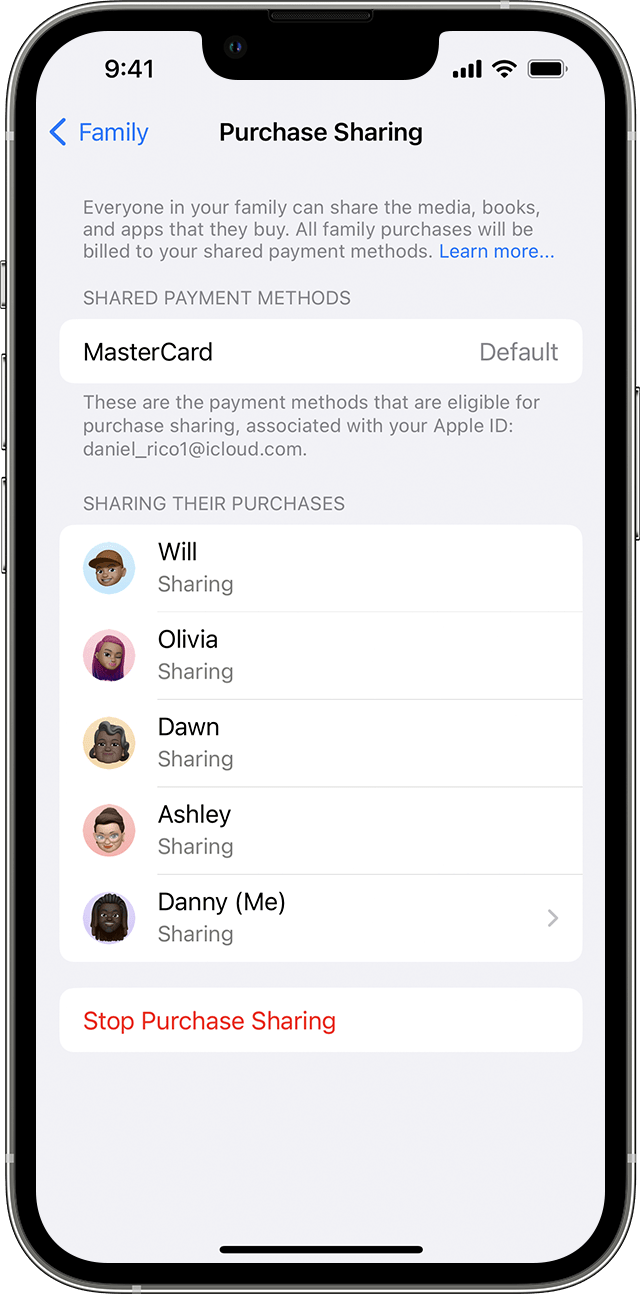
If you are the family organizer and you have Purchase Sharing enabled, any purchases made by other members of the family group would be charged to your card. You can check whether you have Purchase Sharing enabled.


Use your iPhone, iPad, or iPod touch to turn on purchase sharing
1. If you haven't set up Family Sharing yet, set up Family Sharing.
2. Open the Settings app.
3. Tap Family. If you don't see Family, tap your name, then tap Family Sharing.
4. Tap Purchase Sharing.
5. Tap Continue and follow the onscreen instructions.
6. To see which payment method will be billed, tap Purchase Sharing again and look at the Shared Payment Method information.
7.


How to share purchases with your family - Apple Support


Regards.


This thread has been closed by the system or the community team. You may vote for any posts you find helpful, or search the Community for additional answers.

Why did my husband get notified when I added credit cards to my Apple Wallet?

Welcome to Apple Support Community
A forum where Apple customers help each other with their products. Get started with your Apple Account.