Syncing old iMessages on new device

Hi there


I have set up a family member (child) with an Apple Watch SE cellular so she can use for phone and text. When I recently set up her iCloud on second hand iPhone it is syncing the new messages between the watch and phone but there are no previous messages on the phone. They are still on the watch. iCloud is active. How can we access the old messages on the phone?

Apple Watch Series 3, watchOS 8

Posted on Mar 9, 2023 2:29 PM

Reply
Question marked as Top-ranking reply

Posted on Mar 10, 2023 3:29 PM

Hi KeithTP,


For help with iCloud for Messages, you can double-check all Text Message forwarding settings are correct on the iPhone with the help of the guide here, and details below: Set up iCloud for Messages on all your devices - Apple Support


"Set up iCloud for Messages on your iPhone, iPad, or iPod touch

  1. On your iPhone, iPad, or iPod touch, go to Settings > [your name] > iCloud.
  2. Do one of the following:
  • iOS 16, iPadOS 16, or later: Tap Show All, tap Messages, then turn on Sync this [device].
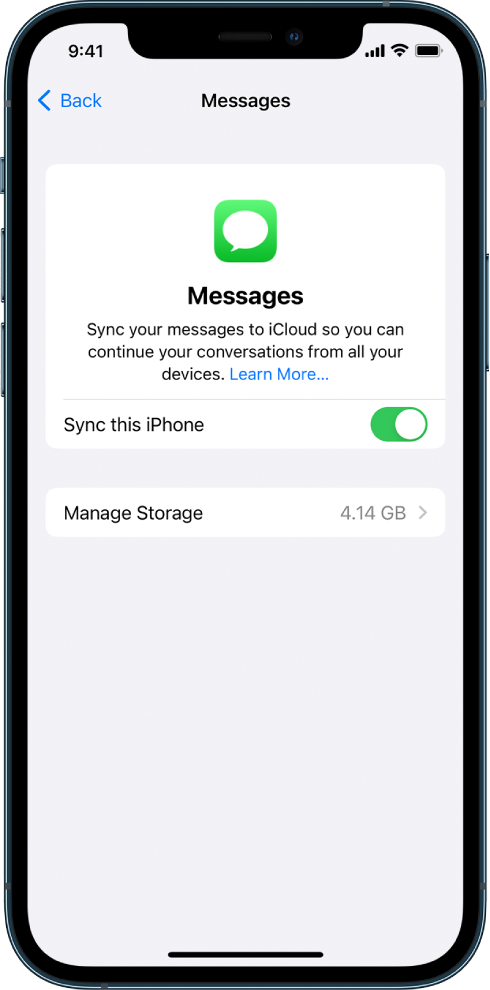
    • The Messages screen in iCloud settings. Sync this iPhone is turned on.
    • iOS 15, iPadOS 15, or earlier: Turn on Messages.

Any messages currently stored in iCloud are now accessible on your device, and any new messages you receive on your device will be stored in iCloud.


3.To make sure you can see your messages on all your devices, also check the following:

    • iMessage account: On your iPhone, iPad, or iPod touch, go to Settings > Messages > Send & Receive. Make sure that you’re signed in to iMessage with the same Apple ID. You can choose which email addresses and phone numbers you want to send and receive messages from on each device.
    • Text message forwarding: If you want to receive SMS and MMS messages on all your devices, go to Settings > Messages > Text Message Forwarding on your iPhone. Turn on text message forwarding for each device. For more information, see the Apple Support article How to forward SMS/MMS text messages from your iPhone to your iPad, iPod touch or Mac.

4.To see messages stored in iCloud, open the Messages app."


Additionally, you may want to re-pair the Apple Watch with the new companion iPhone to make sure the data syncs as expected. How to pair your Apple Watch with a new iPhone - Apple Support


If you continue to have any issues, reach out to Apple Support to check on the account and further assist.


Contact - Official Apple Support


Contact Apple for support and service - Apple Support


Cheers.

Similar questions

1 reply
Question marked as Top-ranking reply

Mar 10, 2023 3:29 PM in response to KeithTP

Hi KeithTP,


For help with iCloud for Messages, you can double-check all Text Message forwarding settings are correct on the iPhone with the help of the guide here, and details below: Set up iCloud for Messages on all your devices - Apple Support


"Set up iCloud for Messages on your iPhone, iPad, or iPod touch

  1. On your iPhone, iPad, or iPod touch, go to Settings > [your name] > iCloud.
  2. Do one of the following:
  • iOS 16, iPadOS 16, or later: Tap Show All, tap Messages, then turn on Sync this [device].
    • The Messages screen in iCloud settings. Sync this iPhone is turned on.
    • iOS 15, iPadOS 15, or earlier: Turn on Messages.

Any messages currently stored in iCloud are now accessible on your device, and any new messages you receive on your device will be stored in iCloud.


3.To make sure you can see your messages on all your devices, also check the following:

    • iMessage account: On your iPhone, iPad, or iPod touch, go to Settings > Messages > Send & Receive. Make sure that you’re signed in to iMessage with the same Apple ID. You can choose which email addresses and phone numbers you want to send and receive messages from on each device.
    • Text message forwarding: If you want to receive SMS and MMS messages on all your devices, go to Settings > Messages > Text Message Forwarding on your iPhone. Turn on text message forwarding for each device. For more information, see the Apple Support article How to forward SMS/MMS text messages from your iPhone to your iPad, iPod touch or Mac.

4.To see messages stored in iCloud, open the Messages app."


Additionally, you may want to re-pair the Apple Watch with the new companion iPhone to make sure the data syncs as expected. How to pair your Apple Watch with a new iPhone - Apple Support


If you continue to have any issues, reach out to Apple Support to check on the account and further assist.


Contact - Official Apple Support


Contact Apple for support and service - Apple Support


Cheers.

This thread has been closed by the system or the community team. You may vote for any posts you find helpful, or search the Community for additional answers.

Syncing old iMessages on new device

Welcome to Apple Support Community
A forum where Apple customers help each other with their products. Get started with your Apple Account.