Hello Terry Q Brinkworth,
Thank you for reaching out to Apple Support Communities.
Let's attempt to to format this drive while in safe mode: Start up your Mac in safe mode
"Erase and reformat a storage device in Disk Utility on Mac
In Disk Utility on Mac, you can erase and reformat storage devices to use with your Mac. Erasing a storage device deletes everything on it.
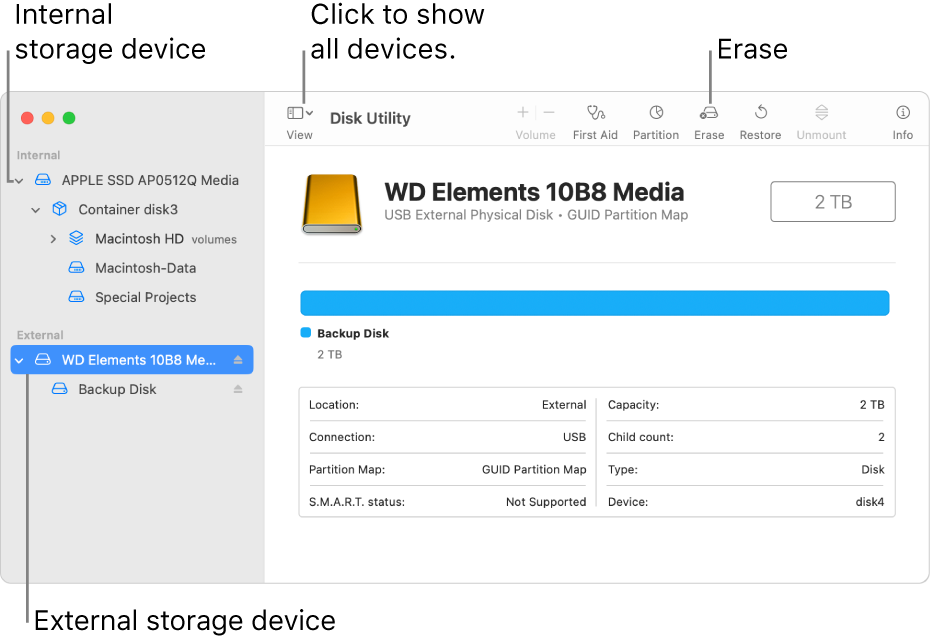
- If you have any files you want to save, copy them to another storage device.
- Open the Disk Utility app
 on your Mac using one of the following methods, depending on the type of disk or volume you want to erase:
- If you want to erase your startup disk: Start up your computer in macOS Recovery, then choose Disk Utility in the Recovery app. To learn how to start up your computer in macOS Recovery, see Intro to macOS Recovery.
- Note: If you want to get your Mac ready to trade in, sell, or give away, and your computer is a Mac with Apple silicon or an Intel-based Mac with an Apple T2 Security Chip, use Erase Assistant.
- If you want to erase any other type of storage device: Double-click Disk Utility in the /Applications/Utilities folder.
3.Choose View > Show All Devices.
4.In the sidebar, select the storage device you want to erase, then click the Erase button  .
.
5.Click the Scheme pop-up menu, then choose GUID Partition Map.If the Scheme pop-up menu isn’t available, make sure you selected the storage device you want to erase—it’s at the top of the hierarchy.
6.Click the Format pop-up menu, then choose a file system format.
7.Enter a name.
8.(Optional) If available, click Security Options, use the slider to choose how many times to write over the erased data, then click OK.Secure erase options are available only for some types of storage devices. If the Security Options button is not available, Disk Utility cannot perform a secure erase on the storage device.
9.Click Erase, then click Done."
More details can be found here: Erase and reformat a storage device in Disk Utility on Mac
If the issue persists, are you able to format the drive using another computer? This will help us further isolate the issue.
Cheers!

