I'm trying to add my wife to Home Sharing, but she is not receiving the invite
Im trying to add my wife to home, but she is not receiving the invite. What’s the fix?
[Re-Titled by Moderator]
iPhone 12 Pro
Im trying to add my wife to home, but she is not receiving the invite. What’s the fix?
[Re-Titled by Moderator]
iPhone 12 Pro
Hello Thtruth007,
Just to clarify, it seems like you're trying to invite a family member to share control of your home but they aren't able to receive the invitation, correct?
If so, please check out the information in the following link to ensure the correct process is being used to invite someone to control your home, so we can make sure there aren't any issues there: Share control of your home
Invite someone to control your home
If Home has been upgraded to the new Home architecture, you must set up a home hub to share control of your home.
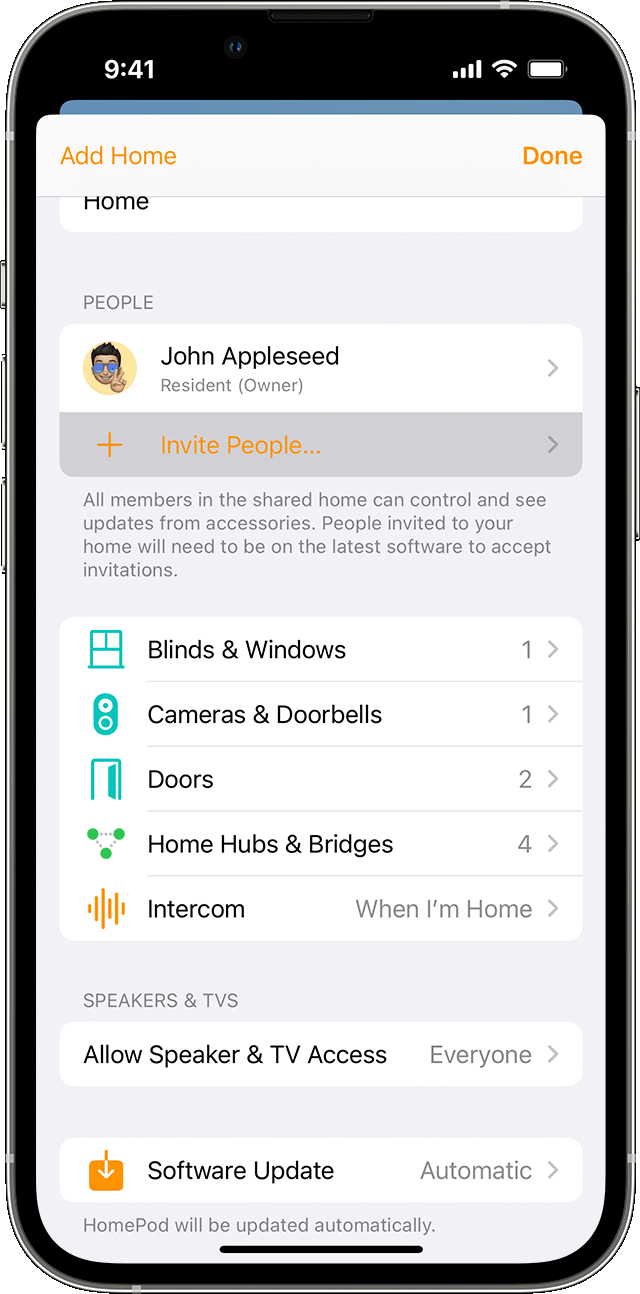
To invite someone to control your home, follow these steps:
1. Open the Home app on your iPhone, iPad, or Mac.
2. Tap or click the More button, then select Home Settings. If you have multiple homes set up, choose the Home that you want to invite someone to, then select Home Settings.
3. Tap or click Invite People.
4. Enter the person's Apple ID that they use with iCloud.
5. Tap or click Send Invite.
Find out what to do if you can't invite someone to control your home.
If you continue to experience an issue, please let us know if you receive any errors when trying to send the invitation, as that information will help us plan how to proceed.
Thank you!
Hello Thtruth007,
Just to clarify, it seems like you're trying to invite a family member to share control of your home but they aren't able to receive the invitation, correct?
If so, please check out the information in the following link to ensure the correct process is being used to invite someone to control your home, so we can make sure there aren't any issues there: Share control of your home
Invite someone to control your home
If Home has been upgraded to the new Home architecture, you must set up a home hub to share control of your home.
To invite someone to control your home, follow these steps:
1. Open the Home app on your iPhone, iPad, or Mac.
2. Tap or click the More button
3. Tap or click Invite People.
4. Enter the person's Apple ID that they use with iCloud.
5. Tap or click Send Invite.
Find out what to do if you can't invite someone to control your home.
If you continue to experience an issue, please let us know if you receive any errors when trying to send the invitation, as that information will help us plan how to proceed.
Thank you!
I'm trying to add my wife to Home Sharing, but she is not receiving the invite