My apple watch soft ware is upto date but it keeps teeling me i have to update

i have been ask to update my apple id settings on my apple watch but if i try loging inits tells me to update watchos before i can proceed but in my apple watch is upto date..Watch series 3


Apple Watch Series 3

Posted on Mar 11, 2023 12:42 PM

Reply
Question marked as Top-ranking reply

Posted on Mar 13, 2023 11:58 AM

Hello rkonaduaddo,


Thanks for choosing the Apple Support Communities. We see you're being promoted to update your Apple Watch. To start, have you double checked to make sure you are running the most compatible up to date version of watchOS? Here is how to check: Update your Apple Watch - Apple Support


"Check your Apple Watch compatibility

First, make sure that your Apple Watch works with the latest software. watchOS 9 is compatible with these Apple Watch models:

  • Apple Watch Series 4 and later
  • Apple Watch SE (1st generation) and later
  • Apple Watch Ultra

Updating to watchOS 9 also requires one of these iPhone models:

  • iPhone 8 or later with iOS 16
  • iPhone SE (2nd generation) or later with iOS 16

If your Apple Watch isn't compatible with the latest version of watchOS, Software Update will show you the newest version that your watch can use.

Identify which Apple Watch or iPhone model you have.


Update your Apple Watch using your iPhone

You can wait until Apple Watch notifies you when a new update is available. Tap Update Tonight in the notification, then go to your iPhone to confirm that you want to update overnight. At the end of the day, leave your Apple Watch and iPhone charging overnight so the update can complete.

Or you can update your Apple Watch with your iPhone manually:

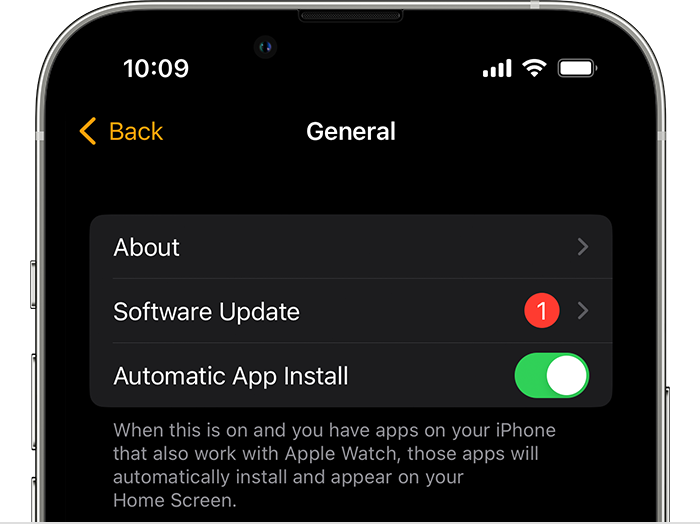
  1. On your iPhone, open the Apple Watch app, then tap the My Watch tab. 
  2. Tap General > Software Update.


3. Download the update. If asked for your iPhone passcode or Apple Watch passcode, enter it. 

4. Wait for the progress wheel to appear on your Apple Watch. It could take from several minutes to an hour for the update to complete. 

Leave your Apple Watch on its charger while the update completes. Don't restart your iPhone or Apple Watch, and don't quit the Apple Watch app. When the update completes, your Apple Watch restarts on its own."


We hope this helps.


Cheers!


1 reply
Question marked as Top-ranking reply

Mar 13, 2023 11:58 AM in response to rkonaduaddo

Hello rkonaduaddo,


Thanks for choosing the Apple Support Communities. We see you're being promoted to update your Apple Watch. To start, have you double checked to make sure you are running the most compatible up to date version of watchOS? Here is how to check: Update your Apple Watch - Apple Support


"Check your Apple Watch compatibility

First, make sure that your Apple Watch works with the latest software. watchOS 9 is compatible with these Apple Watch models:

  • Apple Watch Series 4 and later
  • Apple Watch SE (1st generation) and later
  • Apple Watch Ultra

Updating to watchOS 9 also requires one of these iPhone models:

  • iPhone 8 or later with iOS 16
  • iPhone SE (2nd generation) or later with iOS 16

If your Apple Watch isn't compatible with the latest version of watchOS, Software Update will show you the newest version that your watch can use.

Identify which Apple Watch or iPhone model you have.


Update your Apple Watch using your iPhone

You can wait until Apple Watch notifies you when a new update is available. Tap Update Tonight in the notification, then go to your iPhone to confirm that you want to update overnight. At the end of the day, leave your Apple Watch and iPhone charging overnight so the update can complete.

Or you can update your Apple Watch with your iPhone manually:

  1. On your iPhone, open the Apple Watch app, then tap the My Watch tab. 
  2. Tap General > Software Update.


3. Download the update. If asked for your iPhone passcode or Apple Watch passcode, enter it. 

4. Wait for the progress wheel to appear on your Apple Watch. It could take from several minutes to an hour for the update to complete. 

Leave your Apple Watch on its charger while the update completes. Don't restart your iPhone or Apple Watch, and don't quit the Apple Watch app. When the update completes, your Apple Watch restarts on its own."


We hope this helps.


Cheers!


This thread has been closed by the system or the community team. You may vote for any posts you find helpful, or search the Community for additional answers.

My apple watch soft ware is upto date but it keeps teeling me i have to update

Welcome to Apple Support Community
A forum where Apple customers help each other with their products. Get started with your Apple Account.