How do I set the time on my Apple Watch Series 3?
How do I set the time on my Apple Watch 3
[Re-Titled by Moderator]
iPhone SE, iOS 13
How do I set the time on my Apple Watch 3
[Re-Titled by Moderator]
iPhone SE, iOS 13
Hello joycehorsfield,
The time displayed on your Apple Watch is based on your iPhone or network connection details.
You can use the steps below to manually change the time on your iPhone and Apple Watch:
1. Go to Settings > General > Date & Time.
2. Turn off Set Automatically. Is this setting dimmed?
3. Change the time zone or the date and time:
• Tap Time Zone and enter a city with the time zone that you need.
• Or tap the date to change the date and time.
This article also covers that process: If you can't change the time or time zone on your Apple device - Apple Support
If needed, you can also use the steps below to manually adjust the time shown on your Apple Watch: Change the time settings on your Apple Watch - Apple Support
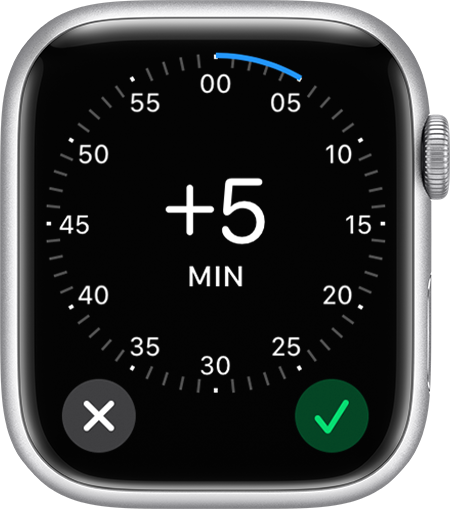
You can set the time shown on your watch face to appear ahead of the actual time. Your alarms, notifications, World Clock, and other times will still match the actual time.
1. Open the Settings app on your watch, then tap Clock.
2. Tap +0 min.
3. Turn the Digital Crown and choose how many minutes ahead to set your watch.
4. Tap the Done button.
Hopefully that addresses your inquiry.
Take care.
Hello joycehorsfield,
The time displayed on your Apple Watch is based on your iPhone or network connection details.
You can use the steps below to manually change the time on your iPhone and Apple Watch:
1. Go to Settings > General > Date & Time.
2. Turn off Set Automatically. Is this setting dimmed?
3. Change the time zone or the date and time:
• Tap Time Zone and enter a city with the time zone that you need.
• Or tap the date to change the date and time.
This article also covers that process: If you can't change the time or time zone on your Apple device - Apple Support
If needed, you can also use the steps below to manually adjust the time shown on your Apple Watch: Change the time settings on your Apple Watch - Apple Support
You can set the time shown on your watch face to appear ahead of the actual time. Your alarms, notifications, World Clock, and other times will still match the actual time.
1. Open the Settings app on your watch, then tap Clock.
2. Tap +0 min.
3. Turn the Digital Crown and choose how many minutes ahead to set your watch.
4. Tap the Done button
Hopefully that addresses your inquiry.
Take care.
How do I set the time on my Apple Watch Series 3?