can't play purchased song on iphone but can on computer
i purchased songs from iTunes which i can play on my computer. yet when i put them on my phone they won't play.
i purchased songs from iTunes which i can play on my computer. yet when i put them on my phone they won't play.
Hello cynthiafrommadison,
Thank you for reaching out in Apple Support Communities. If you haven't tried yet, we recommend to delete a purchased song on your iPhone and redownload it on your device. From there, let's see if you can play the purchased song without any issues. Here's are the steps on how to delete a song:
Delete music on your iPhone, iPad, iPod touch, or Android device
1. Open the Apple Music app.
2. Go to Library and tap Downloaded to see your downloads. On your iPad, tap Downloaded in the sidebar.
3. Find the song, album, or music video that you want to remove.
4. Touch and hold the item, then tap Remove.
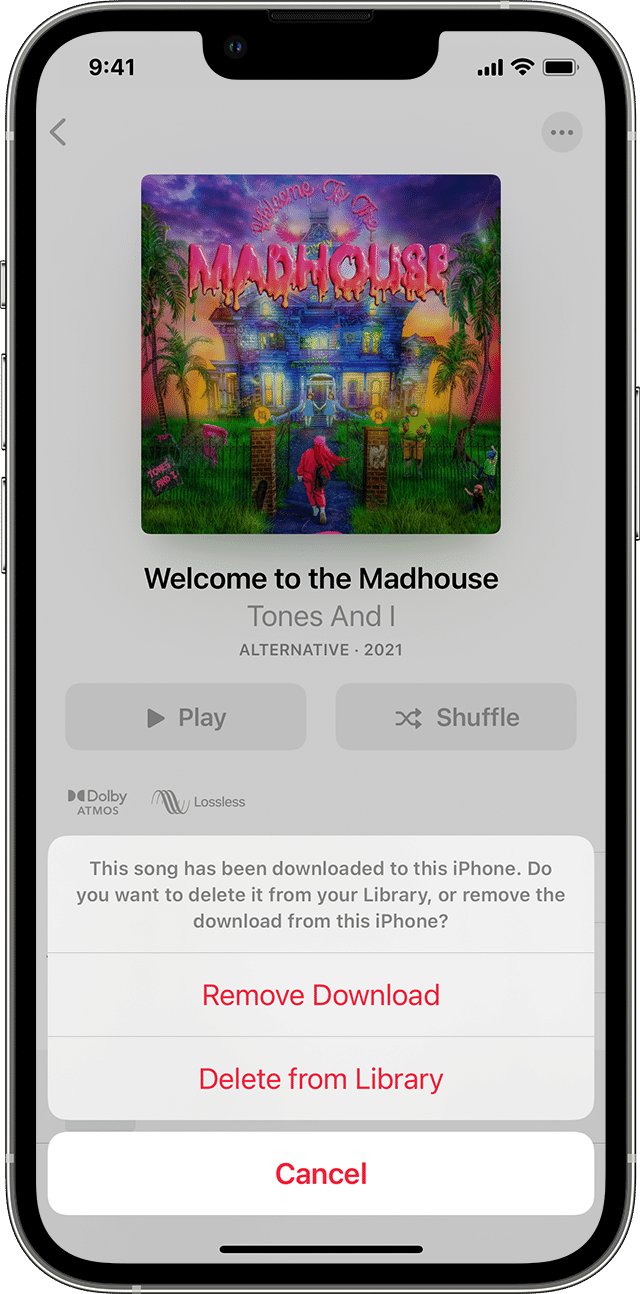
5. Tap Remove Download to remove the item from only this device. Or tap Delete from Library to delete the item across all of your devices.
If you use Family Sharing and don't want other family members to see your purchases, you can hide them. Learn how to hide an item.
You can also delete music in the Settings app. Go to Settings > General > iPhone Storage or iPad Storage. Scroll to Music and tap it. Swipe left on All Songs or on the item that you want to delete, then tap Delete.
These steps are outlined here: Delete music in the Apple Music app - Apple Support
Then, you can redownload the songs by following these steps:
Redownload music in the iTunes Store app on your iPhone, iPad, or iPod touch
1. Open the iTunes Store app.
* On your iPhone or iPod touch: At the bottom of your screen, tap More, then tap Purchased.
* On your iPad: Tap Purchased.
2. Tap Music. If you use Family Sharing, tap a family member’s name to see music that they purchased.
3. Find the music that you want to redownload, then tap it.
4. Tap the download buttonnext to a song or album.
You can reference these steps here: Redownload music - Apple Support
We look forward to hearing back from you with an update.
Kind regards.
Hello cynthiafrommadison,
Thank you for reaching out in Apple Support Communities. If you haven't tried yet, we recommend to delete a purchased song on your iPhone and redownload it on your device. From there, let's see if you can play the purchased song without any issues. Here's are the steps on how to delete a song:
Delete music on your iPhone, iPad, iPod touch, or Android device
1. Open the Apple Music app.
2. Go to Library and tap Downloaded to see your downloads. On your iPad, tap Downloaded in the sidebar.
3. Find the song, album, or music video that you want to remove.
4. Touch and hold the item, then tap Remove.
5. Tap Remove Download to remove the item from only this device. Or tap Delete from Library to delete the item across all of your devices.
If you use Family Sharing and don't want other family members to see your purchases, you can hide them. Learn how to hide an item.
You can also delete music in the Settings app. Go to Settings > General > iPhone Storage or iPad Storage. Scroll to Music and tap it. Swipe left on All Songs or on the item that you want to delete, then tap Delete.
These steps are outlined here: Delete music in the Apple Music app - Apple Support
Then, you can redownload the songs by following these steps:
Redownload music in the iTunes Store app on your iPhone, iPad, or iPod touch
1. Open the iTunes Store app.
* On your iPhone or iPod touch: At the bottom of your screen, tap More
* On your iPad: Tap Purchased.
2. Tap Music. If you use Family Sharing, tap a family member’s name to see music that they purchased.
3. Find the music that you want to redownload, then tap it.
4. Tap the download button
You can reference these steps here: Redownload music - Apple Support
We look forward to hearing back from you with an update.
Kind regards.
can't play purchased song on iphone but can on computer