airplay from homepod

Today I have a Apple TV streaming Apple Music via AirPlay to my Bluesound streamer and use Homekit to control it and it works OK, but I would like to replace the Apple TV with a Homepod 2. Will this work in the same way?

Apple TV 4K, tvOS 16

Posted on Mar 14, 2023 11:49 AM

Reply
3 replies

Mar 15, 2023 1:46 PM in response to svehall

Hi svehall,


We appreciate you reaching out to us.


If you are looking to use your HomePod with your Apple TV, please try the steps below.

  1. "Assign your Apple TV and HomePod or HomePod mini to the same room in the Home app. If you want to use two HomePod or two HomePod mini speakers, create a stereo pair, then assign the stereo pair to the same room as your Apple TV in the Home app.
  2. Turn on your Apple TV. You'll be asked if you want to Use HomePod speakers as Apple TV speakers. 
  3. Select Use as TV Speakers to turn on home theater audio."


You can use the article below as a reference.

Set up home theater audio with HomePod or HomePod mini and Apple TV 4K - Apple Support


Also, we'd like you to know that it is possible to use Hand off audio to HomePod.

  1. "On your iPhone, go to Settings > General > AirPlay & Handoff, then make sure Transfer to HomePod is turned on.
  2. Hold your iPhone near the top of HomePod."


You can use the article below as a reference.

Play audio on HomePod using an iOS or iPadOS device - Apple Support


Take care!


Mar 16, 2023 7:33 AM in response to svehall

Hi svehall,


You can hand off audio from your iOS device to your HomePod. HomePod can play audio sent from your iPad. If you want to play audio from other devices that support AirPlay 2, please check out the documentation for that device for details about selecting an audio destination.


The last link in our previous message has more information about that, and may help: Play audio on HomePod using an iOS or iPadOS device


Play audio on HomePod using Control Center

1. To open Control Center on your iOS or iPadOS device, do one of the following:

* On iPhone with Face ID or on iPad: Swipe down from the top-right edge.
* On iPhone with a Home button: Swipe up from the bottom.
2. Tap the audio card, tap the AirPlay button, then select one or more HomePod speakers.
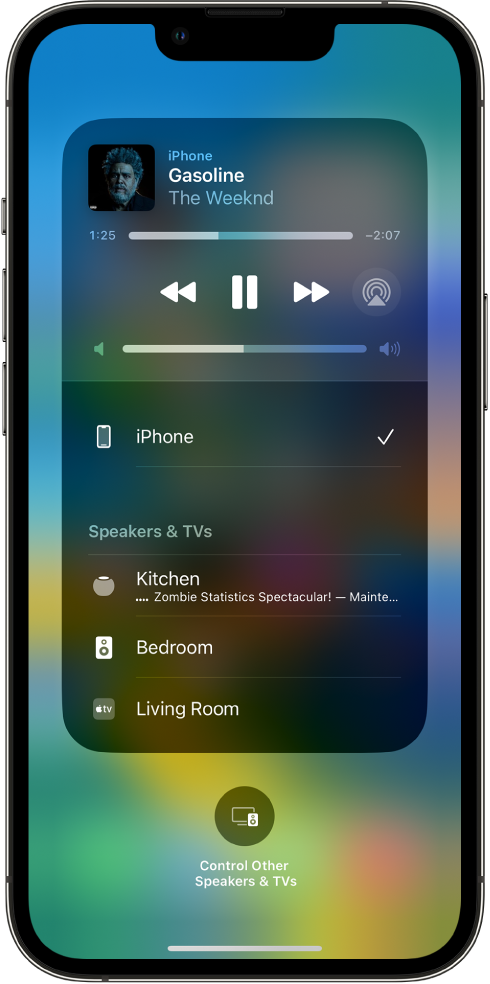
On an iPhone’s screen, a song is playing and a list of devices and speakers is showing. iPhone is selected, and HomePod is an option below.
To play audio from other devices that support AirPlay 2, see the documentation for that device for details about selecting an audio destination.


If you have additional questions, please contact Apple Support for assistance. You may be able to reach them here: Contact Apple Support


Thank you.

This thread has been closed by the system or the community team. You may vote for any posts you find helpful, or search the Community for additional answers.

airplay from homepod

Welcome to Apple Support Community
A forum where Apple customers help each other with their products. Get started with your Apple Account.