
iTunes sign in window won't close

iTunes signin window will not take my password and open even though I know and can use my Apple ID to access my apple on line account

Posted on Mar 15, 2023 8:50 AM

Reply
Question marked as Top-ranking reply

Posted on Mar 16, 2023 11:21 AM

Hi ELocke,


Thanks for contacting Apple Support Communities!


We understand that you're unable to sign into iTunes on your Mac with your Apple ID.


Are you seeing an alert? If so, what message do you see?


If you're seeing a message that says "Unable to sign you in to your Apple ID", you can reference this article which explains what to do: If you see an 'Unable to sign you in to your Apple ID' message - Apple Support

"If you see a message that says "Unable to sign you in to your Apple ID. Try again later," you've attempted to sign in to too many accounts on that device or web browser within a short period of time. You need to wait at least 24 hours before you attempt to sign in again on that device or web browser.

While there's no way to shorten this waiting period, you can continue to use other devices that are already signed in with your Apple ID. 

During this time, don't:

  • Sign out of any of your devices
  • Reset your Apple ID password
  • Begin an account recovery request

Doing so won't remove the message, and might further delay access to your account."


If you're attempting to sign in on your Mac, you don't have to sign into individual Apple apps. Check out this resource which explains how to sign in with your Apple ID via System Settings: Sign in with your Apple ID - Apple Support

"Sign in on your Mac
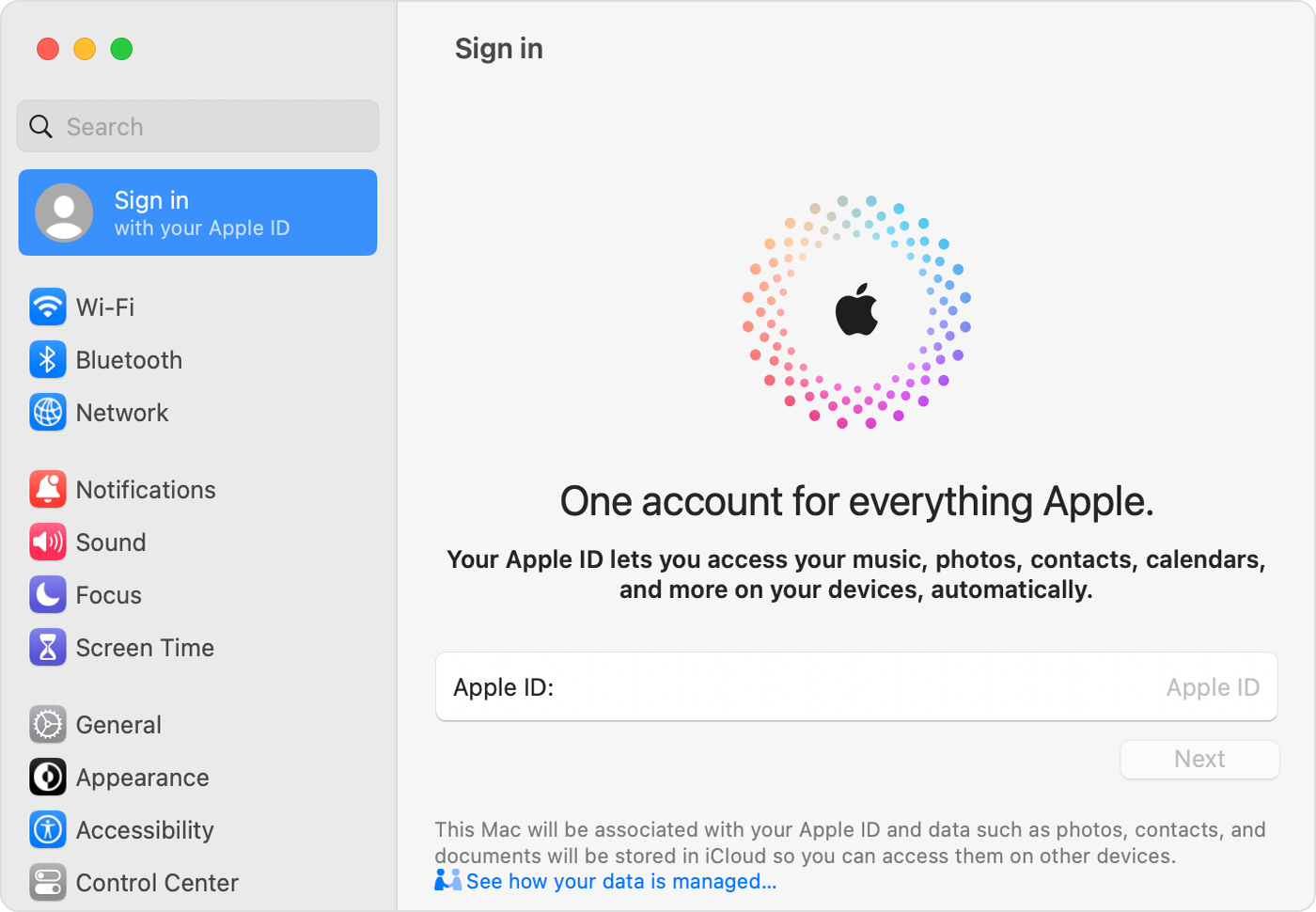
  1. Choose Apple menu  > System Settings. In earlier versions of macOS, choose Apple menu  > System Preferences.
  2. From the sidebar, click Sign In with your Apple ID. In earlier versions of macOS, click Sign In.

On Mac, sign in to your Apple ID in System Settings


3. Enter your Apple ID and password. 

4. If prompted, enter the six-digit verification code sent to your trusted device or phone number and complete sign in."


If you're seeing an alert that your Apple ID password is incorrect, you can reference this link for help to change your Apple ID password: If you forgot your Apple ID password - Apple Support


We hope this helps you.


Cheers!


1 reply
Question marked as Top-ranking reply

Mar 16, 2023 11:21 AM in response to ELocke

Hi ELocke,


Thanks for contacting Apple Support Communities!


We understand that you're unable to sign into iTunes on your Mac with your Apple ID.


Are you seeing an alert? If so, what message do you see?


If you're seeing a message that says "Unable to sign you in to your Apple ID", you can reference this article which explains what to do: If you see an 'Unable to sign you in to your Apple ID' message - Apple Support

"If you see a message that says "Unable to sign you in to your Apple ID. Try again later," you've attempted to sign in to too many accounts on that device or web browser within a short period of time. You need to wait at least 24 hours before you attempt to sign in again on that device or web browser.

While there's no way to shorten this waiting period, you can continue to use other devices that are already signed in with your Apple ID. 

During this time, don't:

  • Sign out of any of your devices
  • Reset your Apple ID password
  • Begin an account recovery request

Doing so won't remove the message, and might further delay access to your account."


If you're attempting to sign in on your Mac, you don't have to sign into individual Apple apps. Check out this resource which explains how to sign in with your Apple ID via System Settings: Sign in with your Apple ID - Apple Support

"Sign in on your Mac

  1. Choose Apple menu  > System Settings. In earlier versions of macOS, choose Apple menu  > System Preferences.
  2. From the sidebar, click Sign In with your Apple ID. In earlier versions of macOS, click Sign In.

On Mac, sign in to your Apple ID in System Settings


3. Enter your Apple ID and password. 

4. If prompted, enter the six-digit verification code sent to your trusted device or phone number and complete sign in."


If you're seeing an alert that your Apple ID password is incorrect, you can reference this link for help to change your Apple ID password: If you forgot your Apple ID password - Apple Support


We hope this helps you.


Cheers!


This thread has been closed by the system or the community team. You may vote for any posts you find helpful, or search the Community for additional answers.

iTunes sign in window won't close

Welcome to Apple Support Community
A forum where Apple customers help each other with their products. Get started with your Apple Account.