Apple Watch wont scroll to see "ping my phone"

Somehow my Apple Watch is locked and wont scroll up to where I can ping the location of my iphone. This is one of the features I use most. How do I get it to be able to scroll up again?

Apple Watch SE, watchOS 8

Posted on Mar 16, 2023 2:16 PM

Reply
Question marked as Top-ranking reply

Posted on Mar 18, 2023 3:29 PM

Hi networkgraphics,


Thanks for connecting with us here in Apple Support Communities. Let's have you try restarting your Apple Watch as this may help to resolve the issue you're facing: Restart your Apple Watch - Apple Support


Learn how to restart your Apple Watch, even if it isn't responding.


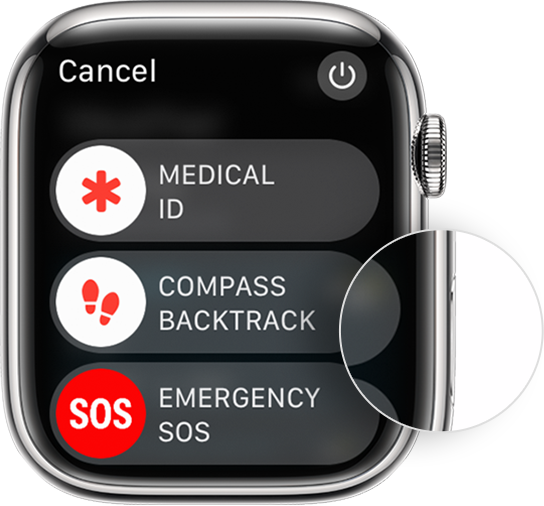
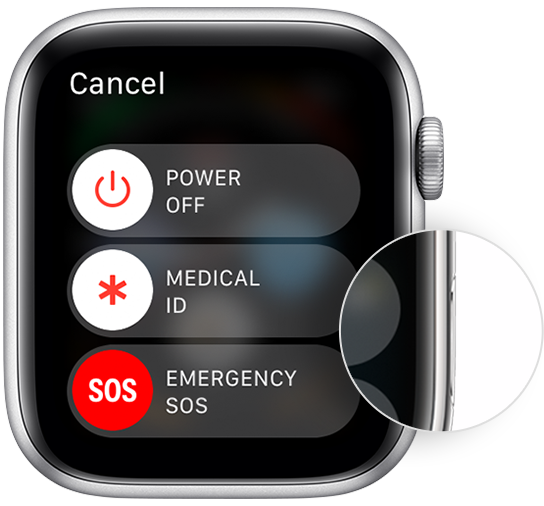
Apple Watch showing where the side button is as well as the Power Off slider. 
How to restart your Apple Watch if you have watchOS 9
1. If your Apple Watch is charging, take it off the charger.
2. Press and hold the side button until you see the power button  in the upper-right corner of the display.

3. Tap the power button.
4. Drag the Power Off slider.
5. After your watch turns off, press and hold the side button again until you see the Apple logo.

 
How to restart your Apple Watch if you have watchOS 8 or earlier
1. If your Apple Watch is charging, take it off the charger.
2. Press and hold the side button until you see the Power Off slider.
3. Drag the Power Off slider.
4. After your watch turns off, press and hold the side button again until you see the Apple logo.

Kind regards.

1 reply
Question marked as Top-ranking reply

Mar 18, 2023 3:29 PM in response to networkgraphics

Hi networkgraphics,


Thanks for connecting with us here in Apple Support Communities. Let's have you try restarting your Apple Watch as this may help to resolve the issue you're facing: Restart your Apple Watch - Apple Support


Learn how to restart your Apple Watch, even if it isn't responding.


Apple Watch showing where the side button is as well as the Power Off slider. 
How to restart your Apple Watch if you have watchOS 9
1. If your Apple Watch is charging, take it off the charger.
2. Press and hold the side button until you see the power button  in the upper-right corner of the display.
3. Tap the power button.
4. Drag the Power Off slider.
5. After your watch turns off, press and hold the side button again until you see the Apple logo.

 
How to restart your Apple Watch if you have watchOS 8 or earlier
1. If your Apple Watch is charging, take it off the charger.
2. Press and hold the side button until you see the Power Off slider.
3. Drag the Power Off slider.
4. After your watch turns off, press and hold the side button again until you see the Apple logo.

Kind regards.

This thread has been closed by the system or the community team. You may vote for any posts you find helpful, or search the Community for additional answers.

Apple Watch wont scroll to see "ping my phone"

Welcome to Apple Support Community
A forum where Apple customers help each other with their products. Get started with your Apple Account.