
What do I do if while waiting for recovery the restore screen stops and the restore is not responding.
I am stuck trying to restore an iPad Help!
iPad (5th generation)
I am stuck trying to restore an iPad Help!
iPad (5th generation)
Greetings Rtom41149,
We'd like to provide you with a few steps that can assist you with restoring your iPad as expected:
"Put your iPad in recovery mode and set it up again

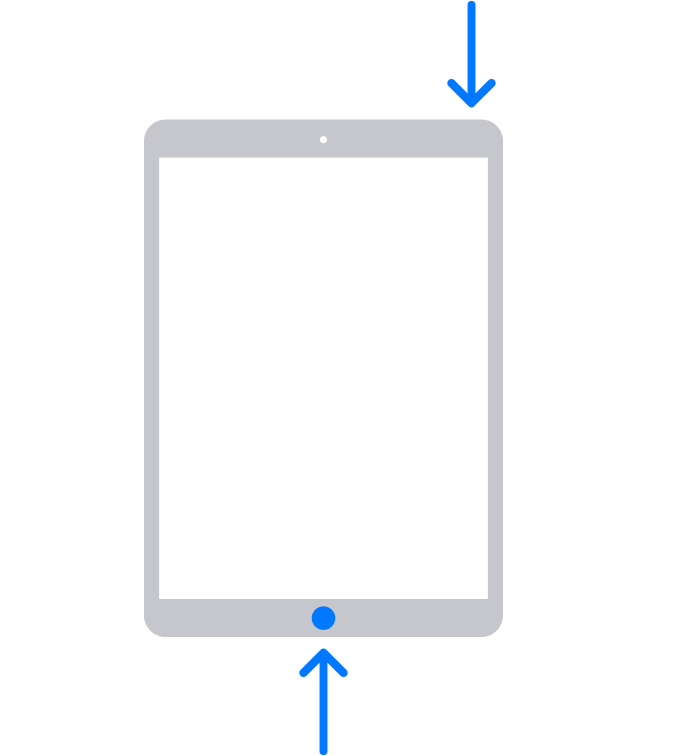
4. Keep holding the button (or buttons) until you see the recovery mode screen: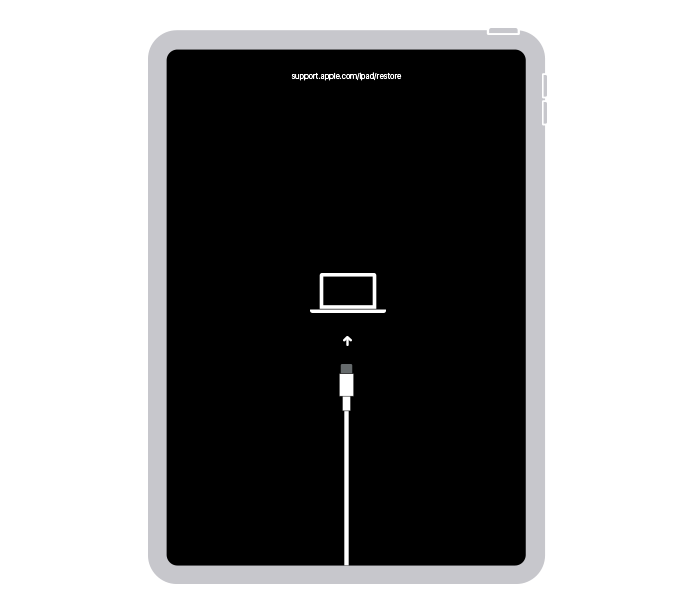
5. Locate your iPad on your computer. When you see the option to Restore or Update, choose Update. Your computer will try to reinstall the software without erasing your data. Wait while your computer downloads the software for your iPad. If the download takes more than 15 minutes and your iPad exits the recovery mode screen, let the download finish, then repeat step 3.
6. After the Update or Restore completes, set up your iPad."
More details here: If you can't update or restore your iPad
Best regards.
Greetings Rtom41149,
We'd like to provide you with a few steps that can assist you with restoring your iPad as expected:
"Put your iPad in recovery mode and set it up again
4. Keep holding the button (or buttons) until you see the recovery mode screen:
5. Locate your iPad on your computer. When you see the option to Restore or Update, choose Update. Your computer will try to reinstall the software without erasing your data. Wait while your computer downloads the software for your iPad. If the download takes more than 15 minutes and your iPad exits the recovery mode screen, let the download finish, then repeat step 3.
6. After the Update or Restore completes, set up your iPad."
More details here: If you can't update or restore your iPad
Best regards.
What do I do if while waiting for recovery the restore screen stops and the restore is not responding.

