my 2020 MacBook Airneeds the software update but won't find it when I am trying to get it to install

how can I update my MacBook Air when it says I need the update but won't find it when I try to start the install


MacBook Air 13″, macOS 10.15

Posted on Mar 17, 2023 8:17 AM

Reply
1 reply

Mar 19, 2023 1:02 PM in response to lorahlstone

Hello lorahlstone,


Thank you for reaching out to Apple Support Communities.


These steps should help you update:


"Use Software Update

Before following these steps, it's a good idea to back up your Mac.

  1. From the Apple menu  in the corner of your screen, choose System Settings or System Preferences.
    • If you chose System Settings, click General on the left side of the window. Then click Software Update on the right.
    • If you chose System Preferences, click Software Update in the window.

2.Software Update then checks for new software. 
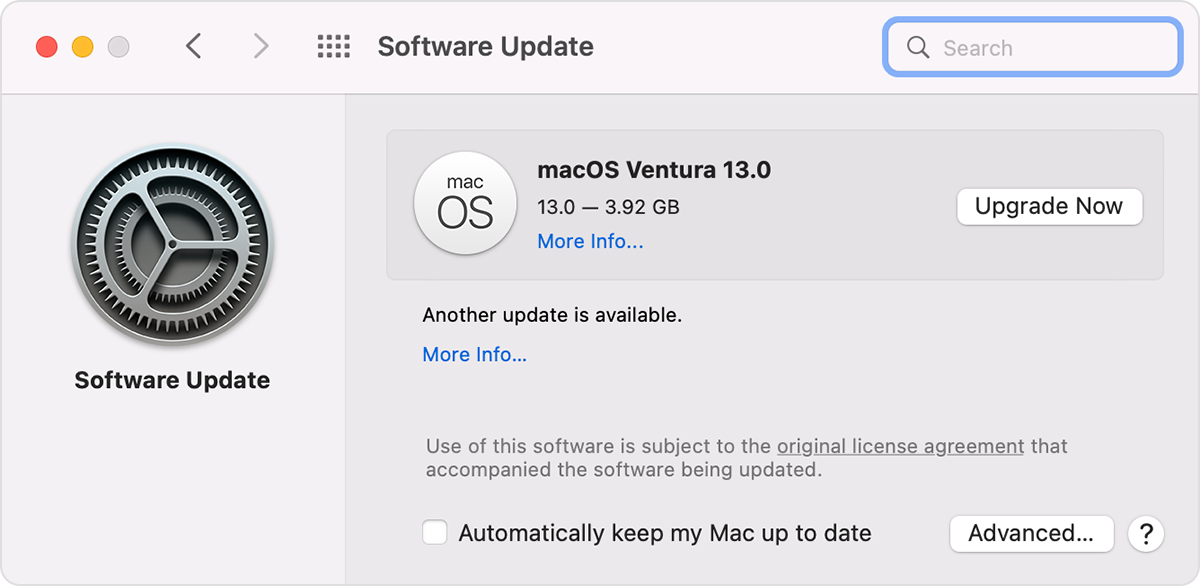
    • If Software Update finds new software, click the button to install it. The button might be named Update Now, Upgrade Now, Install Now, or Restart Now, for example. You might then be asked to enter your administrator password.
    • If Software Update says that your Mac is up to date, then no new software is currently available for your Mac model. Software Update shows only software that is compatible with your Mac.

Software Update window in macOS Monterey"


More details can be found here: Update macOS on Mac


If the issue persists, can you provide a few more details? What happens when you attempt to update? What is your exact macOS version? Also, which update are you attempting to perform?


Cheers!

This thread has been closed by the system or the community team. You may vote for any posts you find helpful, or search the Community for additional answers.

my 2020 MacBook Airneeds the software update but won't find it when I am trying to get it to install

Welcome to Apple Support Community
A forum where Apple customers help each other with their products. Get started with your Apple Account.