How can I repeat a workout section until I’ve gone a specified distance (instead of a number of times)?

I’m using a 10k training plan which includes runs where I and supposed to run for 20 seconds, then walk for 40 seconds, and repeat that until I have gone 3 miles. Is there some way to accomplish this on an Apple Watch?


I have set it up as a 50 m run, a 65 m walk, and then repeat 42 times, which gets me almost exactly 3 miles, but is inaccurate as far as being 20 seconds of running and 40 seconds of walking. It works at the beginning of the run but is two short of a time for the runs after I’m warmed up.


What I want is a way to do the repeats until I’ve gone a certain distance instead of a certain number of times.


It would also be nice to have repeats of, e.g., 100 m run and 60 m walk, repeated for 30 minutes.


Or to repeat a section indefinitely until I stop it (an open-ended repeat).

Apple Watch Series 6, watchOS 9

Posted on Mar 17, 2023 8:30 PM

Reply
1 reply

Mar 20, 2023 9:41 AM in response to fivestones

Hi fivestones,


It sounds like you're trying to create a customized workout on your Apple Watch Workout app where it prompts you to switch up your pace and loops until you're finished. This may not be a capability of the Apple app.


The Run with your Apple Watch Apple Support article has some great tips on customizing your run, you might try to manually track your Run exactly the same twice. You can race against that last or best time from there.


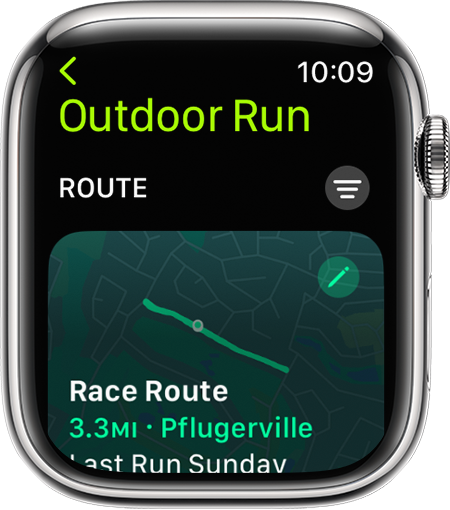
Race your last or best time with Race Route
After you've completed the same route two or more times with little to no deviation, you can select it and race against your last or best time with Race Route.

1. Open the Workout app.
2. Scroll to Outdoor Run.
3. Tap the More button the More icon .
4. Tap the Route you wish to race against, then select Last or Personal Best.
5. An Apple Watch that shows an available route to race.
As you run, your Apple Watch shows you a comparison of your current and previous run. You can check your progress to see how far ahead or behind you are, as well as the distance remaining. You'll also receive an "Off Route" notification if you run off-course.

If you're near the starting point of a previous route, available routes appear as a suggested workout. To view all routes, tap Suggested then Route.


Apple may be able to answer more in depth questions about the capability of the Workout app. We encourage you to contact Apple Support for details.


Thank you for being part of the Apple Support Communities.


Cheers!


This thread has been closed by the system or the community team. You may vote for any posts you find helpful, or search the Community for additional answers.

How can I repeat a workout section until I’ve gone a specified distance (instead of a number of times)?

Welcome to Apple Support Community
A forum where Apple customers help each other with their products. Get started with your Apple Account.