
What is page.link in my passwords
This Page.link showed up in my passwords. Does anyone know what is it for I do not recognized it and I am unable to delete it!
iPhone 12 Pro Max, 16
This Page.link showed up in my passwords. Does anyone know what is it for I do not recognized it and I am unable to delete it!
iPhone 12 Pro Max, 16
Hi 1111peace,
Since you're not sure why the Page.link password is being stored on your device; we recommend that you delete it by following the steps here: How to find saved passwords and passkeys on your iPhone - Apple Support
To perform the recommended troubleshooting steps via the link above, complete the steps in the section titled "View saved passwords and passkeys in Settings."
1. Tap Settings, then select Passwords. In iOS 13 or earlier, select Passwords & Accounts, then tap Website & App Passwords.
2. Use Face ID or Touch ID when prompted, or enter your passcode.
3. To see a password or passkey, select a website or app.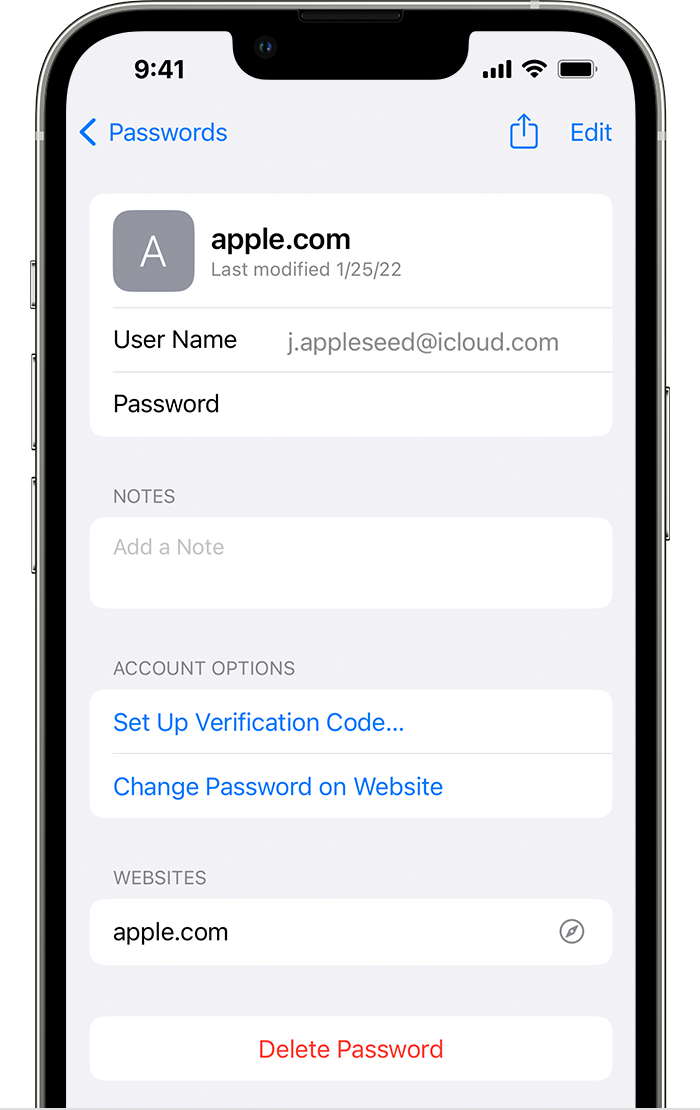
* To delete a saved password or passkey, tap Delete Password or Delete Passkey.
* To update a password or passkey, tap Edit.
We recommend the steps above because they will show you how to find and edit your saved passwords and passkeys on your iPhone.
Please let us know the outcome after giving the above steps a try.
Thanks for using the Apple Support Communities.
Cheers!
What is page.link in my passwords


