
Message sending failed
I can’t send on one number messages I don’t know why others numbers i can send easily but only one number can’t send
iPhone X, iOS 16
I can’t send on one number messages I don’t know why others numbers i can send easily but only one number can’t send
iPhone X, iOS 16
Hi aqeel283,
For help with sending messages, test the steps below found in the article here: If you can't send or receive messages on your iPhone or iPad - Apple Support
"If you see a red exclamation point
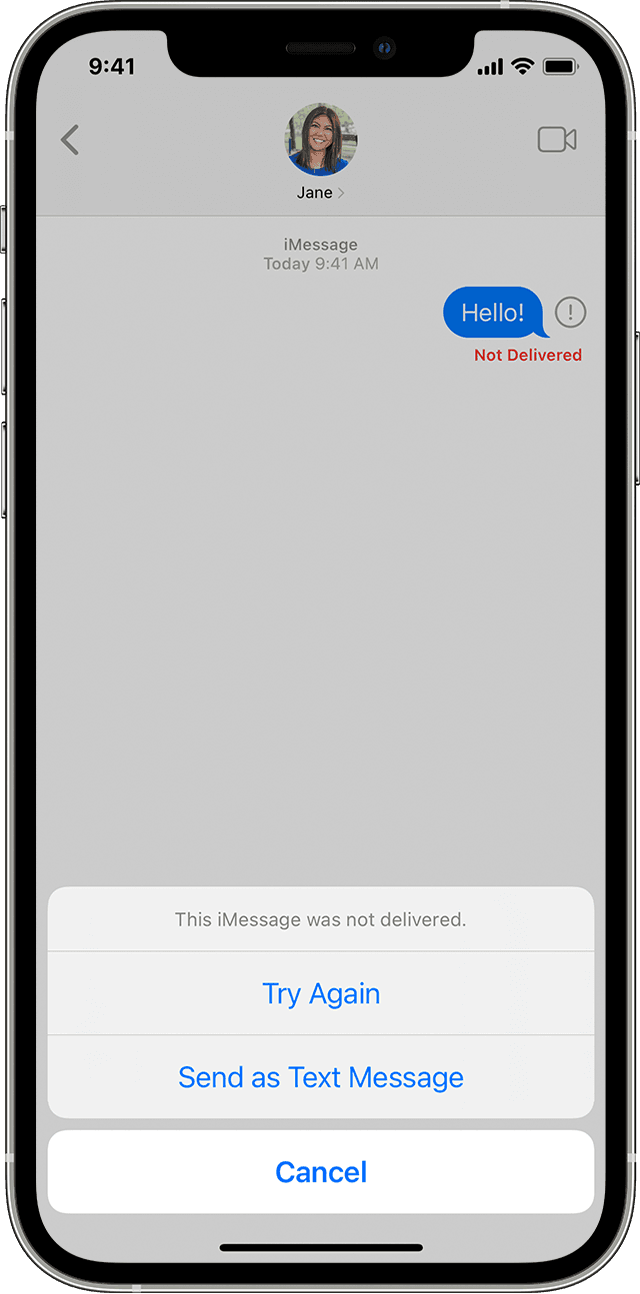
If you try to send a message and you see ! with an alert that says Not Delivered, follow these steps:
 , then tap Try Again., then tap Send as Text Message. Messaging rates may apply. Contact your carrier for more information.
You can set up Messages so that it automatically tries to send messages as an SMS when iMessage isn't available. Go to Settings > Messages, and turn on Send as SMS."
Be sure to check out and complete the additional steps in the section "If you still need help" from the same article. If the issue continues, reach out to Apple Support directly to further assist.
Contact - Official Apple Support
Contact Apple for support and service - Apple Support
Cheers.
Hi aqeel283,
For help with sending messages, test the steps below found in the article here: If you can't send or receive messages on your iPhone or iPad - Apple Support
"If you see a red exclamation point
If you try to send a message and you see ! with an alert that says Not Delivered, follow these steps:
, then tap Try Again., then tap Send as Text Message. Messaging rates may apply. Contact your carrier for more information.You can set up Messages so that it automatically tries to send messages as an SMS when iMessage isn't available. Go to Settings > Messages, and turn on Send as SMS."
Be sure to check out and complete the additional steps in the section "If you still need help" from the same article. If the issue continues, reach out to Apple Support directly to further assist.
Contact - Official Apple Support
Contact Apple for support and service - Apple Support
Cheers.
Message sending failed

