One text thread disappeared

I have an iPhone 12 mini. I have 204 GB out of 256 GB available capacity on my phone. When I look under one person’s number there are no text messages. I haven’t noticed any other threads disappearing. How can I restore this thread?

Posted on Mar 18, 2023 2:29 PM

Reply
Question marked as Top-ranking reply

Posted on Mar 21, 2023 8:07 AM

Hello Cantitjustwork,


To help us get a better understanding of the issue, we’d like to ask a few questions.


1. Were any changes made to your device or settings before this happened? If so, what changes were made?

2. Are you using Messages in iCloud? If so, is that conversation missing from all devices?


The above details will help us plan how to proceed.


Let's also check and if the conversation is in Recently Deleted. This page explains how to check, and outlines how to recover deleted messages, which may help: Recover deleted text messages on your iPhone or iPad


"How to retrieve a deleted message or conversation


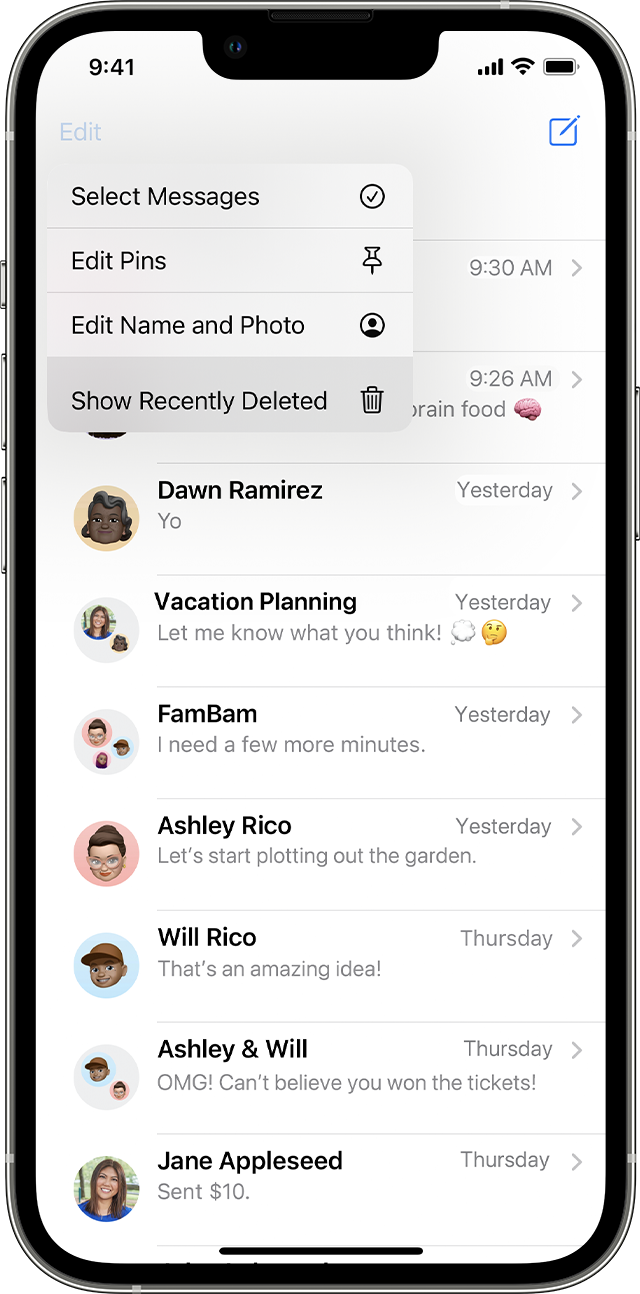
  1. In Messages, tap Edit on the conversations page. If you previously turned Message Filtering on, the Edit button doesn't appear. Instead, tap Filters on the conversations page.
  2. Tap Show Recently Deleted .

On the conversations page in Messages, tap Edit to find the option to show recently deleted messages.   

  3. Choose the conversations with the messages you want to restore, then tap Recover.On the Recently Deleted page in Messages, tap the conversation that includes messages you want to recover.      
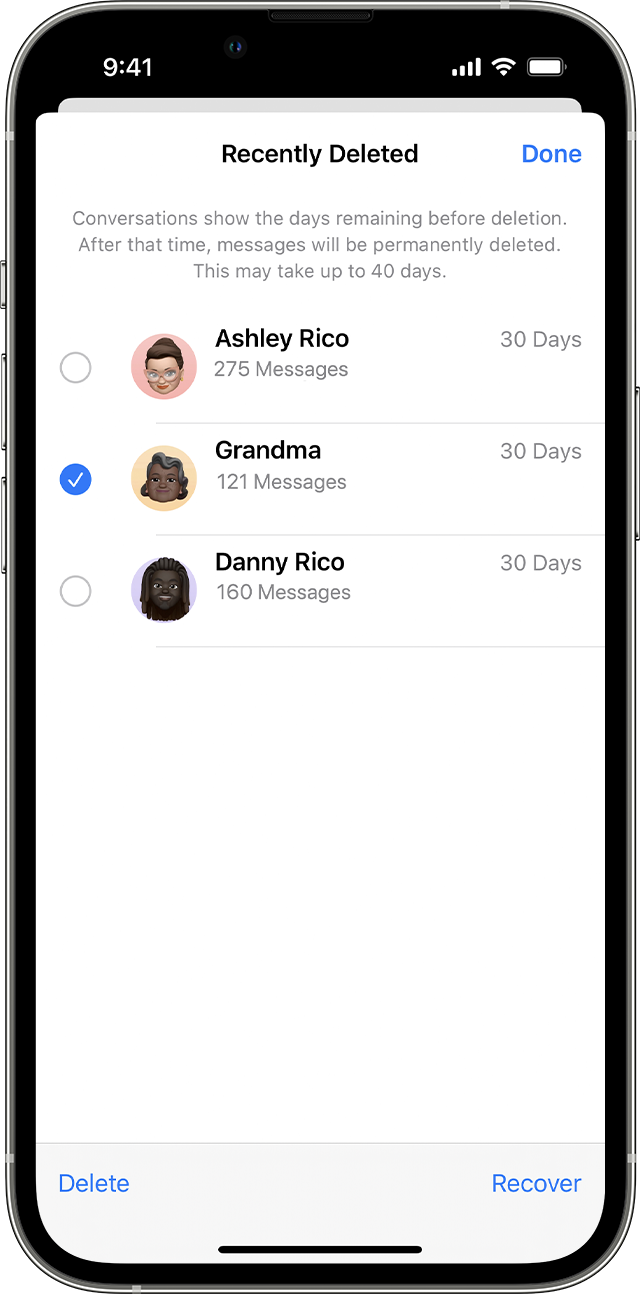
 4. Tap Recover Message or Recover [Number] Messages.

You need iOS 16, iPadOS 16.1, or later to recover deleted messages and conversations. You can only recover messages and conversations that you deleted within the last 30 to 40 days. If you delete a message before you update to iOS 16, iPadOS 16, or later, you can't recover that message."


Thanks!

1 reply
Question marked as Top-ranking reply

Mar 21, 2023 8:07 AM in response to Cantitjustwork

Hello Cantitjustwork,


To help us get a better understanding of the issue, we’d like to ask a few questions.


1. Were any changes made to your device or settings before this happened? If so, what changes were made?

2. Are you using Messages in iCloud? If so, is that conversation missing from all devices?


The above details will help us plan how to proceed.


Let's also check and if the conversation is in Recently Deleted. This page explains how to check, and outlines how to recover deleted messages, which may help: Recover deleted text messages on your iPhone or iPad


"How to retrieve a deleted message or conversation


  1. In Messages, tap Edit on the conversations page. If you previously turned Message Filtering on, the Edit button doesn't appear. Instead, tap Filters on the conversations page.
  2. Tap Show Recently Deleted .

On the conversations page in Messages, tap Edit to find the option to show recently deleted messages.   

  3. Choose the conversations with the messages you want to restore, then tap Recover.On the Recently Deleted page in Messages, tap the conversation that includes messages you want to recover.      

 4. Tap Recover Message or Recover [Number] Messages.

You need iOS 16, iPadOS 16.1, or later to recover deleted messages and conversations. You can only recover messages and conversations that you deleted within the last 30 to 40 days. If you delete a message before you update to iOS 16, iPadOS 16, or later, you can't recover that message."


Thanks!

This thread has been closed by the system or the community team. You may vote for any posts you find helpful, or search the Community for additional answers.

One text thread disappeared

Welcome to Apple Support Community
A forum where Apple customers help each other with their products. Get started with your Apple Account.