recent text messages are not showing up on my laptop only my iPhone
Why are my recent text messages are only on my iPhone, not on my mac laptop?
MacBook Pro 14″, macOS 13.0
Why are my recent text messages are only on my iPhone, not on my mac laptop?
MacBook Pro 14″, macOS 13.0
Hi Barksands,
When you set up Text Message Forwarding, you can send and receive the SMS and MMS messages from your iPhone on any device that meets the Continuity Requirements, so make sure your have Text Message Forwarding enabled. Here's how: Forward SMS/MMS text messages from your iPhone to your Mac or iPad.
Automatically forward texts to your other devices
1. Make sure that you're signed in to iMessage with the same Apple ID on each device:
• iPhone or iPad: Check the Apple ID shown in Settings > Messages > Send & Receive.
• Mac: Open the Messages app, choose Messages > Settings (or Preferences), then click iMessage. Check the Apple ID shown.
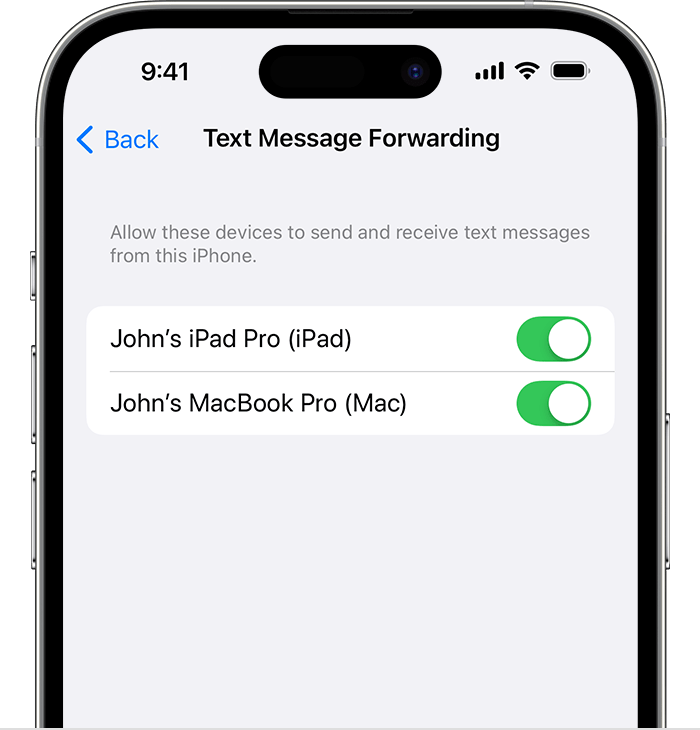
2. On your iPhone, go to Settings > Messages > Text Message Forwarding.
3. If you don't see Text Message Forwarding, go to Settings > Messages. Turn off iMessage, then turn it back on. Tap Send & Receive, tap Use Your Apple ID for iMessage, then sign in with the same Apple ID used on your other devices.
4. Choose which devices can send and receive text messages from your iPhone:
5. If you choose a device that isn't using two-factor authentication for your Apple ID, a verification code appears on each of your other devices: enter that code on your iPhone.
As long as your iPhone is turned on and connected to Wi-Fi or a cellular network, new SMS/MMS texts can be sent and received on the devices that you added.
Regards.
Hi Barksands,
When you set up Text Message Forwarding, you can send and receive the SMS and MMS messages from your iPhone on any device that meets the Continuity Requirements, so make sure your have Text Message Forwarding enabled. Here's how: Forward SMS/MMS text messages from your iPhone to your Mac or iPad.
Automatically forward texts to your other devices
1. Make sure that you're signed in to iMessage with the same Apple ID on each device:
• iPhone or iPad: Check the Apple ID shown in Settings > Messages > Send & Receive.
• Mac: Open the Messages app, choose Messages > Settings (or Preferences), then click iMessage. Check the Apple ID shown.
2. On your iPhone, go to Settings > Messages > Text Message Forwarding.
3. If you don't see Text Message Forwarding, go to Settings > Messages. Turn off iMessage, then turn it back on. Tap Send & Receive, tap Use Your Apple ID for iMessage, then sign in with the same Apple ID used on your other devices.
4. Choose which devices can send and receive text messages from your iPhone:
5. If you choose a device that isn't using two-factor authentication for your Apple ID, a verification code appears on each of your other devices: enter that code on your iPhone.
As long as your iPhone is turned on and connected to Wi-Fi or a cellular network, new SMS/MMS texts can be sent and received on the devices that you added.
Regards.
recent text messages are not showing up on my laptop only my iPhone