I request refund and im not get back the money
What i have to do to get back the my money?
What i have to do to get back the my money?
Hi ChristosGav,
Thanks for reaching out to Apple Support Communities.
It sounds like you're having an issue with requesting a refund.
We're happy to assist.
We recommend checking out the steps in the section titled "How to request a refund" from the article here: Request a refund for apps or content that you bought from Apple - Apple Support
1. Sign in to reportaproblem.apple.com.
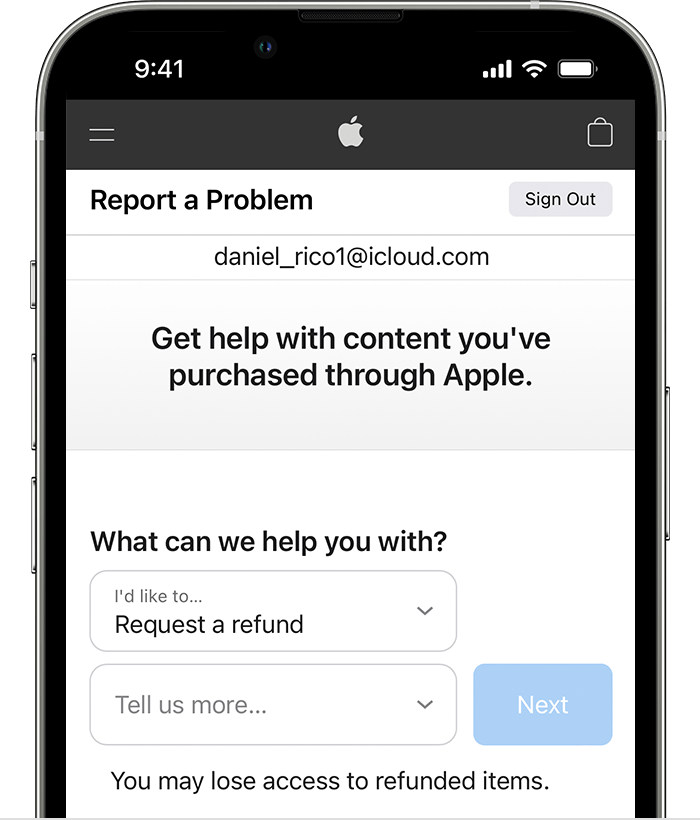
2. Tap or click "I'd like to," then choose "Request a refund."
3. Choose the reason why you want a refund, then choose Next.
4. Choose the app, subscription, or other item, then choose Submit. If you were charged for a subscription that you no longer want, you can also cancel the subscription.
We recommend the steps above because they directly address the issue you initially posted: you're seeking help requesting a refund.
If you cannot request a refund, please follow up with the steps below.
If you can't request a refund on reportaproblem.apple.com
* If the charge is pending, you canʼt request a refund yet. After the charge goes through, try to request a refund again.
* If you have an unpaid order, you need to pay for that order before you request a refund. You might need to update your payment information.
* If you don't know why you were charged, review your family members' purchases. If you're the family organizer, tap or click the Apple ID button, then choose All. Purchases charged to your shared payment method appear.
Please do not hesitate to contact us if you have questions or need additional support.
Cheers!
Hi ChristosGav,
Thanks for reaching out to Apple Support Communities.
It sounds like you're having an issue with requesting a refund.
We're happy to assist.
We recommend checking out the steps in the section titled "How to request a refund" from the article here: Request a refund for apps or content that you bought from Apple - Apple Support
1. Sign in to reportaproblem.apple.com.
2. Tap or click "I'd like to," then choose "Request a refund."
3. Choose the reason why you want a refund, then choose Next.
4. Choose the app, subscription, or other item, then choose Submit. If you were charged for a subscription that you no longer want, you can also cancel the subscription.
We recommend the steps above because they directly address the issue you initially posted: you're seeking help requesting a refund.
If you cannot request a refund, please follow up with the steps below.
If you can't request a refund on reportaproblem.apple.com
* If the charge is pending, you canʼt request a refund yet. After the charge goes through, try to request a refund again.
* If you have an unpaid order, you need to pay for that order before you request a refund. You might need to update your payment information.
* If you don't know why you were charged, review your family members' purchases. If you're the family organizer, tap or click the Apple ID button, then choose All. Purchases charged to your shared payment method appear.
Please do not hesitate to contact us if you have questions or need additional support.
Cheers!
I request refund and im not get back the money