Hello ulrikjeppesen,
Thank you for reaching out to Apple Support Communities, and we'll be happy to help in any way we can. We understand you're having issues with notes creating unexpected emails. Have you tried restarting your iPad? This simple step resolves a multitude of issues: Restart your iPad - Apple Support
"How to restart an iPad without a Home button
- Press and hold either volume button and the top button until the power off slider appears.
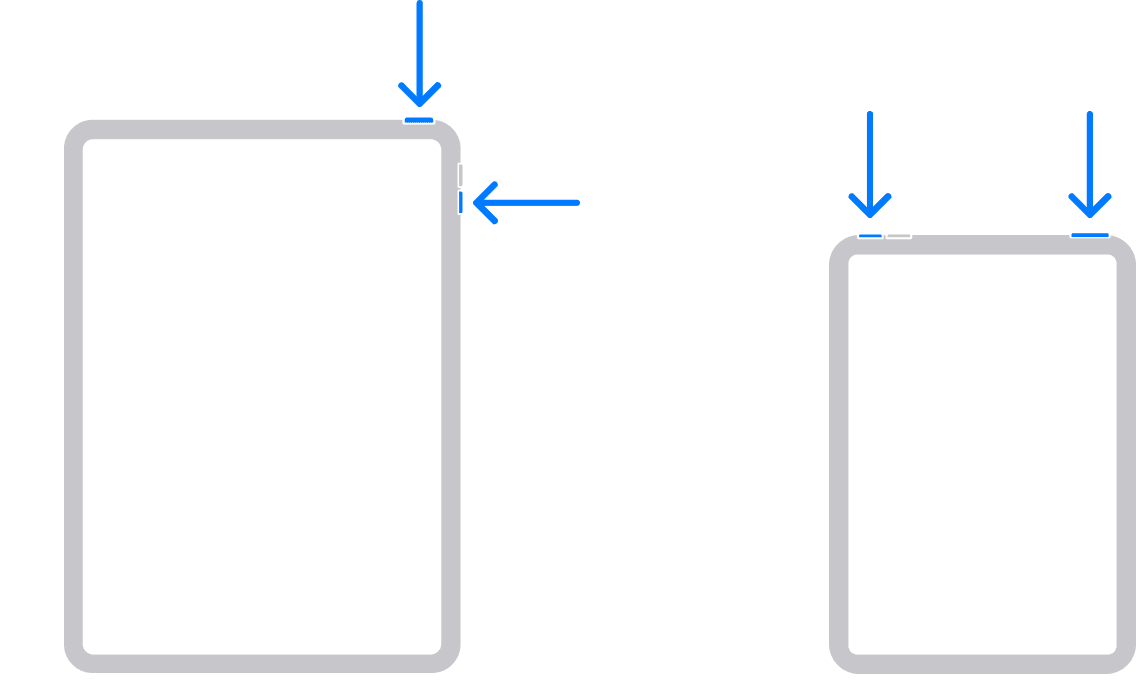
2. Drag the slider, then wait 30 seconds for your device to turn off. If your device is frozen or unresponsive, force restart your device.
3. To turn your device back on, press and hold the top button until you see the Apple logo.
How to restart an iPad with a Home button
- Press and hold the top button until the power off slider appears.

2. Drag the slider, then wait for 30 seconds for your device to turn off. If your device is frozen or unresponsive, force restart your device.
3. To turn your device back on, press and hold the top button until you see the Apple logo."
If that doesn't resolve the issue, does your iPad need updating? Do you have a recent backup for the data in your iPad in iCloud or your computer? If not, we recommend that you create one as described here: How to back up your iPhone, iPad, and iPod touch - Apple Support
Then update your iPadOS as outlined here: Update your iPhone or iPad - Apple Support
We hope this helps.
Cheers!



