Deleting bookmarks

How do I delete all bookmarks on my homescreen at once with ios version 16.3.1?

Posted on Mar 24, 2023 7:21 AM

Reply
1 reply

Mar 25, 2023 1:55 PM in response to Alexisarie1979

Greetings Alexisarie1979,


Thanks for connecting with Apple Support Communities.

We'd like to provide you with a steps on how to organize the bookmarks on your iPhone:

"View and organize your bookmarks

  1. Tap the Show Bookmarks button.
  2. Tap Edit, then do any of the following:
    • Create a new folder: Tap New Folder at the bottom left, enter a name, then tap Done.
    • Move a bookmark into a folder: Tap the bookmark, tap below Location, then tap a folder. Tap the Back button to return to your bookmarks.
    • Delete bookmarks: Tap the Delete button.
    • Rename bookmarks: Tap the bookmark, enter a new name, then tap Done.
    • Reorder bookmarks: Touch and hold The Reorder button, then drag the bookmark to a new location."
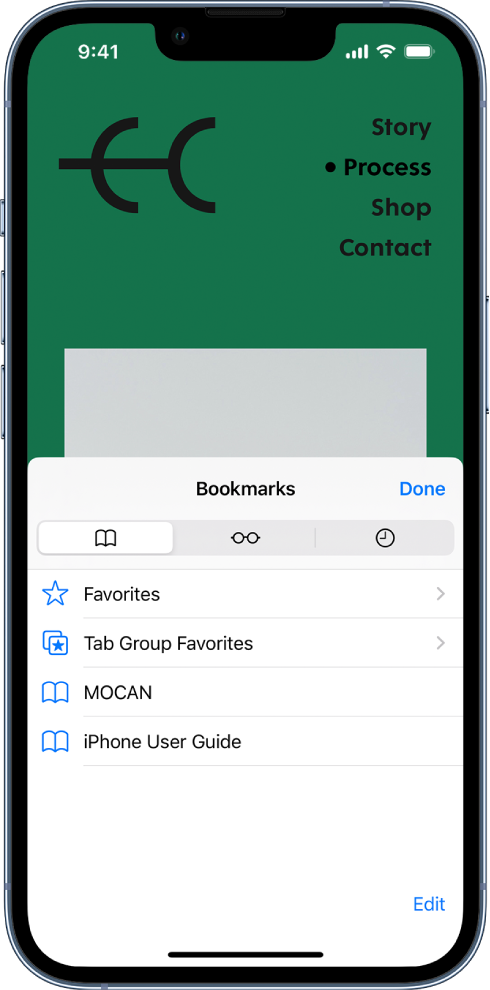
The Bookmarks screen, with options to see your bookmarks, Favorites, Tab Group Favorites, the Reading List, and your browsing history.


More details here: Bookmark a website in Safari on iPhone


Best regards.


This thread has been closed by the system or the community team. You may vote for any posts you find helpful, or search the Community for additional answers.

Deleting bookmarks

Welcome to Apple Support Community
A forum where Apple customers help each other with their products. Get started with your Apple Account.