Hi Jimfartpants,
Try the steps in the link below if you'd like to turn off automatic updates on your iPhone to prevent it from updating on its own.
How to manually update apps on your Apple device
To perform the recommended troubleshooting steps via the link above, complete the steps in the section titled "Turn on or turn off automatic updates."
If you prefer to manually update all your apps, turn off automatic updates. When you do this, you receive notifications from the App Store each time an update for one of your apps is released.
How to turn on or turn off automatic updates on your iPhone or iPad
1. Go to Settings.
2. Tap App Store.
3. Turn on or turn off App Updates.
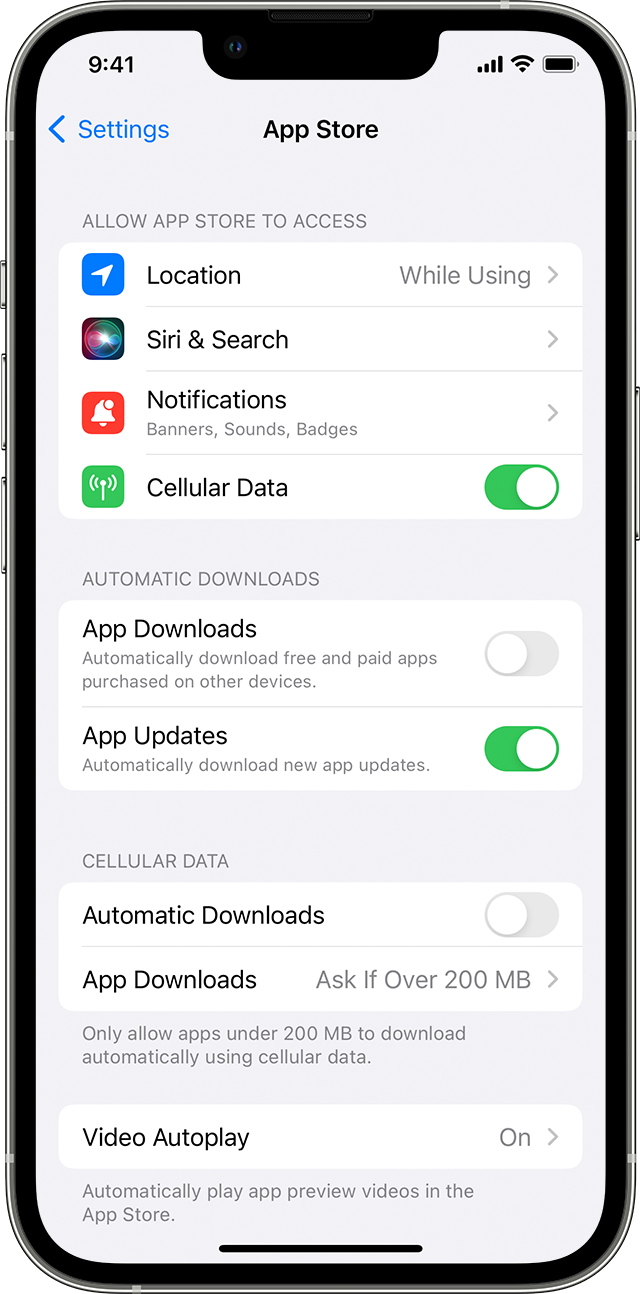
We recommend the steps above because they will show you how to turn off automatic updates on your iPhone to prevent it from updating on its own.
Please do not hesitate to reach back out to us if you have questions or need any additional support.
Thanks for using the Apple Support Communities.
Cheers!


