
my phone is always hot even in normal temperature
my iphone 14 is still new. I've been using it for two weeks now. I noticed it becomes very hot while charging. How can I resolve this?
iPhone 14 Pro Max
my iphone 14 is still new. I've been using it for two weeks now. I noticed it becomes very hot while charging. How can I resolve this?
iPhone 14 Pro Max
Hi suzette249,
Thank you for participating in the Apple Support Communities. We understand your iPhone becomes hot while charging. It's not unusual for an iPhone to become warmer while charging. If it gets too warm, you should see a temperature warning. This article, that you viewed prior to posting here, explains more about this: If your iPhone or iPad gets too hot or too cold.
"Your device might get warm
You might notice that your device feels warmer when you:
These conditions are normal, and your device will return to a regular temperature when the process is complete or when you finish your activity. If your device doesn't display a temperature warning, you can keep using your device.

If your device gets too warm
iOS and iPadOS devices have built-in protections to prevent overheating. If the interior temperature of your device exceeds the normal operating range, your device will protect its internal components by attempting to regulate its temperature.
Avoid these conditions and activities because they might change the performance of your device:
If the interior temperature of your device exceeds the normal operating range, you might notice these changes:
Additionally, if you're navigating, your device might show this alert and turn off the display: "Temperature: iPhone needs to cool down." Navigation still provides audible turn-by-turn directions. When approaching a turn, the display will illuminate to guide you through the turn.
If a temperature warning screen appears
If your device exceeds a certain temperature threshold, it will present a temperature warning screen similar to this:
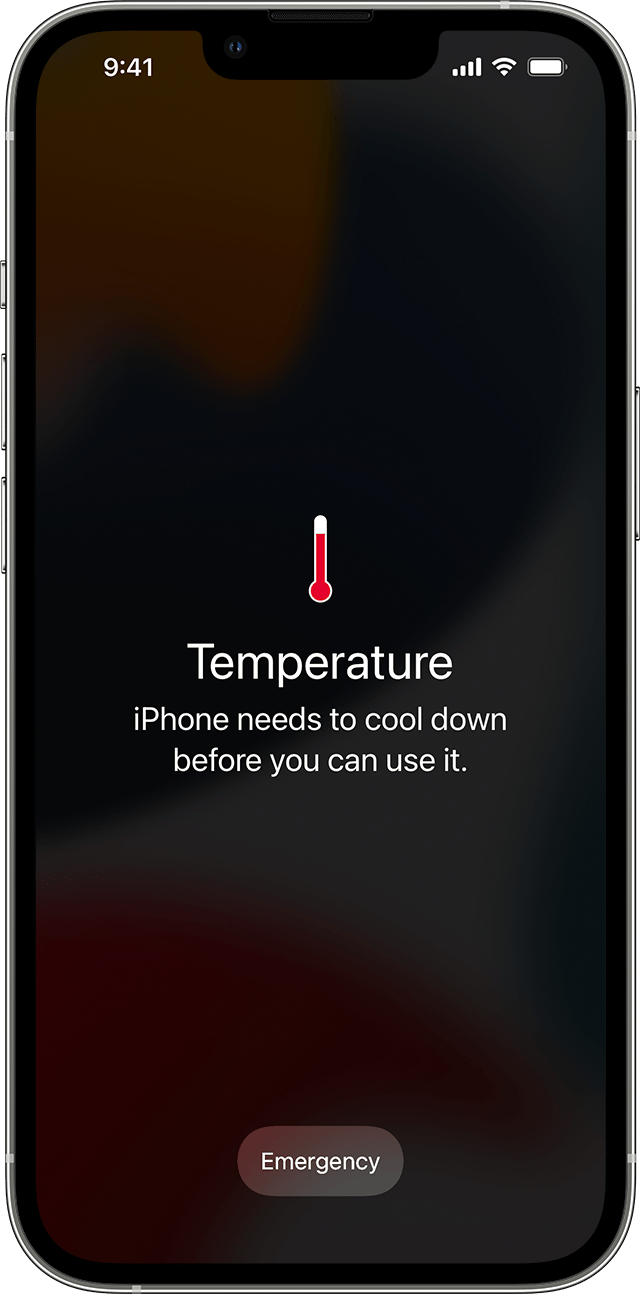
An iPhone showing this message might still be able to make emergency calls.
To resume use of your device as quickly as possible, turn it off, move it to a cooler environment (away from direct sunlight), and allow it to cool down."
Also, this article has some tips to help maximize battery life. If the battery isn't working as hard, then it may help reduce some heat: Batteries - Maximizing Performance - Apple.
Take care.
Hi suzette249,
Thank you for participating in the Apple Support Communities. We understand your iPhone becomes hot while charging. It's not unusual for an iPhone to become warmer while charging. If it gets too warm, you should see a temperature warning. This article, that you viewed prior to posting here, explains more about this: If your iPhone or iPad gets too hot or too cold.
"Your device might get warm
You might notice that your device feels warmer when you:
These conditions are normal, and your device will return to a regular temperature when the process is complete or when you finish your activity. If your device doesn't display a temperature warning, you can keep using your device.
If your device gets too warm
iOS and iPadOS devices have built-in protections to prevent overheating. If the interior temperature of your device exceeds the normal operating range, your device will protect its internal components by attempting to regulate its temperature.
Avoid these conditions and activities because they might change the performance of your device:
If the interior temperature of your device exceeds the normal operating range, you might notice these changes:
Additionally, if you're navigating, your device might show this alert and turn off the display: "Temperature: iPhone needs to cool down." Navigation still provides audible turn-by-turn directions. When approaching a turn, the display will illuminate to guide you through the turn.
If a temperature warning screen appears
If your device exceeds a certain temperature threshold, it will present a temperature warning screen similar to this:
An iPhone showing this message might still be able to make emergency calls.
To resume use of your device as quickly as possible, turn it off, move it to a cooler environment (away from direct sunlight), and allow it to cool down."
Also, this article has some tips to help maximize battery life. If the battery isn't working as hard, then it may help reduce some heat: Batteries - Maximizing Performance - Apple.
Take care.
my phone is always hot even in normal temperature

