HomePod Mini failing

Since this weekend I cannot request to Siri to play music or any radio from my Apple Music. I can request the weather, etc, but when I request any music it starts to say “working on ir” 2 o 3 times and finally doesn’t play anything.


I restarted the homepod, I sign out and later sign it.

Posted on Mar 26, 2023 9:35 AM

Reply
Question marked as Top-ranking reply

Posted on Mar 28, 2023 10:35 AM

Hello Corbella,


If the issue continues, you can try resetting the HomePod with these steps:


1. Unplug HomePod or unplug the power adapter for HomePod mini. Wait 10 seconds, then plug HomePod back in.
2. Wait 10 seconds, then touch your finger to the top of HomePod and hold it there.
3. The white spinning light will turn red. Keep your finger down. 
4. Siri will say that your HomePod is about to reset. When you hear three beeps, you can lift your finger.

Reset HomePod or HomePod mini


If Siri still will not work after that, you'll want to contact Apple to report the issue: Get Support


Cheers!


7 replies
Question marked as Top-ranking reply

Mar 28, 2023 10:35 AM in response to Corbella

Hello Corbella,


If the issue continues, you can try resetting the HomePod with these steps:


1. Unplug HomePod or unplug the power adapter for HomePod mini. Wait 10 seconds, then plug HomePod back in.
2. Wait 10 seconds, then touch your finger to the top of HomePod and hold it there.
3. The white spinning light will turn red. Keep your finger down. 
4. Siri will say that your HomePod is about to reset. When you hear three beeps, you can lift your finger.

Reset HomePod or HomePod mini


If Siri still will not work after that, you'll want to contact Apple to report the issue: Get Support


Cheers!


Mar 28, 2023 2:04 PM in response to Corbella

These flakey connectivity issues are often a result of changing Wi-Fi MAC addresses and outdated ARP tables stemming from Apple's default "Private Wi-Fi Address" introduced with iOS 14 (particularly on WiFi mesh networks). Try turning the 'feature' OFF on all of the iPhones and iPads on your home network (ignore the 'Privacy Warning'). Then reboot everything including your WiFi hub/router.

Mar 28, 2023 7:37 AM in response to Corbella

Hi Corbella,


Please try unplugging your HomePod and your Wi-Fi networking equipment for at least 30 seconds and then reconnecting those devices to the power. This will restart your router, cable or DSL modem. These steps allow your HomePod and Wi-Fi network to refresh and can help with resolving these issues with playing music on your HomePod.


Take care.

Mar 27, 2023 3:15 PM in response to Corbella

Hi Corbella,


We'd be happy to help with your Apple Music and Siri conundrum.


You mentioned that Siri works for other requests, just not Apple Music. Does Apple Music play on your HomePod when you hand off audio or play directly from your other devices? These instructions from Play audio on HomePod using an iOS or iPadOS device will help confirm your Apple Music subscription works as expected as well as test functionality:


Control HomePod from Apple Music or Apple Podcasts
1. Open the Music or Podcasts app on your iOS or iPadOS device, then tap the playback controls.
2. Tap the AirPlay button, then select your HomePod.


Hand off audio to HomePod
1. On your iPhone, go to Settings > General > AirPlay & Handoff, then make sure Transfer to HomePod is turned on.
2. Hold your iPhone near the top of HomePod.

To move audio from HomePod to your iOS device, hold your iPhone near the top of HomePod. On iPhone 11 and iPhone 12 models, hold your iPhone near the top of HomePod, then tap Transfer to iPhone.


It's also possible your HomePod is having a difficult time keeping a strong and steady network connection. You can follow If HomePod or HomePod mini isn't responding to the "Check your Wi-Fi connection" section for guidance to check your connection.


Check your Wi-Fi connection
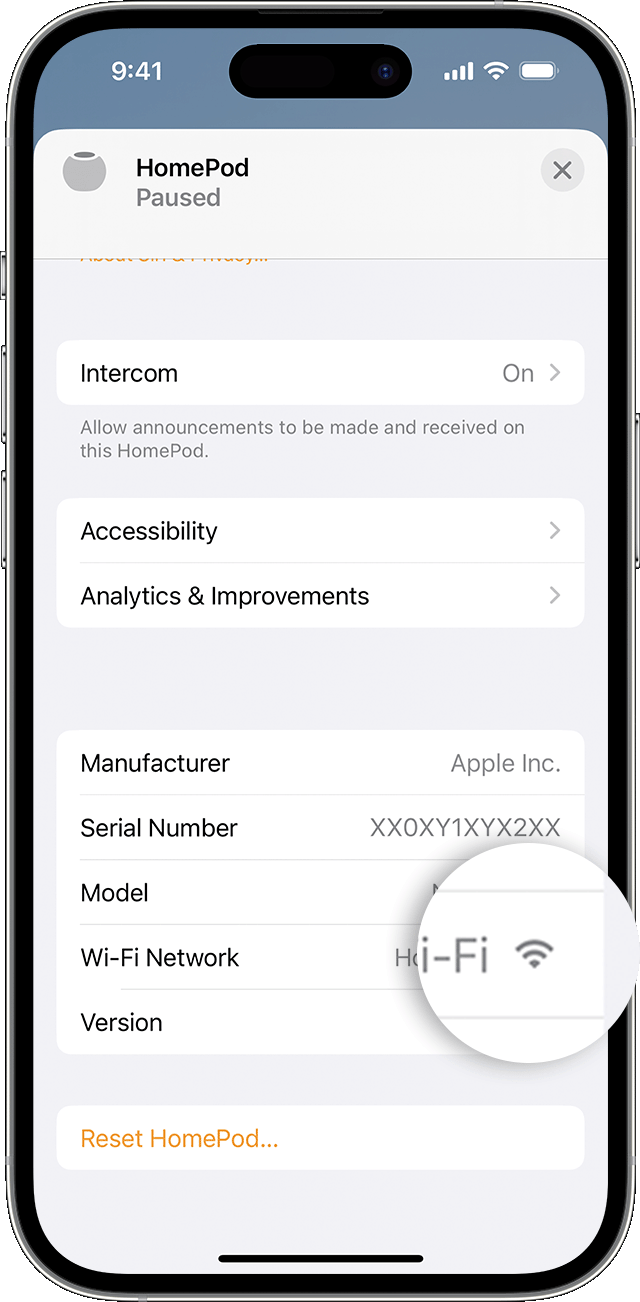
HomePod and HomePod mini automatically connect to the same Wi-Fi network as your iPhone or iPad. To check your Wi-Fi signal strength:
1. Open the Home app on your iPhone, iPad, or Mac.
2. Tap or click HomePod. 
3. Scroll down, or tap or click the Settings icon  and scroll down to Wi-Fi Network. The Wi-Fi signal strength indicator  appears next to your network name.


If the signal strength indicator shows two bars or fewer, your Wi-Fi signal strength is weak. Try moving your HomePod speaker closer to your router and remove potential sources of wireless interference.

If the signal strength indicator shows an exclamation point, learn what to do.


We look forward to learning the results of your troubleshooting.


Warmest Wishes.



This thread has been closed by the system or the community team. You may vote for any posts you find helpful, or search the Community for additional answers.

HomePod Mini failing

Welcome to Apple Support Community
A forum where Apple customers help each other with their products. Get started with your Apple Account.