
When I try to redownload a game it ask for a verification then ask for a credit card
How do I fix this
How do I fix this
Hello Junioriscool1e,
Thank you for reaching out to Apple Support Communities, and we'll be happy to help in any way we can. We understand you're having issues with downloading an app. You may need to have a payment method on file to download apps from the App Store. Try the steps here to see if they resolve the issue: If you can’t download or update apps on your iPhone or iPad - Apple Support
"Try this if you have an issue when you update or download apps from the App Store on your iPhone or iPad.
Manually update the app
Learn how to manually update an app
Add a payment method
You might need to have a valid payment method on file, even if the app that you want to download is free.
Resolve a problem with your payment method
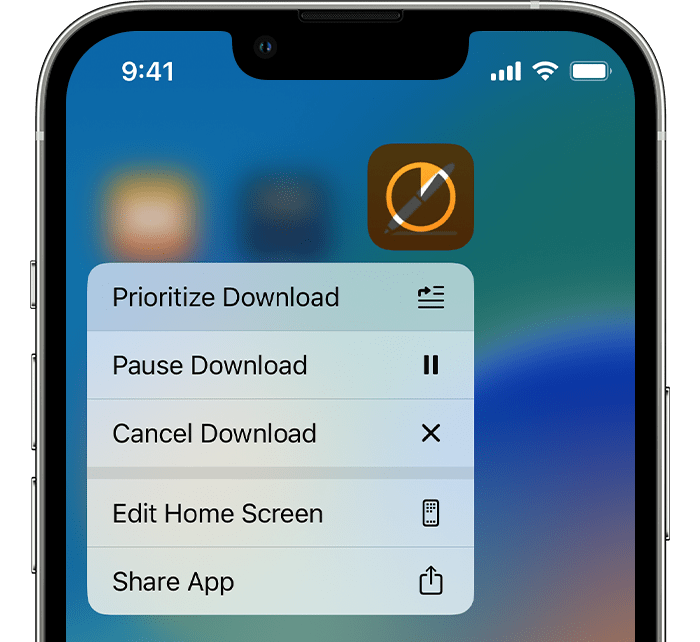
Prioritize the download
From the Home Screen, touch and hold the app. From the menu that appears, choose Prioritize Download.
Restart your device
Restart your iPhone or iPad, then check to see if you can download or update apps.
If you still can't download or update apps
We hope this helps.
Cheers!
Hello Junioriscool1e,
Thank you for reaching out to Apple Support Communities, and we'll be happy to help in any way we can. We understand you're having issues with downloading an app. You may need to have a payment method on file to download apps from the App Store. Try the steps here to see if they resolve the issue: If you can’t download or update apps on your iPhone or iPad - Apple Support
"Try this if you have an issue when you update or download apps from the App Store on your iPhone or iPad.
Manually update the app
Learn how to manually update an app
Add a payment method
You might need to have a valid payment method on file, even if the app that you want to download is free.
Resolve a problem with your payment method
Prioritize the download
From the Home Screen, touch and hold the app. From the menu that appears, choose Prioritize Download.
Restart your device
Restart your iPhone or iPad, then check to see if you can download or update apps.
If you still can't download or update apps
We hope this helps.
Cheers!
When I try to redownload a game it ask for a verification then ask for a credit card

