Hi Bo Racic,
It sounds like you're unable to locate some options for photo editing on your iPad mini. This link provides details on how you can Edit photos and videos on iPad.
"Crop, rotate, flip, or markup a photo or video
- Tap a photo or video thumbnail to view it in full screen.
- Tap Edit, tap
 on the left side of the screen, then do any of the following: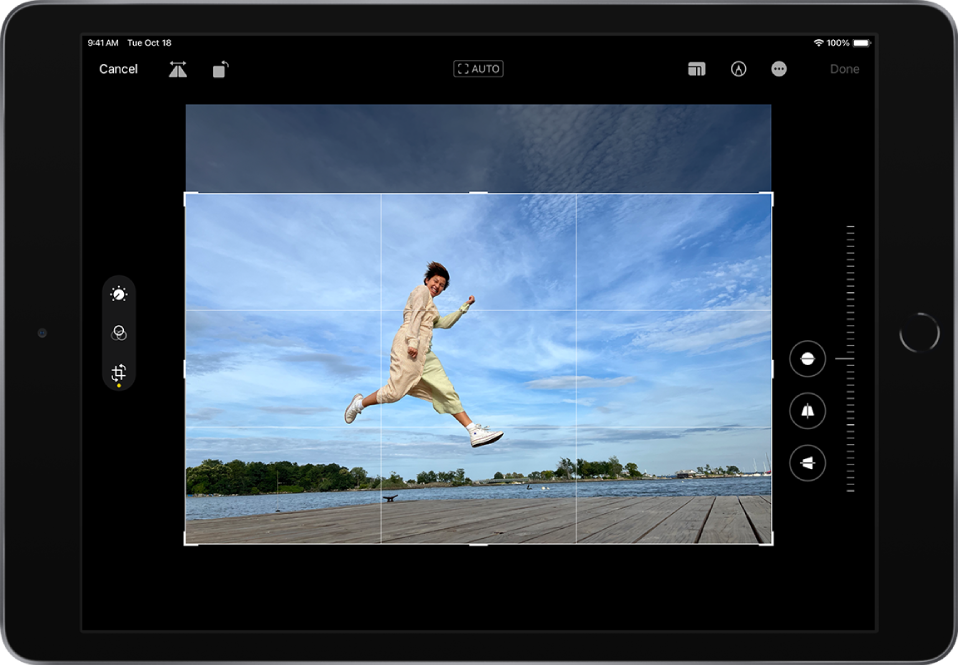
- Crop manually: Drag the rectangle corners to enclose the area you want to keep in the photo, or you can pinch the photo open or closed.
- Crop to a standard preset ratio: Tap
 at the top of the screen, then choose an option at the bottom of the screen such as Square, 9:16, or 5:7.
 - Rotate: Tap
 to rotate the photo 90 degrees.
 - Flip: Tap
 to flip the image horizontally.
- Tap Done to save your edits, or if you don’t like your changes, tap Cancel, then tap Discard Changes."
The steps above are for iPadOS in general and don't make a distinction between iPad and iPad mini, so if you don't see the options above, you might want to try a restart: Restart your iPad - Apple Support
Also, depending on whether you're using your iPad in portrait or landscape mode, you can try rotating it to see if you can then locate the editing options you mentioned: Rotate the screen on your iPad - Apple Support
For follow-up questions, check out this link for options to reach Apple directly: Apple Support
Take care.

