Menu bar setting

Hi, I have a problem with the menu bar, I have a MacBook Air M2, the one with the camera in like an isle on the top of the screen, I don't know what I did to the settings, but now my computer has a black line next to the "isle" and it seem to be just a line and not an isle. I will add a picture if how it looked before and now. Hope someone can help me.

MacBook Air (M2, 2022)

Posted on Mar 28, 2023 4:55 PM

Reply
Question marked as Top-ranking reply

Posted on Apr 1, 2023 8:25 AM

Hello camiacerom,


Thanks for using the Apple Support Communities!


You can adjust specific apps so they use the entire display, or just below the camera housing. These steps explain how to do this further:


Turn on 'Scale to fit below built-in camera' for an app
1. Quit the app.
2. Click the Finder icon in the Dock, then click Applications in the Finder sidebar.
3. Select the app, then choose File > Get Info, or press Command-I.
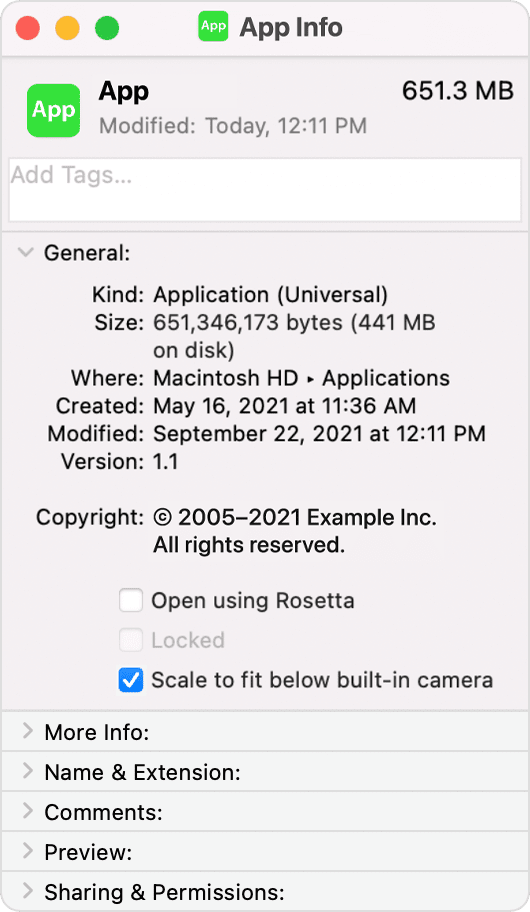
4. In the Info window that opens, select "Scale to fit below built-in camera."
App info window with Scale to fit below built-in camera selected"


This information is from How to adjust an app's settings to appear below the camera area on your 13.6-inch MacBook Air, 14-inch MacBook Pro, or 16-inch MacBook Pro - Apple Support.


Hope this helps!


1 reply
Question marked as Top-ranking reply

Apr 1, 2023 8:25 AM in response to camiacerom

Hello camiacerom,


Thanks for using the Apple Support Communities!


You can adjust specific apps so they use the entire display, or just below the camera housing. These steps explain how to do this further:


Turn on 'Scale to fit below built-in camera' for an app
1. Quit the app.
2. Click the Finder icon in the Dock, then click Applications in the Finder sidebar.
3. Select the app, then choose File > Get Info, or press Command-I.
4. In the Info window that opens, select "Scale to fit below built-in camera."
App info window with Scale to fit below built-in camera selected"


This information is from How to adjust an app's settings to appear below the camera area on your 13.6-inch MacBook Air, 14-inch MacBook Pro, or 16-inch MacBook Pro - Apple Support.


Hope this helps!


This thread has been closed by the system or the community team. You may vote for any posts you find helpful, or search the Community for additional answers.

Menu bar setting

Welcome to Apple Support Community
A forum where Apple customers help each other with their products. Get started with your Apple Account.