add someone to family sharing
How can i add someone to family sharing
How can i add someone to family sharing
Hello jg845retired,
You can invite others to Family Sharing from your iOS device using these steps:
Invite people to join your family
If you choose to invite people later or want to add another member to your family, you can send an invitation via Messages, email, or in person.
If you have multiple Apple IDs, you can invite each of your accounts to the group, so you can share purchases from your other Apple IDs with your family.
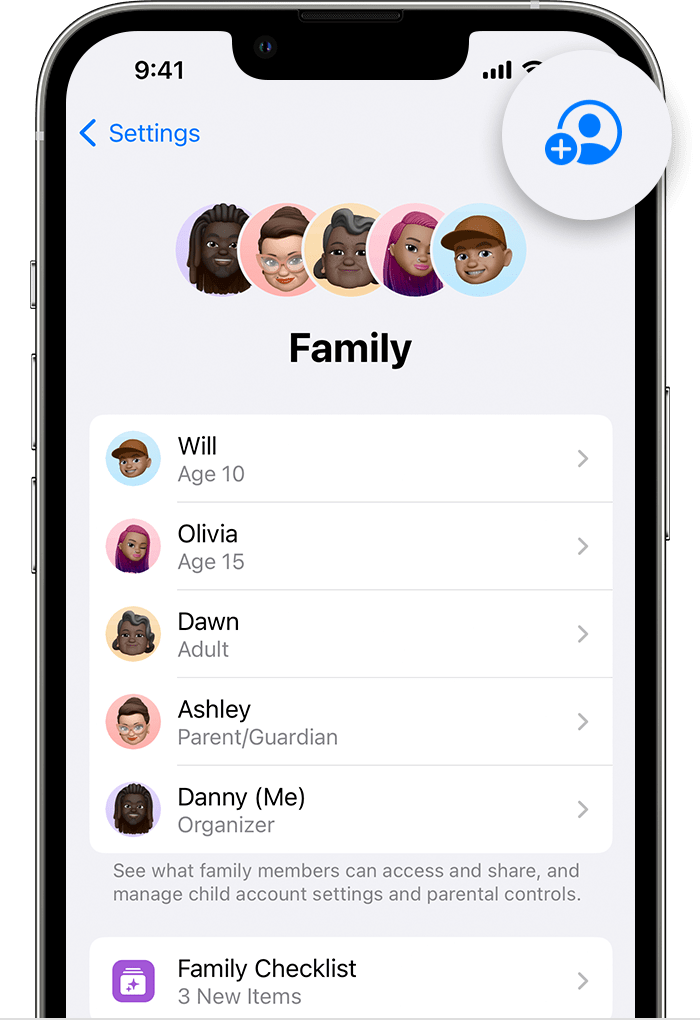
On your iPhone or iPad with iOS 16 or later
1. Go to Settings.
2. Tap Family.
3. Tap Add Member.
4. If your child doesn't have an Apple ID, tap Create an Account for a Child. But if your child already has an Apple ID, tap Invite People. They can enter their Apple ID password on your device to accept the invitation.
5. Follow the onscreen instructions to set up parental controls, location sharing, and more.
On your iPhone, iPad, or iPod touch with iOS 15 or earlier
1. Go to Settings.
2. Tap your name, then tap Family Sharing.
3. Tap Add Member.
4. If your child doesn't have an Apple ID, tap Create an Account for a Child. But if your child already has an Apple ID, tap Invite People. They can enter their Apple ID password on your device to accept the invitation.
5. Follow the onscreen instructions.
You can find more information here: Set up Family Sharing - Apple Support
We hope that helps.
Have a great day.
Hello jg845retired,
You can invite others to Family Sharing from your iOS device using these steps:
Invite people to join your family
If you choose to invite people later or want to add another member to your family, you can send an invitation via Messages, email, or in person.
If you have multiple Apple IDs, you can invite each of your accounts to the group, so you can share purchases from your other Apple IDs with your family.
On your iPhone or iPad with iOS 16 or later
1. Go to Settings.
2. Tap Family.
3. Tap Add Member
4. If your child doesn't have an Apple ID, tap Create an Account for a Child. But if your child already has an Apple ID, tap Invite People. They can enter their Apple ID password on your device to accept the invitation.
5. Follow the onscreen instructions to set up parental controls, location sharing, and more.
On your iPhone, iPad, or iPod touch with iOS 15 or earlier
1. Go to Settings.
2. Tap your name, then tap Family Sharing.
3. Tap Add Member.
4. If your child doesn't have an Apple ID, tap Create an Account for a Child. But if your child already has an Apple ID, tap Invite People. They can enter their Apple ID password on your device to accept the invitation.
5. Follow the onscreen instructions.
You can find more information here: Set up Family Sharing - Apple Support
We hope that helps.
Have a great day.
add someone to family sharing