Connect a USB 3.2 Gen 2 device with a Type C connector to a TB2 port on a Mac Pro 6,1.

I would like to connect a USB 3.2 Gen 2 SSD with a Type C connector to a TB2 port on a Mac Pro 6,1. The USB-C device has a power supply so does not require bus power. Will the Apple USB-C to TB2 adapter work?

Earlier Mac models

Posted on Mar 29, 2023 12:03 PM

Reply
Question marked as Top-ranking reply

Posted on Apr 6, 2023 8:04 PM

So I have a bit more information to share about this situation. It is a rather technical summary but should be definitive for anyone coming across this product and wondering if it can be used with a TB or TB2 Mac. The quick answer: No.


The longer answer:

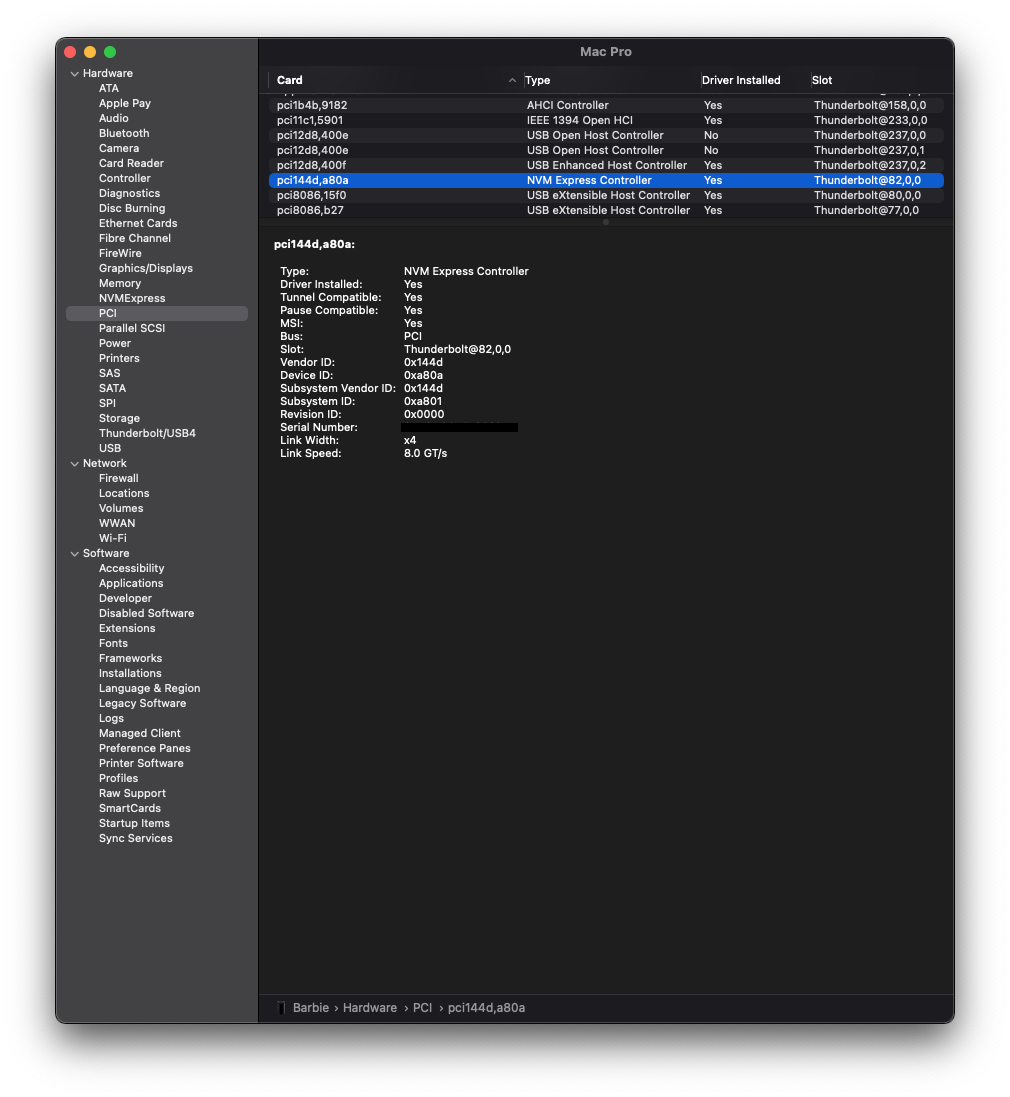
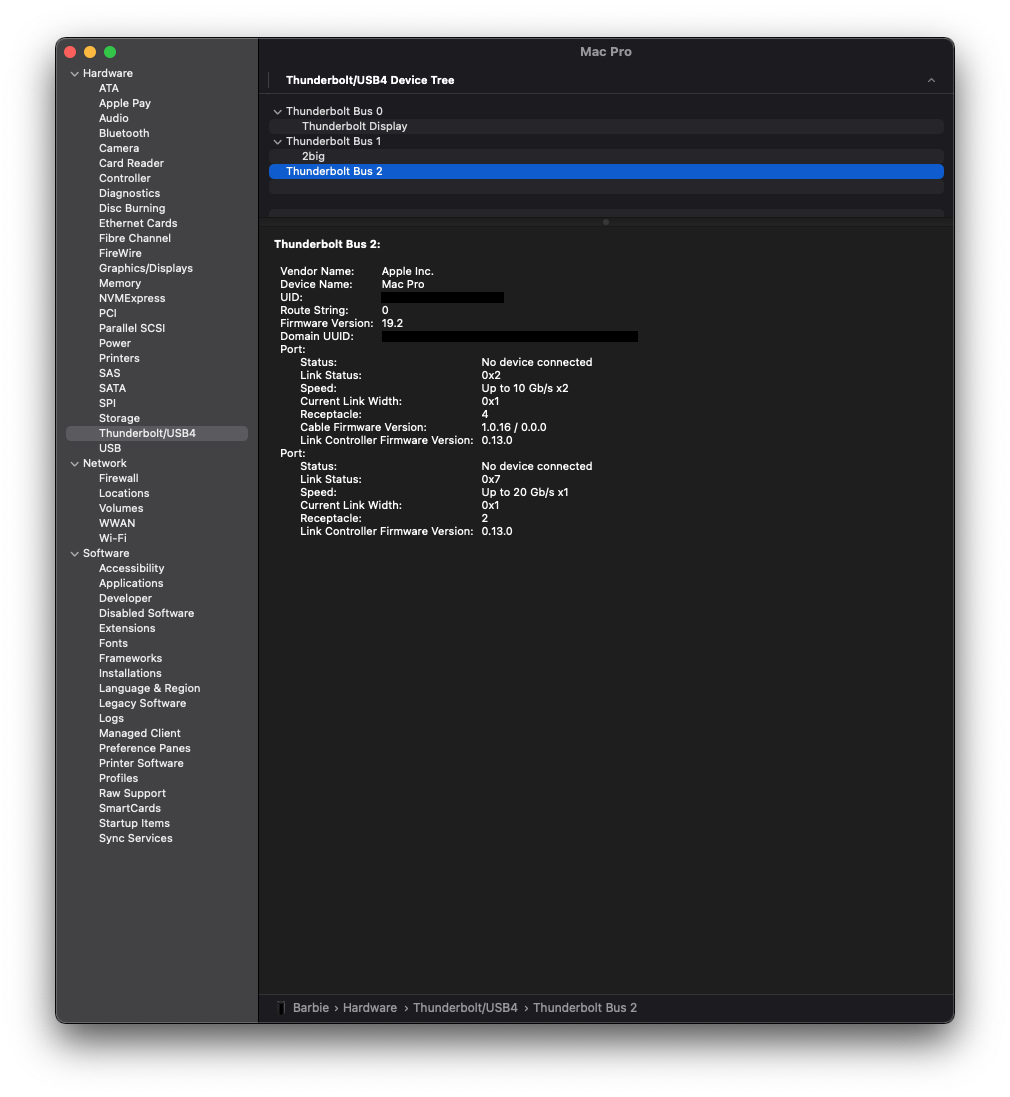
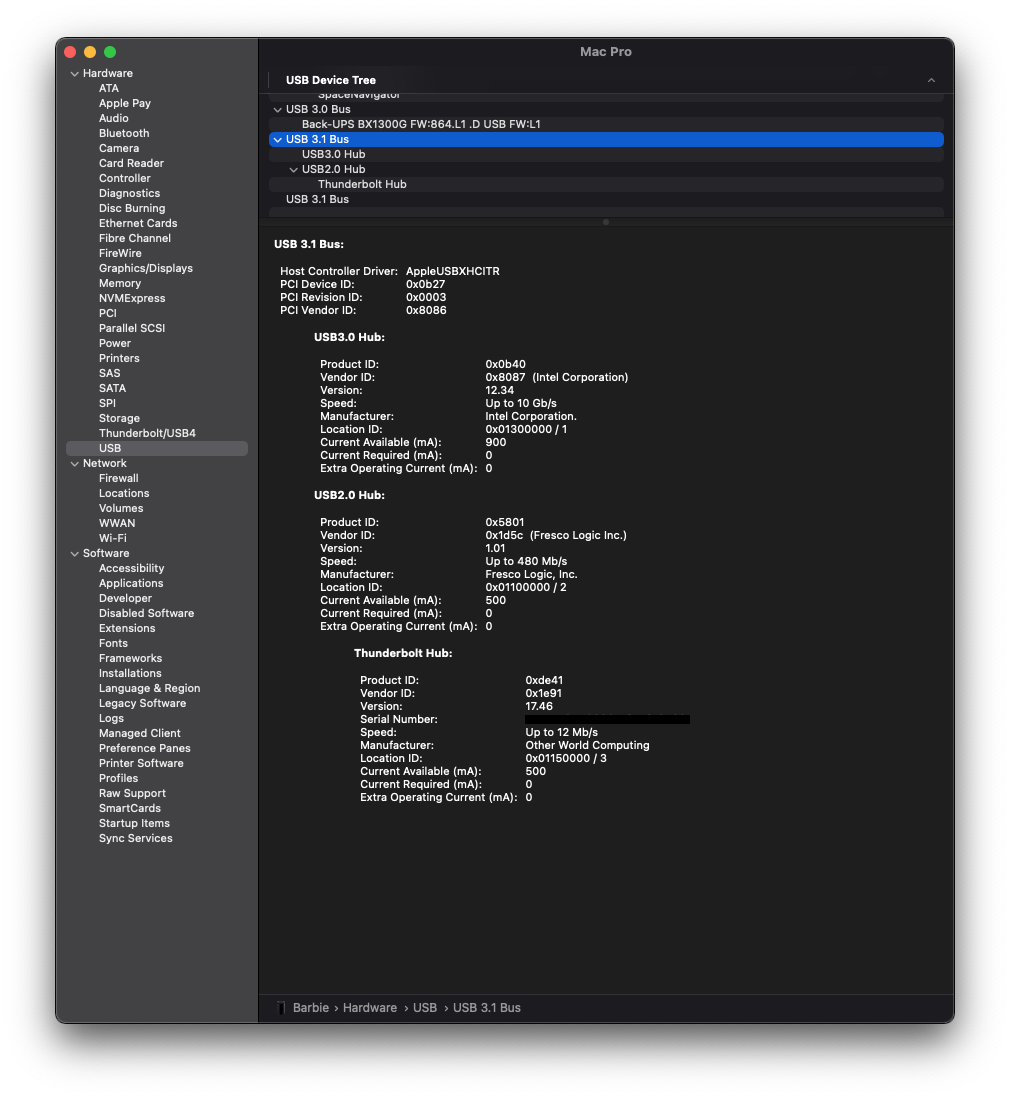
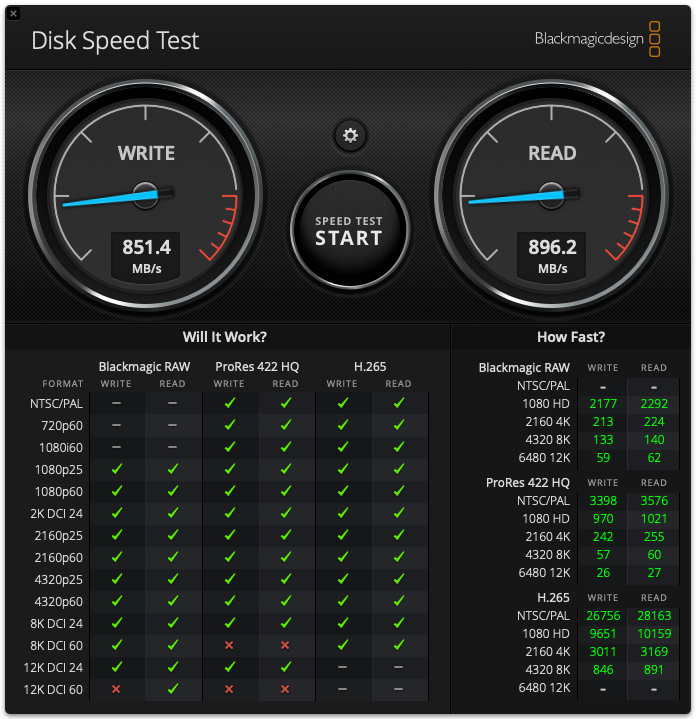
I have an Apple TB3 to TB2 adapter, OWC TB4 Hub and a TB4 SSD enclosure. Connecting them to the MP 6,1 without a reboot results in no enumeration. Rebooting the MP does cause a "partial" enumeration. The PCIe tunnel enumerates so I see the NVMe controller of the SSD connected to the PCIe bus. The NVMe controller enumerates with a link width of x4 and a link speed of 8 GT/s which is expected for the JHL 7440 TB controller which has a PCIe Gen 3 bus and which comprises the SSD enclosure. However, there is no Thunderbolt enumeration so I cannot see either of the Hub, the adapter, the TB2 cable or the TB4 cable. So, there is no way to tell from enumeration what the link speed is between the MP and the hub or the hub and the enclosure. I performed a speed test using the Blackmagic Disk Speed Test and the result suggests the link speed is only 10 Gbps (896 MB/s read, 851 MB/s write). Finally, the SSD volumes that were mounted before putting the computer to sleep were all ejected when the computer woke up thus support for power management is lacking.


So, you can get a connection to a TB3 device that has a PCIe endpoint, but it is likely not an intended and supported use case for the Apple adapter.


So, my conclusion is that the Apple adapter is not particularly useful when connected to a TB or TB2 Mac. I think it is intended to ONLY be used with TB2 devices and the suggestion that it is "bidirectional" is misleading. Apple's own overview suggests the adapter can be used with a dock:

The Thunderbolt 3 (USB-C) to Thunderbolt 2 Adapter lets you connect Thunderbolt and Thunderbolt 2 devices — such as external hard drives and Thunderbolt docks — to any of the Thunderbolt 3 (USB-C) / USB 4 ports on your Mac.


But it is the last part of the sentence that I think spells out the limitation: to any of the Thunderbolt 3 (USB-C) / USB 4 ports on your Mac. So, the adapter supports connecting a TB2 device/dock to a TB3 Mac but does not support connecting a TB3 device/dock to a TB2 Mac.
19 replies
Question marked as Top-ranking reply

Apr 6, 2023 8:04 PM in response to video_newbie

So I have a bit more information to share about this situation. It is a rather technical summary but should be definitive for anyone coming across this product and wondering if it can be used with a TB or TB2 Mac. The quick answer: No.


The longer answer:

I have an Apple TB3 to TB2 adapter, OWC TB4 Hub and a TB4 SSD enclosure. Connecting them to the MP 6,1 without a reboot results in no enumeration. Rebooting the MP does cause a "partial" enumeration. The PCIe tunnel enumerates so I see the NVMe controller of the SSD connected to the PCIe bus. The NVMe controller enumerates with a link width of x4 and a link speed of 8 GT/s which is expected for the JHL 7440 TB controller which has a PCIe Gen 3 bus and which comprises the SSD enclosure. However, there is no Thunderbolt enumeration so I cannot see either of the Hub, the adapter, the TB2 cable or the TB4 cable. So, there is no way to tell from enumeration what the link speed is between the MP and the hub or the hub and the enclosure. I performed a speed test using the Blackmagic Disk Speed Test and the result suggests the link speed is only 10 Gbps (896 MB/s read, 851 MB/s write). Finally, the SSD volumes that were mounted before putting the computer to sleep were all ejected when the computer woke up thus support for power management is lacking.


So, you can get a connection to a TB3 device that has a PCIe endpoint, but it is likely not an intended and supported use case for the Apple adapter.


So, my conclusion is that the Apple adapter is not particularly useful when connected to a TB or TB2 Mac. I think it is intended to ONLY be used with TB2 devices and the suggestion that it is "bidirectional" is misleading. Apple's own overview suggests the adapter can be used with a dock:

The Thunderbolt 3 (USB-C) to Thunderbolt 2 Adapter lets you connect Thunderbolt and Thunderbolt 2 devices — such as external hard drives and Thunderbolt docks — to any of the Thunderbolt 3 (USB-C) / USB 4 ports on your Mac.


But it is the last part of the sentence that I think spells out the limitation: to any of the Thunderbolt 3 (USB-C) / USB 4 ports on your Mac. So, the adapter supports connecting a TB2 device/dock to a TB3 Mac but does not support connecting a TB3 device/dock to a TB2 Mac.

Apr 13, 2023 9:23 AM in response to video_newbie

If the SSD only supports the USB protocol, then you cannot connect it to a Thunderbolt 2 port since those Thunderbolt 2 ports only support the Thunderbolt protocol. The only possible way to do so would involve using an expensive adapter which would perform the conversion of protocols, but I'm not aware of any such product.


Only the newer style Thunderbolt3/4 ports which utilize the USB-C connector can support a drive using the USB protocol since both protocols are supported (at least on most Macs with USB-C ports).


Older Thunderbolt1/2 ports and older USB-A/B ports only support the Thunderbolt & USB protocols respectively.

Apr 7, 2023 7:59 PM in response to Grant Bennet-Alder

There is a significant shortcoming with this setup. Because the port does not enumerate properly as a Thunderbolt port, you must boot the computer with the accessories attached (adapter, hub and SSD) to ensure the PCIe tunnel is configured. If the computer goes to sleep or a volume(s) is unmounted, you need to reboot the computer to remount the volume(s). So, I do not believe this is a workable solution for most use cases.


I did a little more debugging today to drill down a bit more into where the problem lies. I used ioreg to get a deeper look at the various pci bridge configurations between the mac and the ssd. I observed the following:


  1. The MP PLX PCIe switch (UFS0) is showing capabilities = 4 lanes x 8 Gbps = 32 Gbps and negotiated speed of 4 lanes x 5 Gbps = 20 Gbps;
  2. The MP Falcon Ridge TB2 bridge is showing capabilities = negotiated speed = 4 lanes x 2.5 Gbps = 10 Gbps;
  3. The OWC TB4 hub Goshen Ridge controller is showing capabilities = negotiated speed = 4 lanes x 2.5 Gbps = 10 Gbps;
  4. The SSD enclosure TB3 Titan Ridge controller is showing capabilities = 4 lanes x 8 Gbps = 32 Gbps and negotiated speed of 4 lanes x 2.5 Gbps = 10 Gbps.


Falcon Ridge is a TB2 technology with 20 Gbps capability. So, it appears the Falcon Ridge TB2 bridge has not been configured for 20 Gbps for some reason. The good news is I think the issue could likely be fixed with an update to the EFI. The bad news is an engineer at Apple would have to make the update because it involves the EFI.

Mar 30, 2023 5:08 AM in response to video_newbie

Read the section on Displays. in that section Apple makes it clear EXACTLY what Apple-brand display are supported, and points out that ONLY genuine ThunderBolt devices will work there.


There is no such warning for data transfer devices section.


If you were plugging a USB 3.2 device like a disk drive into a native Thunderbolt-3 cable, it would use the USB subset and be happy and run. The notes do not suggest the data transfer device MUST be genuine Thunderbolt to operate. It looks like it should work, however...


Apple has a 14 day full value returns policy if you buy direct from Apple.

Apr 7, 2023 7:14 AM in response to video_newbie

<< So, my conclusion is that the Apple adapter is not particularly useful when connected to a TB or TB2 Mac. >>


Your [rather complex and expensive] connection seems like it won't "do tricks", (so don't expect it to support a Thunderbolt-3 Dock on a Thunderbolt-2 computer.


You do appear to be most of the way to 10,000 M bits/sec or about 1,000 M Bytes/sec, nominal USB-3 Gen-2 speeds at high 800's tested speeds.


When we started talking, I was suggesting that a direct USB-3 Gen-1 connection should be able to get you 5,000 M bits/sec or about 500 M Bytes/sec.


Executive summary:

This setup CAN provide a potentially faster pathway [faster than USB 3 Gen-1] (equivalent to USB 3.1 Gen-2, or HALF Thunderbolt-2 speeds), PROVIDED your drives can use it.


It comes at a cost in dollars and convenience. Its speeds appear to be HALF of 'real' ThunderBolt-2 top speeds of 20 G bits/sec.


¿Does that summary seem fair and accurate?

Mar 29, 2023 4:52 PM in response to Grant Bennet-Alder

If have a PCIe Gen 4 NVMe SSD (Samsung 980 PRO) installed in the USB enclosure. The blade is capable of typical transfer rates of about 2800 MBytes/s read and write when used in a 40 Gbps TB4/USB4 enclosure. The USB 3.2 Gen 2x2 enclosure limits the max to 20 Gbps which works out to about 1700 MBytes/s. This is similar to the speed I am getting with the PCIe Gen 4 NVMe disk installed in the MacPro 6,1.

Mar 29, 2023 5:03 PM in response to video_newbie

USB 3.0 could only provide about 500 Mega Bytes/sec transfer speeds.


For your specific case, it would be worth considering paying the US$50 price of the ThunderBolt-3 <-> ThunderBolt-2 adapter, plus a Thunderbolt-2 cable for the computer end.


This article has the footnotes to consider:


About the Apple Thunderbolt 3 (USB-C) to Thunderbolt 2 Adapter - Apple Support


.


This thread has been closed by the system or the community team. You may vote for any posts you find helpful, or search the Community for additional answers.

Connect a USB 3.2 Gen 2 device with a Type C connector to a TB2 port on a Mac Pro 6,1.

Welcome to Apple Support Community
A forum where Apple customers help each other with their products. Get started with your Apple Account.

