Select all option

Select all has disappeared from mailbox, how do I get it back

iPhone XR, iOS 16

Posted on Mar 29, 2023 11:36 AM

Reply
Question marked as Top-ranking reply

Posted on Apr 2, 2023 8:38 AM

Hello Samele1967,


Are you looking to select all to delete or mark as read? If so, you should find the option when completed the steps below found in the article here: Delete emails on your iPhone or iPad - Apple Support


"Delete multiple emails at once 
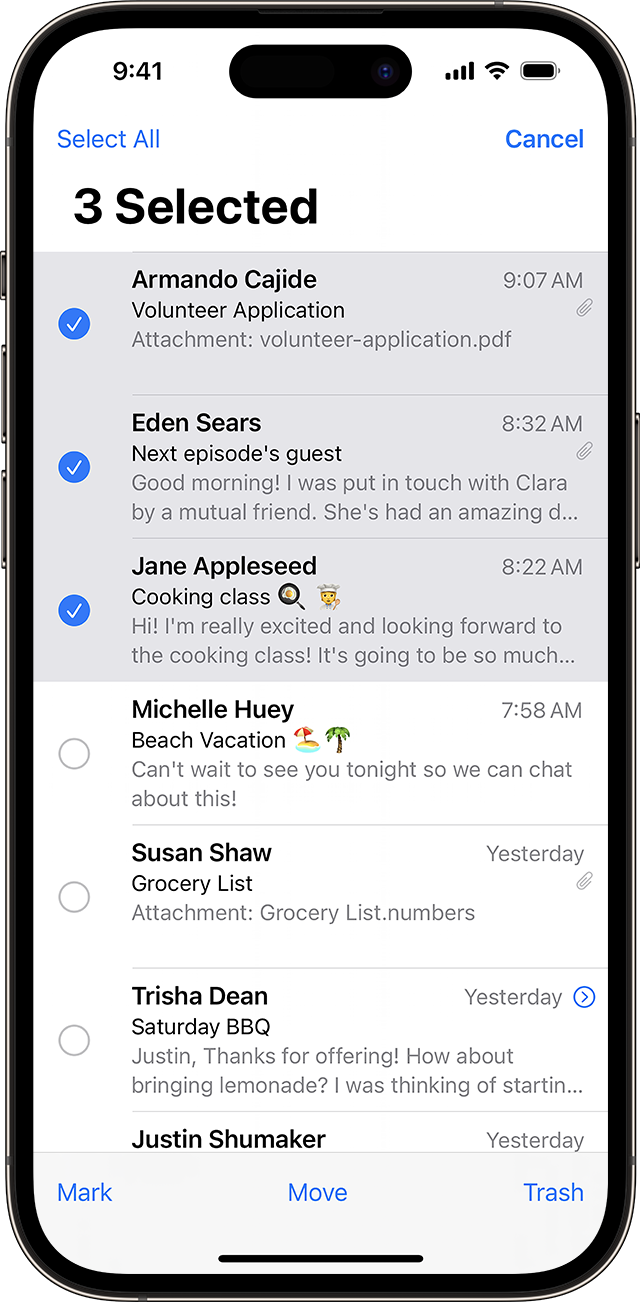

iPhone showing Mail app with three messages selected 

  1. Open Mail and go to your Inbox.
  2. Tap Edit in the upper-right corner, then individually select the emails that you want to delete, or tap Select All. To select multiple emails quickly, swipe down through the checkboxes.
  3. Tap Trash or Archive. If you only see Archive, touch and hold Archive to see other options like Trash Selected Messages."


If you continue to have an issue, and you use multiple mailboxes test when only one is selected. Organize email in mailboxes on iPhone


You can also ensure you have a backup and your iOS is fully updated to test: Update your iPhone or iPad


Cheers.


1 reply
Question marked as Top-ranking reply

Apr 2, 2023 8:38 AM in response to Samele1967

Hello Samele1967,


Are you looking to select all to delete or mark as read? If so, you should find the option when completed the steps below found in the article here: Delete emails on your iPhone or iPad - Apple Support


"Delete multiple emails at once 


iPhone showing Mail app with three messages selected 

  1. Open Mail and go to your Inbox.
  2. Tap Edit in the upper-right corner, then individually select the emails that you want to delete, or tap Select All. To select multiple emails quickly, swipe down through the checkboxes.
  3. Tap Trash or Archive. If you only see Archive, touch and hold Archive to see other options like Trash Selected Messages."


If you continue to have an issue, and you use multiple mailboxes test when only one is selected. Organize email in mailboxes on iPhone


You can also ensure you have a backup and your iOS is fully updated to test: Update your iPhone or iPad


Cheers.


This thread has been closed by the system or the community team. You may vote for any posts you find helpful, or search the Community for additional answers.

Select all option

Welcome to Apple Support Community
A forum where Apple customers help each other with their products. Get started with your Apple Account.
