
Charger problem
I have an iPhone 14 pro max and I’ve purchased multiple charger bricks and it seems that they break within a week of use and my iPhone is 3 weeks old. Why is this happening?
iPhone 14 Pro Max, iOS 16
I have an iPhone 14 pro max and I’ve purchased multiple charger bricks and it seems that they break within a week of use and my iPhone is 3 weeks old. Why is this happening?
iPhone 14 Pro Max, iOS 16
Hi Batmanis_gr,
If you are experiencing charging issues, we'd recommend making sure the charging accessories are Apple certified. Also, please take a look at the following information which can help isolate this bit more:
"If your iPhone or iPod touch won't charge
If your battery won't charge or charges slowly, or if an alert message appears, learn what to do.
Plug into power
To charge your device, follow these steps:
Wall power outlet
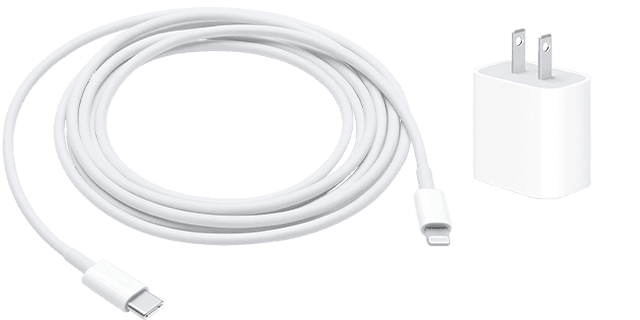
Plug your USB charging cable into a USB power adapter, then plug the adapter into the wall.
Computer
Plug your charging cable into a USB 2.0 or 3.0 port on a computer that's on and not in sleep mode. Don’t use the USB ports on your keyboard.
Power accessory
Plug your cable into a powered USB hub, docking station, or other Apple-certified accessory.

If you're trying to charge wirelessly with an iPhone 8 or later, first make sure that you can charge with the USB cable that came with your device. If that works, then get help with wireless charging. For a third-party accessory, check that it's Apple certified.
When your device charges, a lightning bolt appears inside the battery icon in the status bar  , or a large battery icon on your Lock Screen
  .
.
If your device charges slowly or won’t charge
Follow these steps and try again after each:
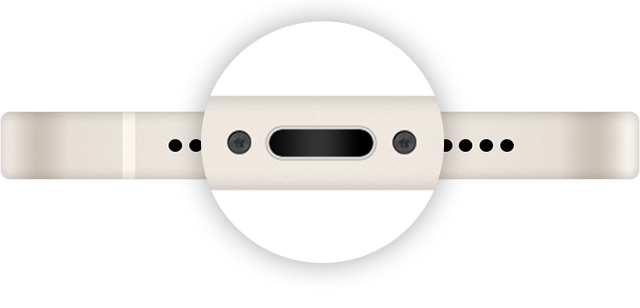

If your device stopped charging at 80 percent
Your iPhone might get slightly warmer while it charges. To extend the lifespan of your battery, if the battery gets too warm, software might limit charging above 80 percent. Your iPhone will charge again when the temperature drops. Try moving your iPhone and charger to a cooler location.
iOS 13 and later use Optimized Battery Charging to slow the rate of battery aging by reducing the time that your iPhone spends fully charged. Your iPhone uses on-device machine learning to understand your daily charging routine so that it can wait until you need to use your iPhone to finish charging past 80 percent.* Optimized Battery Charging is active only when your iPhone predicts that it will be connected to a charger for a long period of time.
* Information regarding your charging routine is stored only on your iPhone. The information isn't included in backups and isn't shared with Apple.
If an alert says that your accessory isn't supported or certified
These alerts can appear for a few reasons:
Follow these steps:
"
If your iPhone or iPod touch won't charge - Apple Support
Cheers.
Hi Batmanis_gr,
If you are experiencing charging issues, we'd recommend making sure the charging accessories are Apple certified. Also, please take a look at the following information which can help isolate this bit more:
"If your iPhone or iPod touch won't charge
If your battery won't charge or charges slowly, or if an alert message appears, learn what to do.
Plug into power
To charge your device, follow these steps:
Wall power outlet
Plug your USB charging cable into a USB power adapter, then plug the adapter into the wall.
Computer
Plug your charging cable into a USB 2.0 or 3.0 port on a computer that's on and not in sleep mode. Don’t use the USB ports on your keyboard.
Power accessory
Plug your cable into a powered USB hub, docking station, or other Apple-certified accessory.
If you're trying to charge wirelessly with an iPhone 8 or later, first make sure that you can charge with the USB cable that came with your device. If that works, then get help with wireless charging. For a third-party accessory, check that it's Apple certified.
When your device charges, a lightning bolt appears inside the battery icon in the status bar , or a large battery icon on your Lock Screen .
If your device charges slowly or won’t charge
Follow these steps and try again after each:
If your device stopped charging at 80 percent
Your iPhone might get slightly warmer while it charges. To extend the lifespan of your battery, if the battery gets too warm, software might limit charging above 80 percent. Your iPhone will charge again when the temperature drops. Try moving your iPhone and charger to a cooler location.
iOS 13 and later use Optimized Battery Charging to slow the rate of battery aging by reducing the time that your iPhone spends fully charged. Your iPhone uses on-device machine learning to understand your daily charging routine so that it can wait until you need to use your iPhone to finish charging past 80 percent.* Optimized Battery Charging is active only when your iPhone predicts that it will be connected to a charger for a long period of time.
* Information regarding your charging routine is stored only on your iPhone. The information isn't included in backups and isn't shared with Apple.
If an alert says that your accessory isn't supported or certified
These alerts can appear for a few reasons:
Follow these steps:
"
If your iPhone or iPod touch won't charge - Apple Support
Cheers.
Charger problem

