Shared albums notification

Hi all,


Today I received a strange notification on my MacBook saying that I reached my iCloud photo sharing limit for an hour. The issue— I wasn’t sharing any photos or had any shared albums through the computer; I literally only had two photos in my Photos app.


I’m worried that somebody has compromised my account and downloaded my photos. However I couldn’t find anything else weird.


Help??

MacBook Air 13″, macOS 10.12

Posted on Apr 3, 2023 4:00 PM

Reply
Question marked as Top-ranking reply

Posted on Apr 6, 2023 6:06 PM

Hi katiekatiekatie9797,


You mentioned you weren't sharing any photos or albums, are you a member of an iCloud Shared album on another device using the same iCloud account that you use on your Mac? Another user may have met the shared limit as some of the limits are combined.


You can learn more about those limits to see if any apply to you here:

My Photo Stream and Shared Albums limits - Apple Support


If you're not able to find any instances of you or other users meeting a shared album limit, we encourage you to do a little research to see if someone may have access to your device(s) or account. These instructions will show you how to determine if any other devices have connected with your account.


Check your Apple ID device list to find where you're signed in - Apple Support

Use your Mac to find where you're signed in
1. Choose Apple menu  > System Settings. In macOS Monterey or earlier, choose Apple menu  > System Preferences.
2. Click your name. In macOS Montery or earlier, click Apple ID.
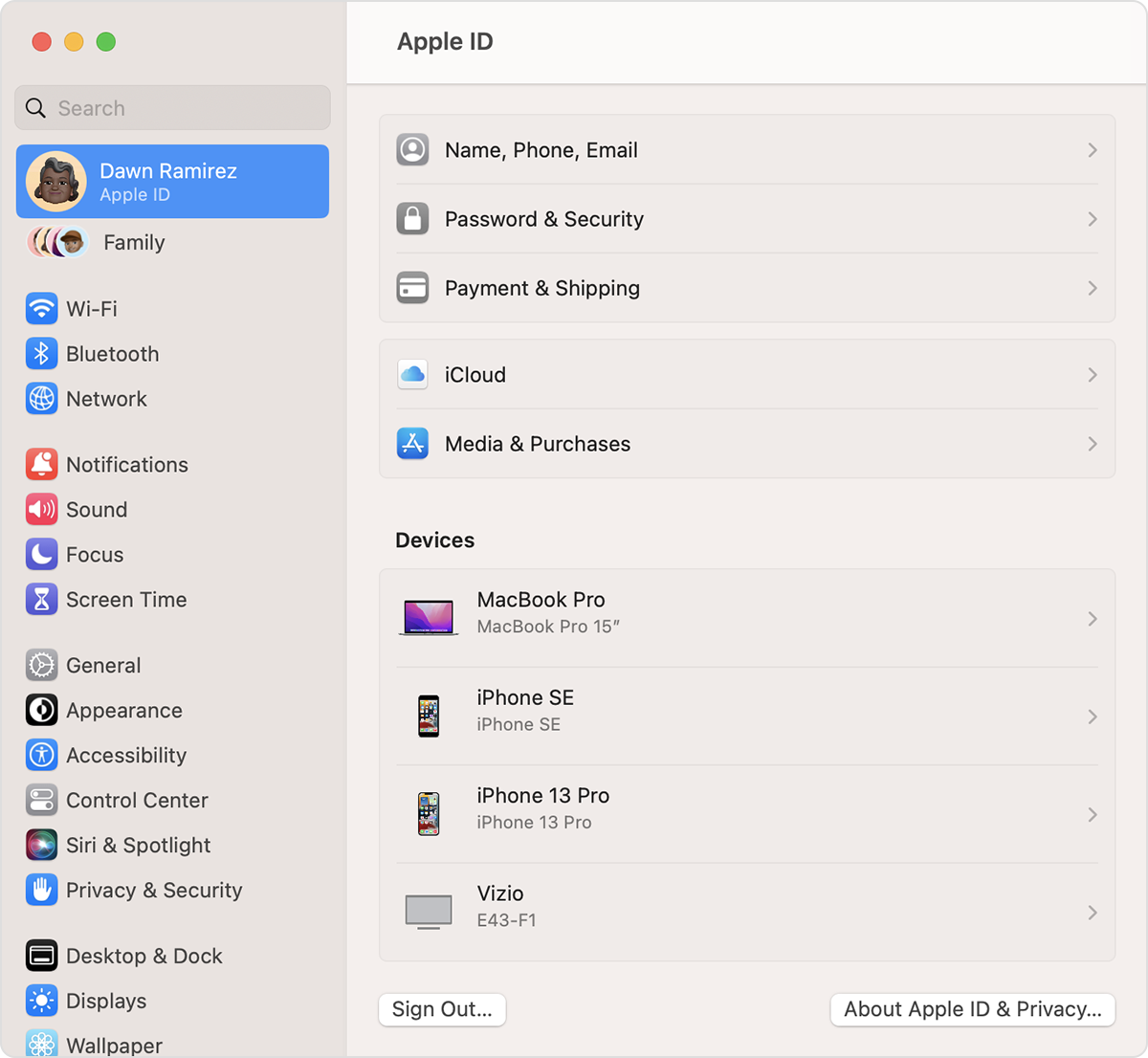
On Mac, find devices that you're signed in to with your Apple ID in System Settings
3. Click any device name to view that device's information, such as the device model, serial number, and OS version. The information might vary depending on the device type. You might need to answer your security questions to view device details. 


If you see a device you do not recognize, remove it from your account and take the steps recommended by Apple to recover and secure your account.

If you think your Apple ID has been compromised - Apple Support


Thank you for being part of the Apple Support Communities.


Kindest Regards.


1 reply
Question marked as Top-ranking reply

Apr 6, 2023 6:06 PM in response to katiekatiekatie9797

Hi katiekatiekatie9797,


You mentioned you weren't sharing any photos or albums, are you a member of an iCloud Shared album on another device using the same iCloud account that you use on your Mac? Another user may have met the shared limit as some of the limits are combined.


You can learn more about those limits to see if any apply to you here:

My Photo Stream and Shared Albums limits - Apple Support


If you're not able to find any instances of you or other users meeting a shared album limit, we encourage you to do a little research to see if someone may have access to your device(s) or account. These instructions will show you how to determine if any other devices have connected with your account.


Check your Apple ID device list to find where you're signed in - Apple Support

Use your Mac to find where you're signed in
1. Choose Apple menu  > System Settings. In macOS Monterey or earlier, choose Apple menu  > System Preferences.
2. Click your name. In macOS Montery or earlier, click Apple ID.
On Mac, find devices that you're signed in to with your Apple ID in System Settings
3. Click any device name to view that device's information, such as the device model, serial number, and OS version. The information might vary depending on the device type. You might need to answer your security questions to view device details. 


If you see a device you do not recognize, remove it from your account and take the steps recommended by Apple to recover and secure your account.

If you think your Apple ID has been compromised - Apple Support


Thank you for being part of the Apple Support Communities.


Kindest Regards.


This thread has been closed by the system or the community team. You may vote for any posts you find helpful, or search the Community for additional answers.

Shared albums notification

Welcome to Apple Support Community
A forum where Apple customers help each other with their products. Get started with your Apple Account.