how to turn off hide my mail?
how do i turn off the hide my mail feature on some apps?
how do i turn off the hide my mail feature on some apps?
Hi gymbody,
Hide My Email is a great privacy feature, but it isn't ideal for all apps. You can deactivate the random unique email address for each app at Go to Settings > [your name] > iCloud > Hide My Email. Tap an address (below Create New Address), then tap Deactivate Email Address.
If you have already created a random unique email address to sign in on a third-party app, you may need to reach out to the app developer to learn options for changing your email/login.
Follow these steps to contact the app developer:
1. Open the App Store on your iPhone or iPad.
2. Search for the app, then tap it. If you can't find it, tap the account buttonor your photo at the top of the screen, tap Purchased, tap "Not on this [device]," then tap the app.
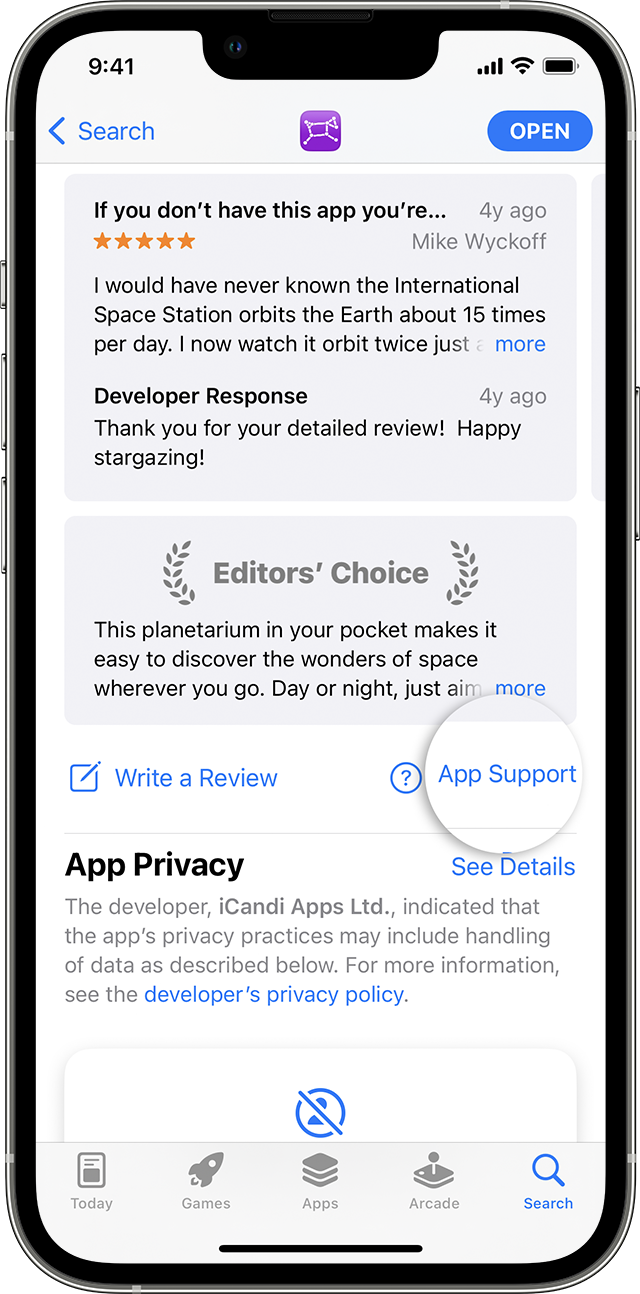
3. The app's product page appears. Scroll to the Ratings & Reviews section, then tap App Support. If you don't see App Support, make sure that you're signed in with the correct Apple ID.
How to contact an app developer - Apple Support
Thank you for being part of the Apple Support Communities.
Kindest Regards.
Hi gymbody,
Hide My Email is a great privacy feature, but it isn't ideal for all apps. You can deactivate the random unique email address for each app at Go to Settings > [your name] > iCloud > Hide My Email. Tap an address (below Create New Address), then tap Deactivate Email Address.
If you have already created a random unique email address to sign in on a third-party app, you may need to reach out to the app developer to learn options for changing your email/login.
Follow these steps to contact the app developer:
1. Open the App Store on your iPhone or iPad.
2. Search for the app, then tap it. If you can't find it, tap the account button
3. The app's product page appears. Scroll to the Ratings & Reviews section, then tap App Support. If you don't see App Support, make sure that you're signed in with the correct Apple ID.
How to contact an app developer - Apple Support
Thank you for being part of the Apple Support Communities.
Kindest Regards.
thankyou for the reply though there is not a Deactivate Email Address button on the screen
how to turn off hide my mail?