The update and the restore doesn't work.

How to restore the phone if the restore doesn't work?

Posted on Apr 4, 2023 4:22 AM

Reply
Question marked as Top-ranking reply

Posted on Apr 7, 2023 8:40 AM

Hi Cajun1964,


To clarify, are you attempting to restore or update your iPhone via the steps outlined in the resource below?


"If your iPhone turns on but gets stuck during start up

If you see the Apple logo or a red or blue screen during startup, try these steps:

  1. Connect your iPhone to a computer. On a Mac with macOS Catalina, open the Finder. On a Mac with macOS Mojave or earlier, or on a PC, open iTunes. Find out which macOS your Mac is using.
  2. Select your iPhone on your computer.
  3. While your iPhone is connected, follow these steps:
  • On your iPhone 8 or later, including iPhone SE (2nd and 3rd generation): Press and quickly release the volume up button. Press and quickly release the volume down button. Then press and hold the side button.

    • An animation of an iPhone with arrows pointing to the volume up button, then to the volume down button, and then to the side button.
  • On your iPhone 7 or iPhone 7 Plus: Press and hold the side button and volume down button at the same time.
  • An iPhone with arrows pointing to the volume down button and the side button.
    • On your iPhone 6s or earlier, including iPhone SE (1st generation): Press and hold both the Home button and the side button or the top button at the same time.
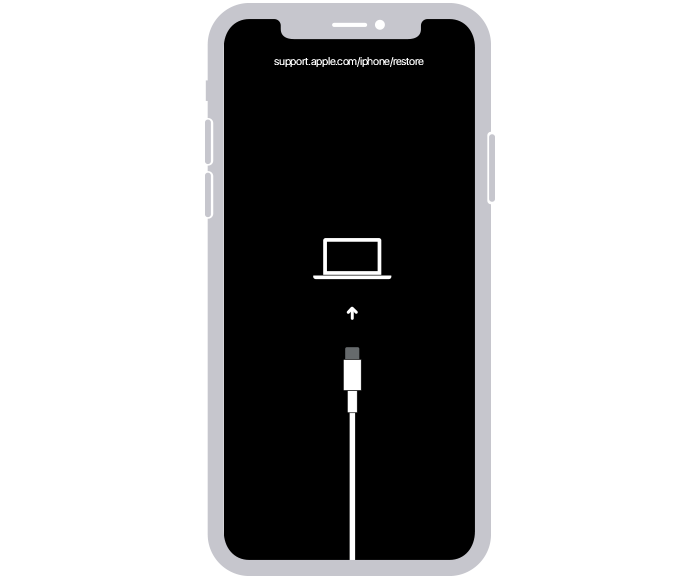
  1. Keep holding the buttons until you see the recovery mode screen.
  2. An iPhone showing the recovery mode screen.
  3. When you get the option to restore or update, choose Update.
  4. A Finder window showing a prompt with the choice to update or restore your iPhone. Update is selected.
  5. Your computer will download the software for your device. If it takes more than 15 minutes, your device will exit recovery mode. Repeat steps 2-4."


If so and neither the update nor restore option works, what specific error or message do you receive?


Let us know in a reply to this post.


Cheers!

2 replies
Question marked as Top-ranking reply

Apr 7, 2023 8:40 AM in response to Cajun1964

Hi Cajun1964,


To clarify, are you attempting to restore or update your iPhone via the steps outlined in the resource below?


"If your iPhone turns on but gets stuck during start up

If you see the Apple logo or a red or blue screen during startup, try these steps:

  1. Connect your iPhone to a computer. On a Mac with macOS Catalina, open the Finder. On a Mac with macOS Mojave or earlier, or on a PC, open iTunes. Find out which macOS your Mac is using.
  2. Select your iPhone on your computer.
  3. While your iPhone is connected, follow these steps:
  • On your iPhone 8 or later, including iPhone SE (2nd and 3rd generation): Press and quickly release the volume up button. Press and quickly release the volume down button. Then press and hold the side button.

    • An animation of an iPhone with arrows pointing to the volume up button, then to the volume down button, and then to the side button.
  • On your iPhone 7 or iPhone 7 Plus: Press and hold the side button and volume down button at the same time.
  • An iPhone with arrows pointing to the volume down button and the side button.
    • On your iPhone 6s or earlier, including iPhone SE (1st generation): Press and hold both the Home button and the side button or the top button at the same time.
  1. Keep holding the buttons until you see the recovery mode screen.
  2. An iPhone showing the recovery mode screen.
  3. When you get the option to restore or update, choose Update.
  4. A Finder window showing a prompt with the choice to update or restore your iPhone. Update is selected.
  5. Your computer will download the software for your device. If it takes more than 15 minutes, your device will exit recovery mode. Repeat steps 2-4."


If so and neither the update nor restore option works, what specific error or message do you receive?


Let us know in a reply to this post.


Cheers!

Apr 7, 2023 3:48 PM in response to DerekM87

This all started after I downloaded/installed the last iphone update. The phone was backed up and the update started. About 50% of the update was done when an "unknown error" occurred and the update was terminated. I'm guessing the phone then tried to back out of the update, when another error occurred that was equally as cryptic as the first. Message said the phone could not be updated and a reset was needed. Phone was stuck on the restore screen and wouldn't do anything. I couldn't turn it off to restart it. I could not get the power slider to appear. I literally tried the entire night to restore from the backup with no success. Each attempt would give a different error about half way. After many unsuccessful attempts just repeating the same steps, the update finished and booted up. Then I attempted to restore from the backup. Just like the update, the restore would get 50% done and then crap out. Some errors were "-8", "9", "75", "1004" (I think). Some errors said it couldn't synch my music library because the location was full. But I wasn't trying to synch the library, and there was 963 GBs of free space, so I know that error wasn't correct. Eventually, some parts of the backup was restored but not all. I lost all my games, in game purchases, settings etc. The home screen has duplicates apps and it's a mess, but at least my phone works. I called support in the middle of the night and they couldn't help. I eventually did some poking around and discovered that the MobileDeviceDrivers and iTunes Helpers were missing. The Serial Bus Controllers for the USB Mobile Device were also missing. That update really did a number on my system. I'm going to continue trying to restore from my backup. What good is a backup if it doesn't work?


BTW, I never got the message that you showed above.

This thread has been closed by the system or the community team. You may vote for any posts you find helpful, or search the Community for additional answers.

The update and the restore doesn't work.

Welcome to Apple Support Community
A forum where Apple customers help each other with their products. Get started with your Apple Account.