Hi there Mikeosmith,
If you are signed in to the incorrect Apple ID on your iPhone, follow these steps from Sign out of iCloud on your iPhone, iPad, iPod touch, Apple TV, or Mac in order to sign out:
Sign out on your iPhone, iPad, or iPod touch
1. Go to Settings, then tap your name.
2. Scroll down to the bottom.
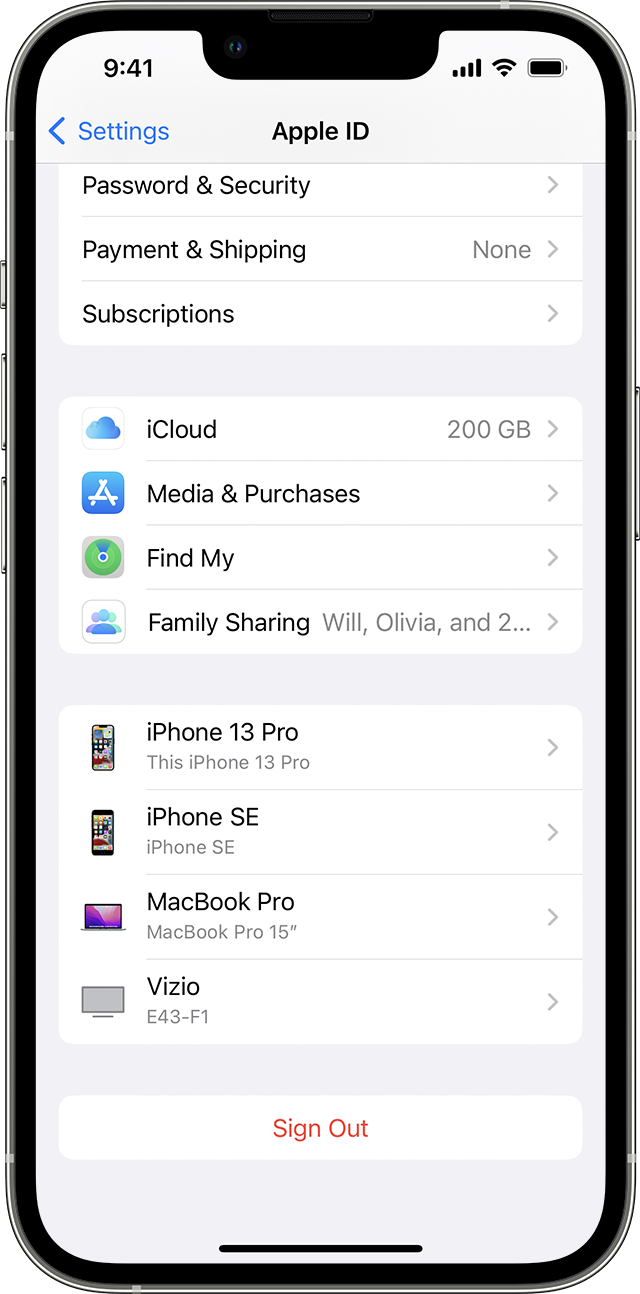
3. Tap Sign Out.
4. Enter your Apple ID password and tap Turn Off. Forgot your Apple ID password?
5. Turn on the data that you want to keep a copy of on your device.
6. Tap Sign Out.
7. Tap Sign Out again to confirm that you want to sign out of iCloud.
Once you are signed out, use this article to sign in with your regular Apple ID: Sign in with your Apple ID
If something else is occurring, please provide more details and what exact error message you are seeing so that we can continue to assist as best we can.
Cheers!


