Hey there and welcome to Apple Support Communities rushan2233,
We can certainly understand your concern and can help provide some insight.
We recommend checking out these steps for more information on updating your device. The steps will show multiple ways to update your Apple Watch.
" Update your Apple Watch using your iPhone
You can wait until Apple Watch notifies you when a new update is available. Tap Update Tonight in the notification, then go to your iPhone to confirm that you want to update overnight. At the end of the day, leave your Apple Watch and iPhone charging overnight so the update can complete.
Or you can update your Apple Watch with your iPhone manually:
- On your iPhone, open the Apple Watch app, then tap the My Watch tab.
- Tap General > Software Update.
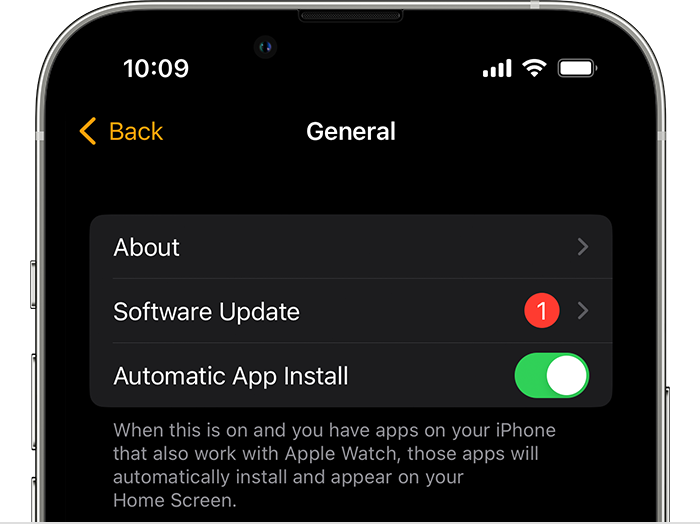
3. Download the update. If asked for your iPhone passcode or Apple Watch passcode, enter it.
4. Wait for the progress wheel to appear on your Apple Watch. It could take from several minutes to an hour for the update to complete.
Leave your Apple Watch on its charger while the update completes. Don't restart your iPhone or Apple Watch, and don't quit the Apple Watch app. When the update completes, your Apple Watch restarts on its own.

Update directly on your Apple Watch
If your Apple Watch has watchOS 6 or later, you can install updates without your iPhone:
- Make sure that your watch is connected to Wi-Fi.
- On your watch, open the Settings app.
- Tap General > Software Update.
- Tap Install if a software update is available, then follow the onscreen instructions.
Leave your Apple Watch on its charger while the update completes, and don't restart your Apple Watch. When the update completes, your Apple Watch restarts on its own. "
For additional information, check out this link: Update your Apple Watch - Apple Support
These steps will help ensure your device is working with ease and can fix common issues like the ones you’re experiencing.
Kindest regards!


