account recovery & adding trusted family member
I have sent request to add my daughter, however she is not seeing any link to accept.
Any help?
Mac mini, macOS 13.3
I have sent request to add my daughter, however she is not seeing any link to accept.
Any help?
Mac mini, macOS 13.3
Hello Robert Hoffman,
You'll want to verify that you meet the requirements below:
Requirements for setting up a recovery contact
• All of your devices must be running iOS 15, iPadOS 15, watchOS 8, or macOS Monterey or later. You might be prompted to update any devices not running the latest OS, or remove any devices that you aren't using.
• You must be over the age of 13.
• You need two-factor authentication turned on for your Apple ID.
You'll also want to double check that you are using the steps below:
1. Choose Apple menu > System Settings (or System Preferences), then click your name (or Apple ID).
2. Click Password & Security.
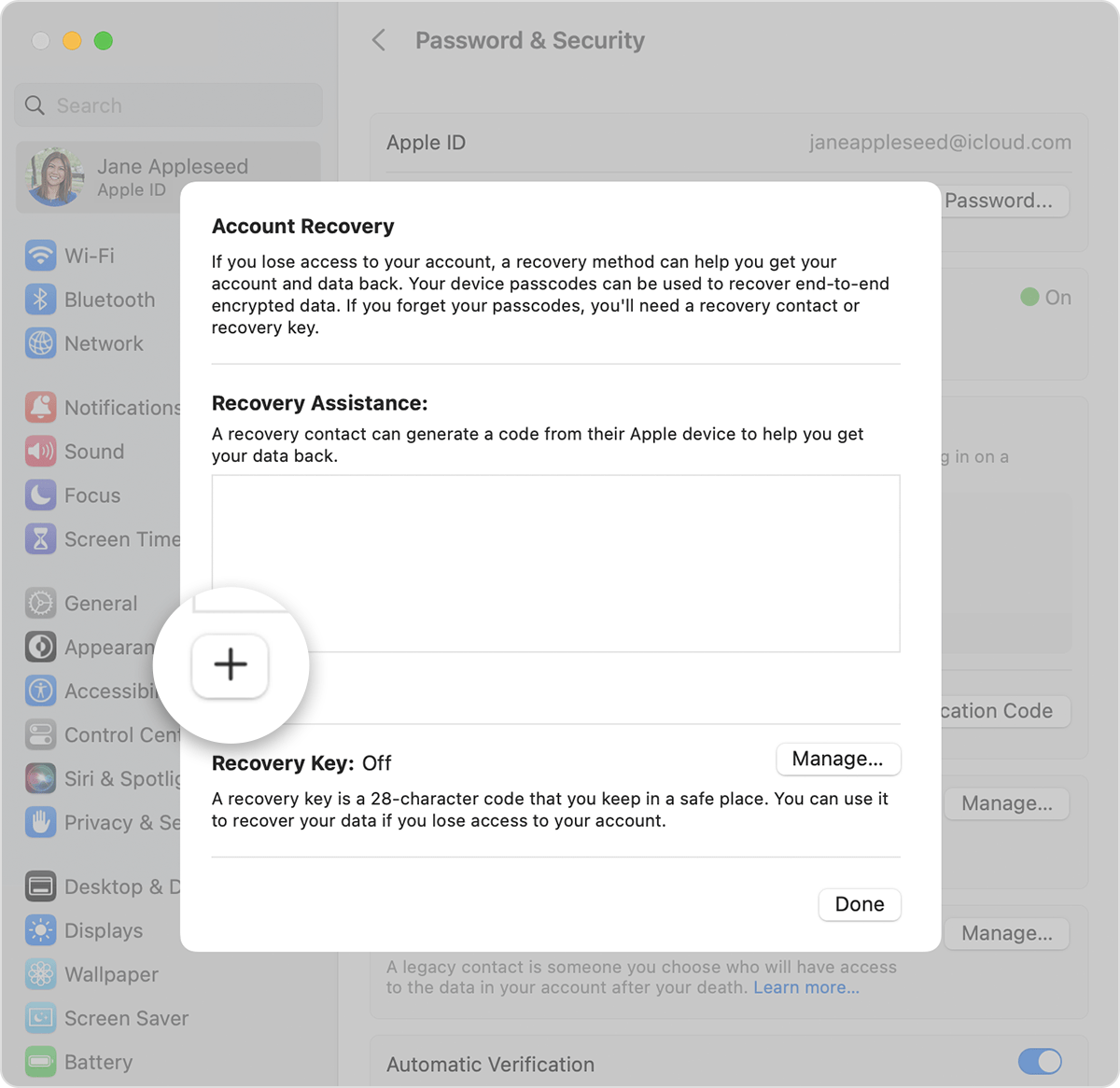
3. Next to Account Recovery, click Manage.
4. Click the Add buttonand click Add Recovery Contact, then authenticate with Touch ID or your Mac password.
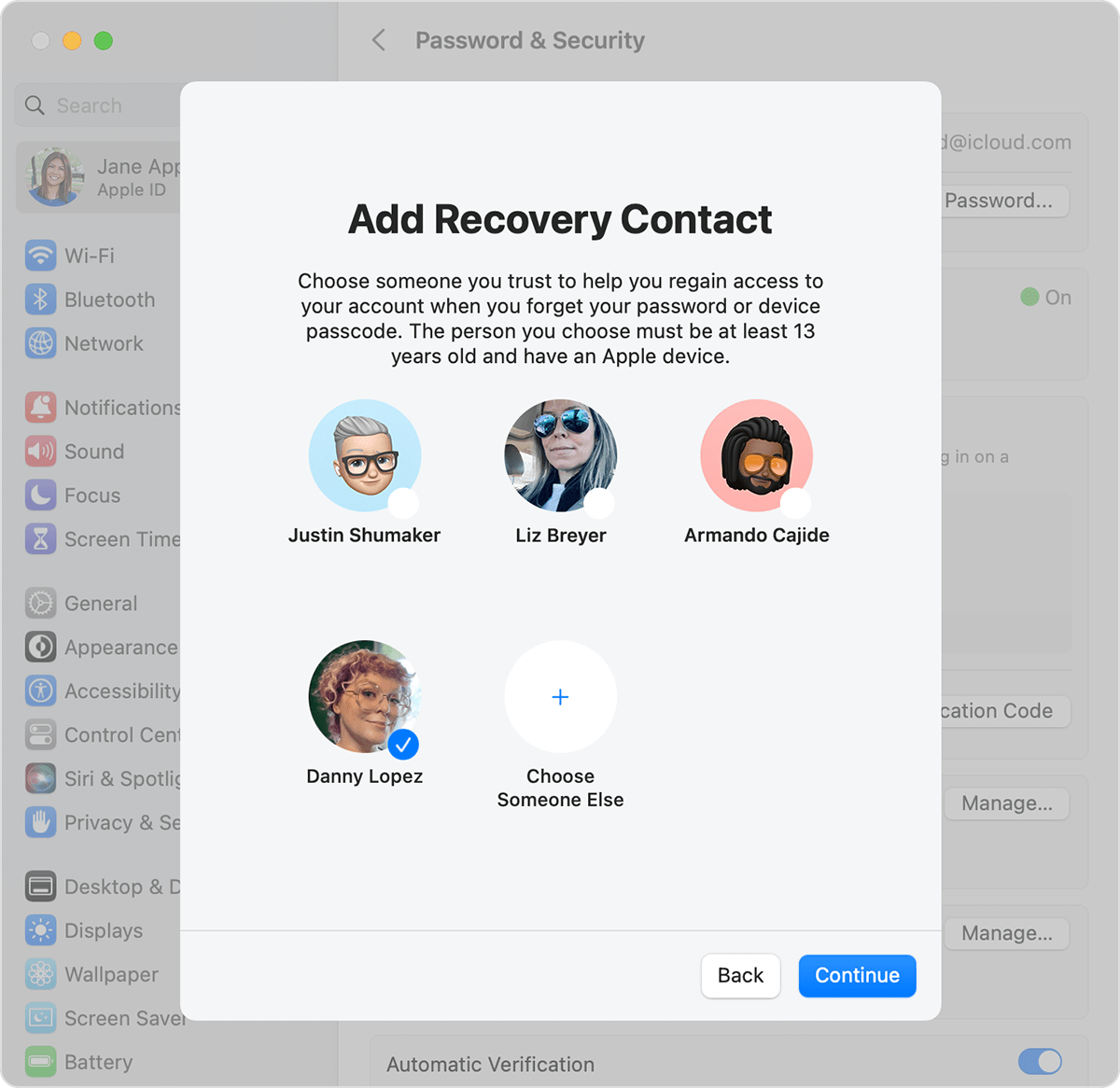
5. If you're in a Family Sharing group, the members of the group are recommended. Or you can click Choose Someone Else to choose one of your contacts. Then click Continue.
6. If you select a family member, they're added automatically. If you select a contact, they need to accept the request. You also send them a message to let them that know you'd like to add them as your recovery contact.
7. After they accept your request, you see a message that they have been added as your account recovery contact.
You can also find those requirements and steps in this resource: Set up an account recovery contact - Apple Support
Should she still not receive that request, you'll want to reach out to Apple Support: Contact - Official Apple Support They'll be in the best position to look into this further.
Take care.
Hello Robert Hoffman,
You'll want to verify that you meet the requirements below:
Requirements for setting up a recovery contact
• All of your devices must be running iOS 15, iPadOS 15, watchOS 8, or macOS Monterey or later. You might be prompted to update any devices not running the latest OS, or remove any devices that you aren't using.
• You must be over the age of 13.
• You need two-factor authentication turned on for your Apple ID.
You'll also want to double check that you are using the steps below:
1. Choose Apple menu > System Settings (or System Preferences), then click your name (or Apple ID).
2. Click Password & Security.
3. Next to Account Recovery, click Manage.
4. Click the Add button
5. If you're in a Family Sharing group, the members of the group are recommended. Or you can click Choose Someone Else to choose one of your contacts. Then click Continue.
6. If you select a family member, they're added automatically. If you select a contact, they need to accept the request. You also send them a message to let them that know you'd like to add them as your recovery contact.
7. After they accept your request, you see a message that they have been added as your account recovery contact.
You can also find those requirements and steps in this resource: Set up an account recovery contact - Apple Support
Should she still not receive that request, you'll want to reach out to Apple Support: Contact - Official Apple Support They'll be in the best position to look into this further.
Take care.
account recovery & adding trusted family member