Freestyle libra app scanning
How to do scanning in i phone 7 plus in freestyle libra app
How to do scanning in i phone 7 plus in freestyle libra app
Hi Gopi3467,
Welcome to Apple Support Communities. We understand that you're having an issue with scanning for something within an app. We'd like to help you get pointed in the right direction for help.
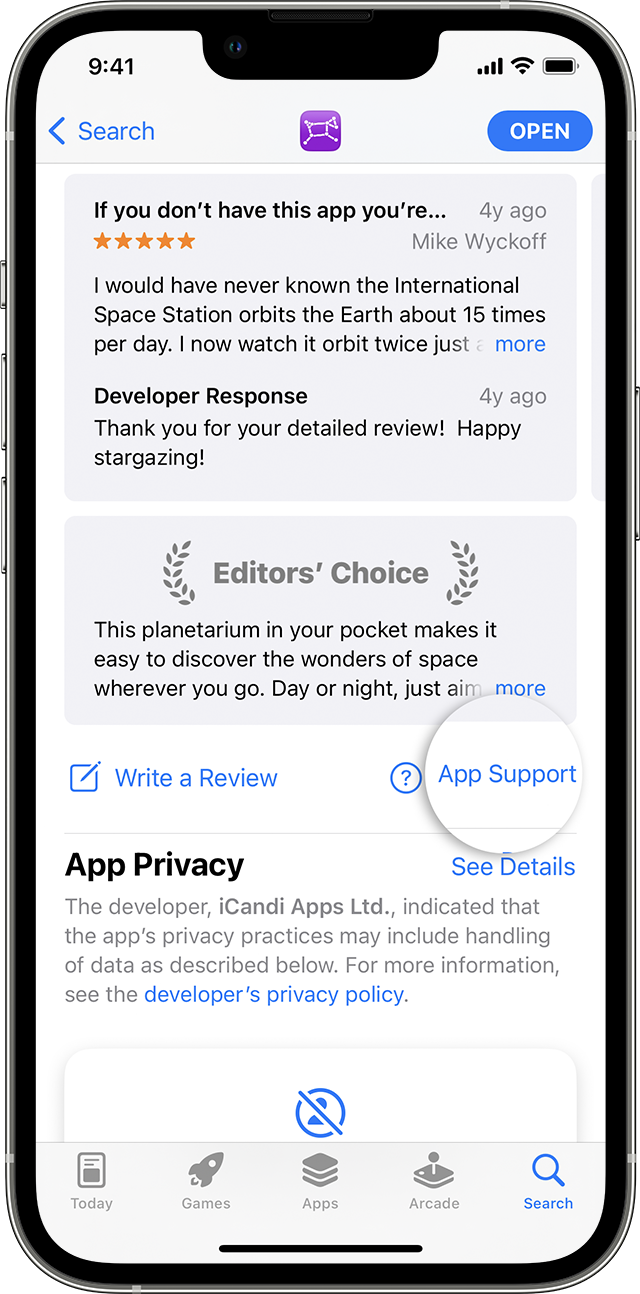
Since this is a third-party app, it would be best to connect with the app developer about the best way to accomplish something within their app. To find the best contact info from this developer, follow these steps from this article: How to contact an app developer - Apple Support
Contact the developer of an iOS, iPadOS, or watchOS app
1. Open the App Store on your iPhone or iPad.
2. Search for the app, then tap it. If you can't find it, tap the account buttonor your photo at the top of the screen, tap Purchased, tap "Not on this [device]," then tap the app.
3. The app's product page appears. Scroll to the Ratings & Reviews section, then tap App Support. If you don't see App Support, make sure that you're signed in with the correct Apple ID.
Hope that helps.
Cheers!
Freestyle libra app scanning