spotify home hub

Hi just got a Home Hub Mini


Previously I was playing audio from ios phone 13 to a dumb bluetooth speaker, with Spotify as the music source on the phone.


Is there a way of doing the same thing with the Home Hub Mini - I understand Spotify isn't on the Home Hub Mini itself, so I'd like to be able to just do what I was doing - using Spotify on the phone and playing it through the Home Hub as a simple wireless speaker - without getting Siri, Apple Music, old itunes purchases etc etc involved


It maybe just not having my head round it yet it's just out of the box this morning - Is it AirPlay I need to use, and is there a "using home hub mini as a wireless / bluetooth speaker with Spotify from an ios device" guide or something please?


Thanks for any help!


HomePod mini

Posted on Apr 9, 2023 3:51 PM

Reply
Question marked as Top-ranking reply

Posted on Apr 11, 2023 11:27 AM

Hi cooking crumble,


In short, yes. You would use AirPlay to stream audio started on your iPhone to your HomePod mini. See the tips below:


"You can quickly hand off audio from your iOS device to your HomePod. HomePod can also play audio sent from an iOS or iPadOS device, Apple TV, or Mac using AirPlay 2.


For details about using the Music app, the Podcasts app, and Control Center, see the iPhone User Guide or iPad User Guide.


Hand off audio to HomePod

You and members of your home can transfer audio from your iPhone to your HomePod to keep playing from where you left off.


To change who can hand off audio to HomePod, see “Allow others to control audio on HomePod,” below.

Note: To hand off audio, your device must have Bluetooth turned on and be on the same Wi-Fi network as HomePod.

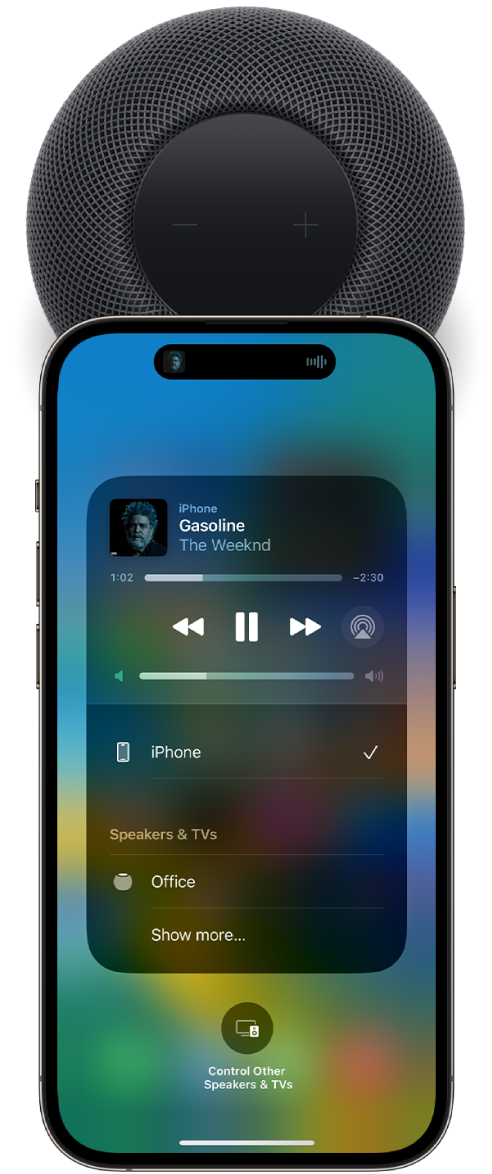
On an iPhone’s screen, a song is playing. The iPhone is close to the top of HomePod, and an alert says that the song is transferring to HomePod.

  1. On your iPhone, go to Settings > General > AirPlay & Handoff, then make sure Transfer to HomePod is turned on.
  2. Hold your iPhone near the top of HomePod.


To move audio from HomePod to your iOS device, hold your iPhone near the top of HomePod. On iPhone 11 and iPhone 12 models, hold your iPhone near the top of HomePod, then tap Transfer to iPhone."


Cheers!

Similar questions

3 replies
Question marked as Top-ranking reply

Apr 11, 2023 11:27 AM in response to cooking crumble

Hi cooking crumble,


In short, yes. You would use AirPlay to stream audio started on your iPhone to your HomePod mini. See the tips below:


"You can quickly hand off audio from your iOS device to your HomePod. HomePod can also play audio sent from an iOS or iPadOS device, Apple TV, or Mac using AirPlay 2.


For details about using the Music app, the Podcasts app, and Control Center, see the iPhone User Guide or iPad User Guide.


Hand off audio to HomePod

You and members of your home can transfer audio from your iPhone to your HomePod to keep playing from where you left off.


To change who can hand off audio to HomePod, see “Allow others to control audio on HomePod,” below.

Note: To hand off audio, your device must have Bluetooth turned on and be on the same Wi-Fi network as HomePod.

On an iPhone’s screen, a song is playing. The iPhone is close to the top of HomePod, and an alert says that the song is transferring to HomePod.

  1. On your iPhone, go to Settings > General > AirPlay & Handoff, then make sure Transfer to HomePod is turned on.
  2. Hold your iPhone near the top of HomePod.


To move audio from HomePod to your iOS device, hold your iPhone near the top of HomePod. On iPhone 11 and iPhone 12 models, hold your iPhone near the top of HomePod, then tap Transfer to iPhone."


Cheers!

This thread has been closed by the system or the community team. You may vote for any posts you find helpful, or search the Community for additional answers.

spotify home hub

Welcome to Apple Support Community
A forum where Apple customers help each other with their products. Get started with your Apple Account.